
An In-Depth Look at the 10 Best WordPress Comment Plugins
- Category : WordPress
- Posted on : Sep 30, 2018
- Views : 3,203
- By : Barton S.

Comments are as much a part of a blog as the article itself. Your comment section engages readers and allows them to interact with other people who have similar interests. Users can ask questions, create discussion, and even make jokes or share images depending on how powerful the comment system is. You’ll even find some systems that provide social sharing tools or integrated communities so that you can reach more visitors. It all depends on what type of interface you’d like and which of the best WordPress comment systems you decide on.
So what are the main reasons why most blogs – including Host SEO– feel compelled to open up their blog’s doors to audience contributions in the form of blog comments?
The Main Reasons WordPress Comments are Great
1. Interaction – Are you blogging for yourself or for an audience? If it’s the latter (and it should always be the latter regardless of whether or not you have comments enabled), having an open comments section allows you to interact much easier with your audience, which in turn makes them an integral part of your blog’s puzzle.
In many cases, the discussions that ensue in the comments section – whether between you and your readers, or several of your readers going back and forth — can often be just as meaningful or even more so, as the content itself, raising important questions and adding details that aid your audience’s understanding of the topic.
2. Feedback – As well as discussions, the comments section also gives your audience an easy way to provide you with feedback. Do they like what you’re currently doing? Could you be doing more of something else?
Let them guide you — they’ll tell you exactly what they like and don’t like, and you can then make the necessary improvements to your blog. It’s pretty much like getting a blog consultation for free.
We create tons of Trello tasks on a weekly basis just from feedback we get from visitor’s comments.
3. Content Ideas – A quick scan through the comments relating to any given post will provide you with plenty of ideas for follow up content. Are there certain aspects of your posts your users don’t fully understand? Are there bits that they’d like to hear more about? Expand on those topics in a blog post.
What’s more, a few users (I’ve done it before in my comments) will go out on a tangent and tell you outright that they would like to learn more about xyz topic, and that you should do a blog post on it. Neat, huh? If you struggle to regularly come up with fresh content ideas, your comments section could be a Godsend.
4. SEO – Did you know that the comments your users leave will aid your SEO performance? The free user-generated content fills out your page and will be fully acknowledged when search engines crawl your site. In fact, if your commentators frequently mention keywords that you’re trying to rank your blog post for, your post will start ranking higher for the keyword (in most scenarios).
Be careful with this though. We highly recommend manually moderating all comments to ensure only high-quality content is added to your site. Otherwise, it could have the opposite effect.
Secondly, tons of comments helps Google to know that people are engaged with your blog and enjoy interacting with it. Consequently, they’ll look at your blog with good favor and rank you better.
5. Community – When you have an open comments section, you’ll probably see the same people commenting again and again. When you interact with these people, you’ll begin to build your own community around your blog, which encourages loyalty.
On the other hand, WordPress comment systems come along with some downsides. That’s why many publications either don’t have comments at all or decide to get rid of them after awhile. For instance, NPR eventually blocked its commenting system because it felt that the news is more about the article. And, the comment thread tended to spiral into negativity.
The Main Downsides of Having WordPress Comments
1. Spam – The moment you open up your comments section you will be inundated with all kinds of ridiculous pingbacks, trackbacks, and bot-generated comments, even if you think that you don’t have much of an audience. The fact of the matter is that you do have an audience … it’s just that most of them are bots.
Nothing is more annoying than spam comments. They are the blogger’s scourge of the Internet and each one will take away precious minutes from your day.
2. Moderation – You can install all the spam blockers in the world, but spam messages will still slip through the cracks here and there. Moderation can be a huge drain on time.
Even when you’re dealing with a relatively small amount of comments, the time it takes to read each one can really start to stack up. Could you be doing better things with your time?
3. Negativity – To be a blogger, you need thick skin. It’s a fact of life. You can’t please everyone, and, with the Internet providing a cloak of anonymity, there are bound to be trolls you’ll encounter. Having a different opinion is perfectly fine and should be encouraged, but some people take pleasure in saying malicious things.
For some sites, such as a small business website without a blog, it can make sense to simply disable WordPress comments altogether.
A Shortlist of the Best WordPress Comment Plugins in 2019
If you’ve decided that the pros of opening up your comments section outweigh the cons (and you’ll find that they do, 5 vs 3), it’s time to decide which plugin to use, or if you even need one. As with all things WordPress, there’s a large array of plugins all very able to get the job done.
We’ll take look at 10 of the most popular options available: their strengths, their weaknesses, and their installation process.
- WordPress Native Comments
- JetPack
- Thrive Comments
- Disqus
- wpDiscuz
- GraphComment
- WpDevArt Facebook Comments
- Super Socializer
- De:comments
- Replyable by Postmatic
1. WordPress Native Comments
The WordPress native comments system is built into WordPress, so you don’t have to worry about setting anything up. This preconfigured commenting area is good for several reasons. First of all, it’s designed for WordPress, so it shouldn’t conflict with anything on your website like themes or plugins. In addition, the design is rather sleek and modern, providing a way for people to make comments without forcing your readers to sign in with something like social media accounts. It’s the simplest way to start a conversation, and it also provides support for things like links and formatting.

What Makes This One of the Best WordPress Comment Systems?
- The WordPress native comments system is already installed when you activate a WordPress site.
- It’s a clean, modern interface that people aren’t going to get confused by.
- The comments are easier to brand and make look nice for your own website.
- It’s completely free and you don’t have to worry about any ads or strange modules popping up.
- The overall functionality is stripped down and basic. It’s best for creating a quick conversation and keeping other elements away such as photo uploading tools and social sharing.
- When integrating with a plugin like Askimet your spam is cut down to a minimum.
And if you’re worried about performance with the WordPress native comment system check out our post on how to speed up WordPress comments.
2. Jetpack
The Jetpack plugin from Automattic offers a combination of features for those who might want to get additional functionality without installing a wide range of plugins. For instance, Jetpack has an analytics module for checking to see how many people come to your site every day. There’s also automatic post scheduling, advertisement options, and security tools. that’s just a small taste of what you get from Jetpack considering there are dozens of features for you to test out. The only downside is that some of the best settings are reserved for paying customers.
When you install Jetpack and activate the comments, it completely replaces the native WordPress comments. This way you aren’t showing two sets of comments and confusing your readers. As for logging in and posting a comment, your users are able to either make an account for your website or log in with one of their social profiles. This is seen as an advantage since they already probably have a social account (so they don’t have to generate a brand new account on your site).

The comment formatting is sleek and easy to understand, with a box for writing the comment and a form to fill in personal information. The users can also choose to be notified of new posts or follow-up comments through their own email. Other than that, the Jetpack comment system is pretty straightforward. There is the ability to change the color scheme from light to dark, and markdown and gravatars are supported.
What Makes This One of the Best WordPress Comment Plugins?
- Although many features from Jetpack require payment, the comment module is free. All you have to do is activate them in the settings.
- Jetpack is a well-respected plugin from Automattic. All of the features run smoothly, including the comments.
- You’re not only receiving a WordPress comment system, but a large collection of tools for things like social sharing, design, security, and more.
- Because this is an all-in-one plugin, you don’t need to clutter your website with several other plugins.
- Your users aren’t limited to logging into the comment system by making a new username and password. The Jetpack comments include options for logging in with previously created social accounts.
- There are some customization settings such as the ability to change from one color scheme to another.
- Gravatars are supported.
- Akismet is also owned by Automattic, so you can rest easy knowing that the two integrate just fine.
A small drawback to using Jetpack is that by default it loads additional requests for things you might not even be using. These Jetpack request can be disabled, and most features switched off and on, but it can be a little cumbersome.
3. Thrive Comments
Thrive Comments is a product from Thrive Themes, a company that makes and sells all sorts of plugins and themes. Some of them include the Thrive Quiz Builder, Membership plugin, and Leads. The Thrive Comment package is sold as a premium plugin, so there’s no option to download it for free and try it out. However, it is a rather powerful solution to replace the native WordPress comments. The one license pack sells for $39 and allows you to install it on one website. This includes all of the Thrive Comments features, along with unlimited free updates, and one full year of support. Other than that, you would only upgrade if you needed to use the comments on multiple websites.
For instance, the five website pack goes for $47 and 15 license pack is listed as $97. These prices change on occasion, but you can usually expect them to remain fairly low.
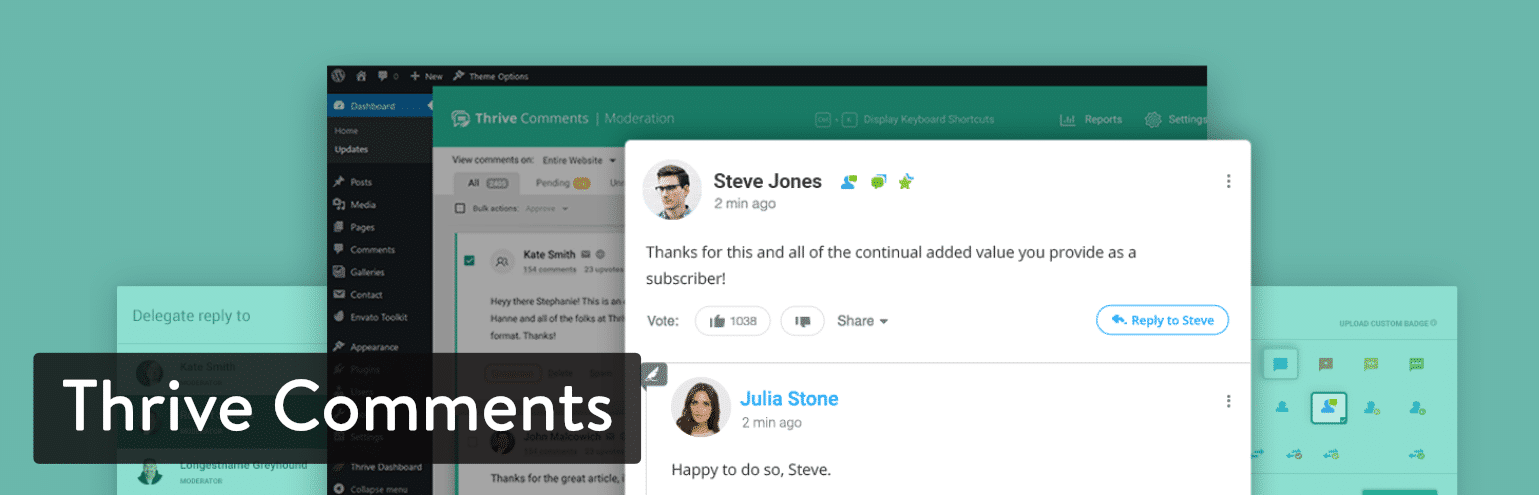
The idea behind Thrive Comments is to incentivize conversation in your blog. The theory is that you shouldn’t expect your users to comment and get nothing in return. Places like Facebook provide likes and shares for your comments and posts, but a standard blog commenting system doesn’t have anything like this.
Therefore, Thrive Comments actually works similar to a social network, where your customers and readers are able to “like” other comments and even achieve badges based on how active they are. You can also turn your commenting area into something like Reddit, where upvotes are tallied to show the most popular comments. Overall, this type of setup encourages more conversation and makes sure that only quality comments are being shown. In addition, social sharing is encouraged and you have the opportunity to automate these incentives without having to respond to the comments yourself.
What Makes This One of the Best WordPress Comment Plugins?
- Thrive Comments is only $39 for one site.
- It replaces the native WordPress comments for a clean, modern discussion area.
- Thrive Comments takes the conversation to the next level, allowing you to provide some sort of immediate incentive for commenting on your blog.
- You can configure your comments in different ways. For instance, some users like to have the Reddit-style comments, where upvotes and downvotes are used to filter out the bad stuff.
- You can present each new commenter with a coupon or other incentive for them to create an account with their email address.
- Social sharing buttons are shown for people to send out what they have talked about to places like Facebook.
- The Thrive Comments dashboard is more organized than most other WordPress comment systems.
- You can also delegate comment replies to other people in your organization. This is important, since some people might not know how to reply to some comments.
- Automatic link generation helps with specifying which keywords should be linked when you reference them. For instance, “support forum” might be a common one for a software company.
4. Disqus
Disqus has become one of the more popular alternatives to the WordPress native system, mainly because it was one of the first that dared to change around the format and add social functionality. It’s still an impressive, comment tool, but be warned that Disqus has started to place ads on some sites without warning. Because of this, the popularity has seemingly gone down since then.
However, it’s still worth checking out or understanding if you’re in the market for a new WordPress comment system. Disqus helps publishers move beyond the regular commenting format, using special engagement features for things like formatting text in comments, logging in with different social usernames, and offering rich media embeds, like for YouTube.

In the beginning, Disqus didn’t have any ads unless you wanted them for your own moneymaking endeavors. However, the company has decided to include these ads on the free Basic plan. It’s nice that the plan is still free, but there are some downsides. As for the features in that plan, you can expect items like the regular comments plugin, spam filters, analytics, configurable ads, and moderation tools.
After that, you can pay $9 per month to remove those ads and get direct customer support from the Disqus team. Finally, the $89 per month Pro plan includes options like priority support, shadow banning, and email subscriptions. The monthly payment plans aren’t ideal for a commenting system, so if you don’t mind ads being shown, I like the free Basic plan. Otherwise, you’re better off considering Thrive Comments, since you wouldn’t have to pay that recurring monthly fee.
What Makes This One of the Best WordPress Comment Plugins?
- Although the ads aren’t exactly the highest quality, Disqus at least allows for advertisements as a moneymaking opportunity.
- Disqus is still one of the best WordPress comment systems for complete user flexibility. For instance, a user can see real-time comments, customize the text formatting, and upload items like photos and videos.
- Disqus has a unique focus on protecting the quality of your comments. It has a user reputation score to identify spammers and trolls. We used to use Disqus on the Host SEO blog and can say that it does a great job of detecting spam out of the box.
- You can make two lists: one for trusted users and another for banned users. All of the comments from trusted users are always automatically approved.
- Disqus also has a large community of users. Therefore, your articles and comments might show up in the Disqus Digest or even on another website. This is an advantage for bringing new users to your site.
- The stats from Disqus help you understand metrics like article reads, comment reads, and total engagements.
5. wpDiscuz
The wpDiscuz plugin is known for its speed, stability, and modern design–which is all probably why it’s been touted as a reliable solution for your blog comments. The ratings are high, and the support forum is buzzing with chatter. The comments are stored in your site database for safe keeping. Furthermore, you can integrate with a wide range of popular plugins like BuddyPress, UserPro, and Akismet. The default comment box is interactive and responsive for multiple devices. The wpDiscuz plugin provides social logins as well.
The main reason I would consider going with wpDiscuz is because of how reliable it is. The comments have a lazy load effect when users scroll down, so it doesn’t slow down your site. You also get everything from multi-level comments, to anonymous names, and a subscription activation.

Another benefit of wpDiscuz is how the core plugin is entirely free. You don’t have to worry about a monthly or yearly fee, and the forum customer support is pretty much all you need to keep things in check. There are, however, some add-ons to extend the functionality of wpDiscuz. For instance, you might want a comment search tool or a subscription manager. For these features, it would cost you around $25 to $100, depending on the add-on and how many sites you would like to use it on.
What Makes This One of the Best WordPress Comment Plugins?
- The wpDiscuz plugin doesn’t require a payment for the core plugin. Most blogs will be fine with this, unless there’s the need for a premium add-on.
- It’s a smart, clean, and fast comment module that’s tough to argue against. It’s clear which people are commenting, and you have options for gravatars and sharing on social media.
- Up and down votes are available for something similar to what you might see on Reddit. This is great for filtering out the bad comments and pushing the good ones to the top.
- The plugin is 100% customizable so that you can change around the buttons, fields, colors, and components.
- You can activate anonymous comments, which can be good for some blogs.
- Your users can paste image URLs that automatically get converted to viewable images on the comments thread.
6. GraphComment
The GraphComment plugin is a social comments system that tries to reinvent the standard discussion modules we see online. Some of the interesting tools include options for discussions, votes, and shares, along with media embedding. If you run a commercial, professional, or personal blog, you have the option to get the free Personal plan. This provides five themes and many of the expected features you would need for a fully functional comments system. A more successful blog might consider the $19 per month plan for more themes, moderator support, smart moderation, and more. GraphComment also provides an Enterprise plan for those with customization needs.
GraphComment is formatted to consolidate comments that are replying to previously posted comments. This way, the conversation is more organized and broken into topics. So, you wouldn’t have to scroll through a conversation that’s not relevant to you. Each thread begins with the initial question, then typically, the responses to that question are consolidated and hidden until needed.

Text formatting and social integrations are included, along with live discussions that reveal responses in real-time. We also like the badges and rewards, since your customers are more likely to post a comment if they have an incentive. The community profiles remind me of something you might see on Yelp, where badges are given out and this type of status could be seen as valuable to some people. Overall, GraphComment is a fairly powerful comment tool, so it’s worth looking into if you’re going to stick with the free version. I can’t imagine paying $19 for a comment plugin.
What Makes This One of the Best WordPress Comment Plugins?
- The core plugin is free.
- GraphComment is one of the better options if you’re trying to create a community. As mentioned in the description, some of the profile and incentive tools are similar to Yelp, where people can show off how much they contribute.
- Several themes and colors are provided for you to merge the comments into your current design.
- You can upload your logo on the login module, while also having buttons for users to log in with their social accounts.
- This plugin has a unique feature for importing old comments from an old blog or previous comment plugin.
- GraphComment offers an excellent interface for editorializing the conversation. In short, it lets you consolidate answers to questions under one question and even rename the questions for easier reference. It kind of makes the comment section into a forum.
7. WpDevArt Facebook comments
The WpDevArt Facebook comments plugin is one of the few Facebook comment options left. Integrating Facebook comments into blogs became quite popular once people realized the potential, but there haven’t been many WordPress plugins that have thrived with the feature. That said, WpDevArt Facebook comments show a feed of comments under your blog posts. Because it runs through Facebook, these users don’t have to sign up for new accounts on your site. In addition, the comments are shared on the users’ Facebook pages, potentially bringing some of their friends over to your website.
It’s an excellent idea with some limitations. On one hand, Facebook is so popular it’s hard to argue against it. However, it’s not a guarantee that some of your otherwise VIP commenters use Facebook. So, you might be alienating top contributors. I’ve also seen plenty of blogs that try to have both WordPress native comments and the Facebook comments feed, in an attempt to have it all. However, this seems to confuse people and create two dialogues on your page.

Therefore, I’d recommend either choosing Facebook comments or not using it at all. The WpDevArt Facebook comments plugin can assist with bringing a user-friendly interface with options for setting the size, color, and location of your Facebook comment box. The primary plugin is free, but you do have the option to upgrade to the Pro Version of WpDevArt Facebook comments. The premium solution starts at $10 and goes up to $31 depending on how many licenses you require. That’s a great deal for the addition of premium support, background settings, animation effects, and more.
What Makes This One of the Best WordPress Comment Plugins?
- The core plugin is free, and the premium version is extremely inexpensive.
- Facebook comments create an infrastructure where the users can interact with your conversation on either your blog or Facebook. Therefore, you have a chance of accumulating more followers from the Facebook community.
- It’s much easier for Facebook users to login and start talking with a setup like this.
- Although Facebook comment plugins are easy to recognize because of the Facebook branding, this plugin has some decent settings for changing things like the color, size, and fonts.
- You basically receive whatever tools are provided through Facebook comments. So, you have the advantage of features such as “likes” some media support, consolidating long comment threads, and more. This definitely limits your customization options, but it’s still a respectable commenting tool.
The major disadvantage of Facebook comments is that none of the comments are actually stored on your blog; they’re stored in Facebook.
8. Super Socializer
For a lightweight, free comment system, consider the Super Socializer plugins. It offers a powerful combination of social sharing and logging in tools. For example, you can place social follow icons on the comments to get more people following your brand on places like Facebook and Instagram. Super Socializer also includes a social share option for over 100 social networks. This means that everything from Pinterest to LinkedIn is supported.
No premium version is sold for the Super Socializer plugin. Therefore, you can simply download the free core plugin and get all of the features listed on the plugin page. It’s very clear that this is the ultimate social commenting tool, with options for networks like WhatsApp, Reddit, and Telegram.

Because of this extreme focus on social logins, your users don’t have to sign up for your blog. This is seen as a bad thing for some blogs, but it is quite often where a user will completely opt out of commenting if they have to go through another third-party account creation. In addition to all of this, Super Socializer is modern and lightweight, with mobile responsive modules and some compatible features with plugins like BuddyPress and WooCommerce. So, you might have a comment thread in your own social network or consider adding fields to your WooCommerce product pages.
As for customer support, Super Socializer has a Facebook fan page, Google account, and Twitter page. Documentation is shown online as well, so you don’t have to think about whether or not you’ll get any support since the plugin is free. That said, the developer does sell some add-ons that cost around $10 to start.
What Makes This One of the Best WordPress Comment Plugins?
- The entire core plugin is completely free. Some of the add-ons are useful, but most of the main features are in the plugin. Not to mention, the add-ons are affordable.
- Your users don’t have to sign up for a new account, since they can take a previously created social account and use that. Most of the time all they would have to do is click on the social network of their choice and get logged in within seconds.
- Spam is kept to a minimum since the major social networks authenticate all users and remove the need for you to do that yourself.
- All of that social profile data is pulled into your database for you to use for your own marketing.
- The Super Socializer plugin is packed with social sharing buttons. Some of the networks you’ll have never heard of, but you’ll at least know that your favorite social networks are there.
9. De:comments
De:comments calls itself the most powerful plugin for WordPress comments. That’s a bold claim, but it is a strong contender for the most feature-packed solution on this list. To start, we like it for developers or site owners who want to completely customize the comments area. De:comments opens up the CSS files for you to add your own web styles. Social network sign ins are supported through De:comments, and the plugin works with WordPress multisite. Another thing to consider is how the plugin supports a wide range of languages, including German, French, and dozens of others.
Some interesting features inside of the plugin include the voting system. This is like Reddit, where other users can like or dislike comments, sending the lesser quality ones to the bottom. The badge system also encourages people to post more often, creating a game out of your comment area. Along with media attachments and the responsive interface, the De:comments plugin has quite a few elements that make it appealing.
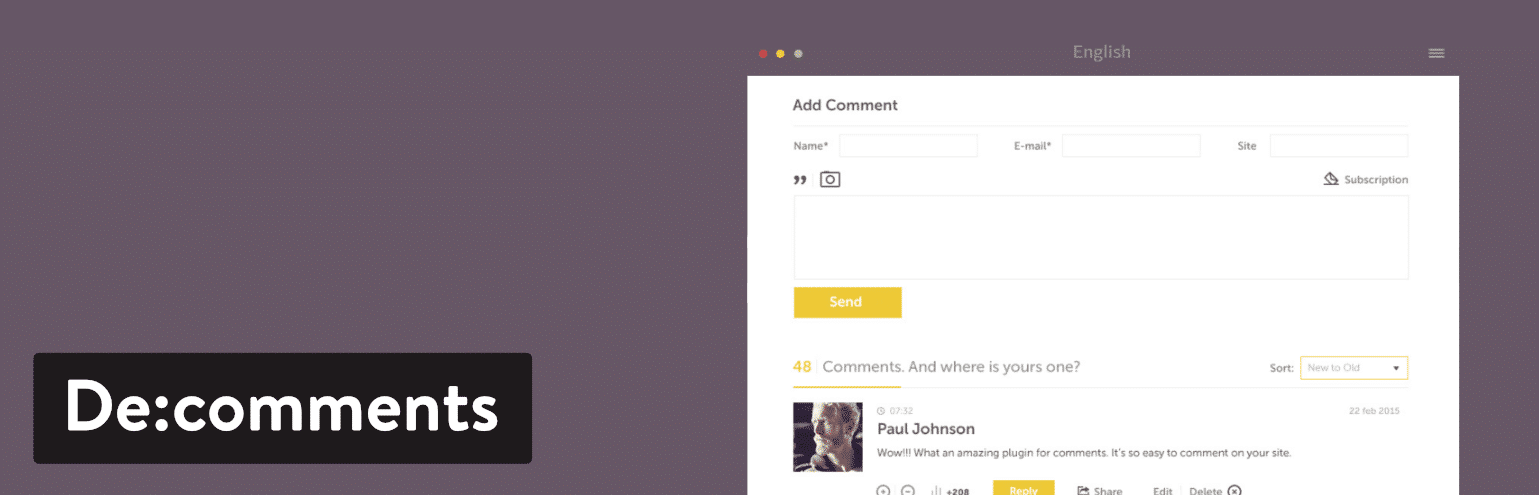
The De:comments plugin does not provide a free version. However, the $50 package for one year on one site isn’t bad. After that, you would have to upgrade to the $100 plan for three sites, or the $300 plan for 10 sites. It’s a good value when you think about the features packed into the plugin. Not to mention, you receive some excellent customer support, which isn’t always the case for the free alternatives.
What Makes This One of the Best WordPress Comment Plugins?
- The pricing starts at $50 per year. There’s no free option, but this is still fairly affordable considering how strong the plugin is.
- You receive multilingual support for a wide range of languages. It looks as if new languages are also being added on a regular basis.
- A voting system can be shown on the frontend, while the information about those votes is stored in your database.
- You also receive a badge system, which is essential if you’d like to incentivize your readers.
- A wide variety of media attachments can be uploaded by your readers. For instance, some people might want to upload GIFs or pictures or videos.
- Social network buttons are provided for single-click sign-ons.
- If you buy one license it still works on all of your WordPress sites in one network. You have to be running multisite, but for many people, this is a huge plus.
10. Replyable by Postmatic
The entire idea behind Replyable is to improve the subscriptions that users sign up for after commenting. Most of the time, a reader would check off that they want to get emails about replies to their own comments. This is fine in theory, but in the past, we’ve seen problems with spam, emails not being sent, or boring messaging that doesn’t bring people back to a website. Replyable modernizes these subscriptions by complying with all international spam laws and delivering additional elements in the messaging such as gravatars, post recaps, and profile images.
The responsive templates are great for getting started, but you’ll be quite impressed when you see how the email templates auto-adapt to fit your website branding. It’s something to be said about a plugin that it automatically takes your colors, fonts, and images so that all of your emails look just how you would want them to.

Templates and modernized subscriptions are provided for free in the Replyable plugin. You can also sign up for the premium version which starts at $2.99 per month. This package includes several premium features such as enhanced templates, guaranteed outbound mail delivery, and merging with the native WordPress comments system. For $4.99 per month, you get even more, such as automatic subscriptions for authors and guests, along with the option to share the workload between authors. Finally, the $9.99 per month plan has an interesting algorithm to prevent too much email from going to one person–in addition to several other features.
What Makes This One of the Best WordPress Comment Plugins?
- You don’t have to pay a dime for the core plugin.
- The core plugin offers exceptional features for getting your users to subscribe to your comments and come back to talk more about the topic.
- Keeps WordPress comments locally in your own database so it’s easy to switch off later if needed.
- You can opt for premium features starting at just $2.99 per month.
- Replyable adheres to international spam laws and WordPress best practices so that you don’t break any laws or tick off any of your customers.
- The Replyable plugin offers some amazing email templates that automatically change branding based on the colors and other elements on your site. This is one of the coolest features I’ve seen on a WordPress comment system.
Which of These WordPress Comment Systems is Best for You?
Out of all 10 of these WordPress comments systems, you can only choose one. Some websites try to combine multiple options like the WordPress native comments and a Facebook thread, but I would encourage against that. This way, you’re not causing any confusion, yet you can still create a welcoming environment with things like gamification and subscriptions to comments.
Since having a list of ten to choose from is still a long list, here are some final suggestions based on what situation you might be in:
- For the simplest, cleanest option for comments on your blog (and for a system that’s already installed) – Go with WordPress Native Comments.
- If you’re interested in an all-in-one plugin with a comment system included – Think about JetPack.
- For unique features like votes and coupons – Try out Thrive Comments.
- If you want a well polished comment plugin with great spam detection – Think about Disqus.
- For one of the cheapest comment systems with still lots of features – Try out wpDiscuz.
- If you’d like to editorialize your comments (with renaming tools and comment consolidation) – Consider GraphComment.
- If you’d like to take advantage of the social aspect of Facebook – Try out WpDevArt Facebook comments.
- For a wide range of social sharing and login tools – Go with Super Socializer.
- If you’d like a premium plugin with all of the features you need built-in, and some development tools – Consider the De:comments plugin.
- If you’d like a revolutionary subscription system for your comments – Try out Replyable by Postmatic.
If you have any questions about any of these WordPress comment systems, let us know in our comments section below!
Categories
Subscribe Now
10,000 successful online businessmen like to have our content directly delivered to their inbox. Subscribe to our newsletter!Archive Calendar

| Sat | Sun | Mon | Tue | Wed | Thu | Fri |
|---|---|---|---|---|---|---|
| 1 | 2 | |||||
| 3 | 4 | 5 | 6 | 7 | 8 | 9 |
| 10 | 11 | 12 | 13 | 14 | 15 | 16 |
| 17 | 18 | 19 | 20 | 21 | 22 | 23 |
| 24 | 25 | 26 | 27 | 28 | 29 | 30 |
| 31 | ||||||
Recent Articles
-

Posted on : Jul 25
-

Posted on : Jul 07
-

Posted on : Apr 07
-

Posted on : Mar 19
Optimized my.cnf configuration for MySQL 8 (on cPanel/WHM servers)
Tags
- layer 7
- tweak
- kill
- process
- sql
- Knowledge
- vpn
- seo vpn
- wireguard
- webmail
- ddos mitigation
- attack
- ddos
- DMARC
- server load
- Development
- nginx
- php-fpm
- cheap vpn
- Hosting Security
- xampp
- Plesk
- cpulimit
- VPS Hosting
- smtp
- smtp relay
- exim
- Comparison
- cpu
- WHM
- mariadb
- encryption
- sysstat
- optimize
- Link Building
- apache
- centos
- Small Business
- VPS
- Error
- SSD Hosting
- Networking
- optimization
- DNS
- mysql
- ubuntu
- Linux






