
6 WordPress Age Verification Plugins to Help You Add an Age Gate
- Category : WordPress
- Posted on : Sep 29, 2018
- Views : 3,095
- By : Edgardo D.

Need to add an age check gate to your WordPress site? Using a pre-built WordPress age verification plugin is going to be a much simpler option than trying to custom code your own solution. While age gates aren’t technically required by law in most major jurisdictions, plenty of businesses dealing in age-sensitive industries opt to use an age gate to at least partially control the age of their visitors. Common industries where you’ll see them include alcohol, tobacco, gambling and more.
Additionally, even though age gates aren’t required in most countries, Americans might be interested in knowing that the FTC still does recommend that such sites use age-verification technologies anyway. No matter what your reason, adding an age gate to WordPress is easy with any one of the following WordPress age verification plugins.
Best WordPress Age Verification Plugins in 2019
We’ll take a peek at six different WordPress age verification plugins in the following sections. The first three are 100% free, with the fourth operating on a freemium model and the fifth and sixth are premium. If you’d like to jump to a specific plugin, you can use the links below. Otherwise, we’ll go through each one in order:
- Age Verify
- Age Gate
- Dispensary Age Verification
- AgeVerify
- Age Verifier for WordPress
- Age Checker
1. Age Verify
Age Verify is a free WordPress age verification plugin that gives you a good deal of control over how your age gate functions. There is one downside to the plugin, but let’s cover the good news first.

The good news is flexibility. You have tons of control over where, when, and how often your age verification window appears. You can do things like:
- Only require age verification to access specific content
- Allow logged-in users to browse without verifying their age or require verification for everyone
- Choose how long to remember a visitor’s age for before requiring them to verify their age again

And you can also customize the message that’s shown on the age gate, though you can’t add any images. So what’s the bad news? You might need to use custom CSS to make the age gate look good. By default, Age Verify pulls its styling from your theme, which might make it a little bit ugly. For example, here’s what it looks like using the default Twenty Seventeen Theme:
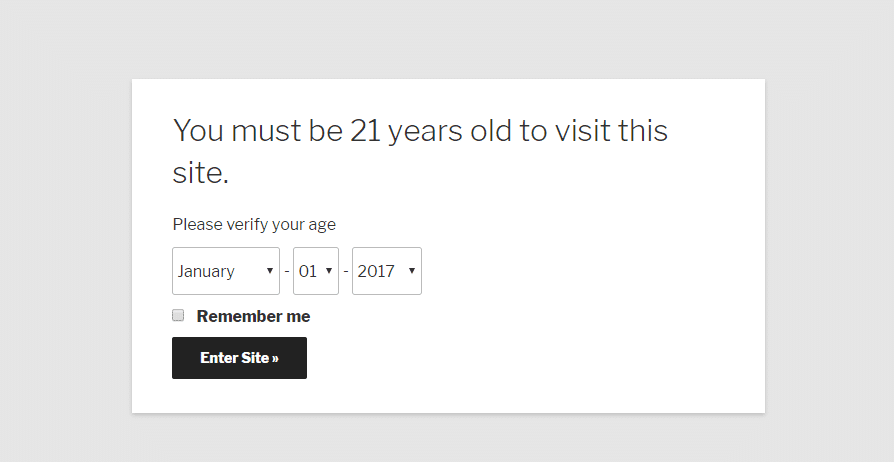
Also, since it utilizes cookies, you might have issues with hosts that have aggressive caching. Other than that potential downsides, it’s a flexible, and free, option.
2. Age Gate
Age Gate is a fairly new release – it’s only been out for a month or so as of when this post was written. Despite its youthful age, it has an intriguing feature list, good (albeit limited) reviews, and a responsive developer who’s pushing out plenty of new releases.

Also, since it utilizes cookies, you might have issues with hosts that have aggressive caching. Other than that potential downsides, it’s a flexible, and free, option.
2. Age Gate
Age Gate is a fairly new release – it’s only been out for a month or so as of when this post was written. Despite its youthful age, it has an intriguing feature list, good (albeit limited) reviews, and a responsive developer who’s pushing out plenty of new releases.
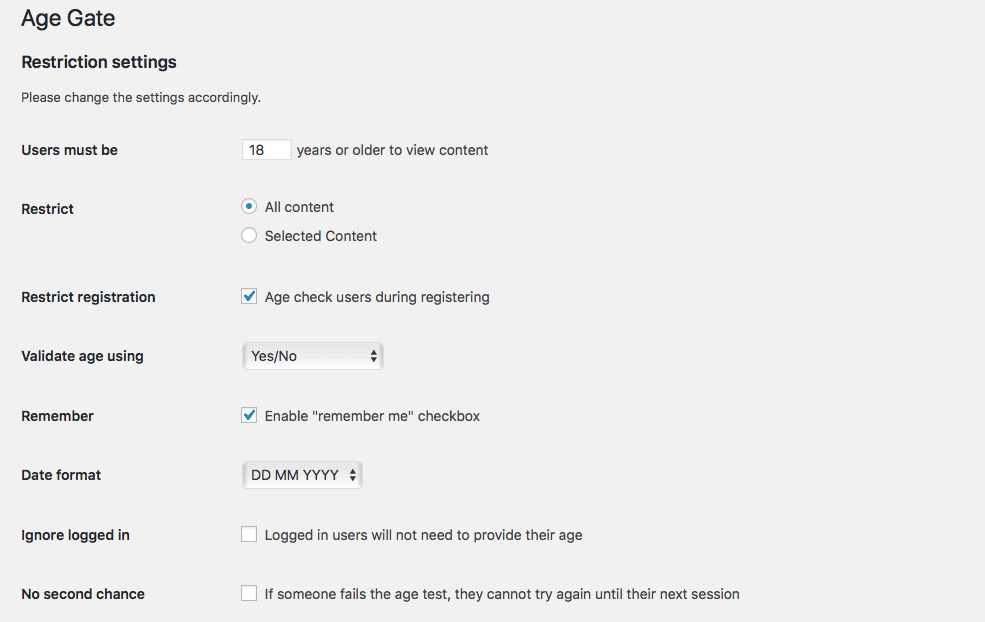
And in addition to those features, you can also add your own logo to the age check form and customize all of the text that appears. The default style is also a bit more modern than the previous Age Verify plugin that we looked at:
And lastly, a feature that was just added is the ability to switch over to a JavaScript triggered version. This would ensure that you can bypass your host’s or plugin’s cache.

Honestly – the feature set on this one is great. The only thing it’s lacking is age and popularity.
3. Dispensary Age Verification
While Dispensary Age Verification is technically an add-on for the WP Dispensary plugin, you don’t need to use the core plugin to use this add-on, nor is Dispensary Age Verification limited in the topics that it deals with.

It’s actually a lightweight, but still fairly flexible, solution for adding a simple age gate to your entire site. The entire site part is the most important – the plugin will show the age gate on a visitor’s first visit no matter which page they land on. But if that’s ok with you, you’ll have full control over the design of your age gate via the WordPress Customizer.
Once you’ve activated Dispensary Age Verification, you can go to Appearance → Customize → Age Verification to set up your:
- Logo
- Title
- Message
- Minimum Age
Because the settings use the native WordPress Customizer, you can preview all of your changes in real-time. Other than customizing your age gate – there’s nothing else that you need to do. That is, the age gate is live as soon as you activate the plugin. To turn it off, you’ll need to deactivate the plugin.
4. AgeVerify
AgeVerify is a bit more heavy-duty in its approach to WordPress age verification. It gives you tons of different templates to match a variety of uses.

But…there’s one pretty major downside to this plugin. The free version is ad-supported. That means if you want to remove ads from your age verification gate, you’ll need to purchase the pro version for $59. It does give you decent flexibility by letting you set:
- Custom cookie expirations
- Custom redirect URLs
And the background images that it uses are a nice touch. But the simple fact remains that unless you pay for Pro, your age gate is going to look like this:

And that doesn’t look very professional, does it? All in all, AgeVerify is flexible and looks great if you’re willing to pay, but the free version isn’t the best option.
5. Age Verifier for WordPress
Age Verifier for WordPress is the first plugin on this list that doesn’t offer any kind of free version. While it’s still affordable at $17, you should take that into account when making your decision.

For that $17, you do get some gorgeous designs, as well as a helpful visual builder to customize the look of your age gate. You can also choose different verification methods, as well as how long the cookie should last before it expires.

Another nice thing is that you can add animation effects for when your age gate appears. Honestly, though – the core functionality isn’t much different than the functionality offered by the free plugins.
Your purchasing decision for this plugin should basically come down to: Am I willing to pay $17 to make my age gate look better? If so, grab this one. If not, you can probably get by with one of the free WordPress age verification plugins.
6. Age Checker
Age Checker for WordPress is another premium plugin you can choose from. It’s only $14 and offers a few unique features that the other plugins above don’t.

The Age Checker plugin offers 3 background modes, a solid color, image, or video. While many of the above solutions have a birthday as an option, one of the unique features in this plugin is the ability to have a simple checkbox or enter verification method. Perhaps you need something simple, such as having the visitor confirm they are over a certain again, but you don’t want to go as far as requiring a DOB. This works great for that!

You can also redirect users, change the form validation text, and cookie life. Crawlers can be omitted from age verification to ensure this doesn’t harm your SEO.
Which WordPress Age Verification Plugin Should You Choose?
In the end, Age Gate has the best blend of functionality and style…it just lacks the track record of other more well-reviewed options like Age Verify and Age Verifier for WordPress. Dispensary Age Verification also provides a nice lightweight solution, though it doesn’t offer the same depth of functionality as the other plugins.
Did we miss a great WordPress age verification plugin? If you know of a good option that deserves to be on this list, let us know in the comments below.
Categories
Subscribe Now
10,000 successful online businessmen like to have our content directly delivered to their inbox. Subscribe to our newsletter!Archive Calendar

| Sat | Sun | Mon | Tue | Wed | Thu | Fri |
|---|---|---|---|---|---|---|
| 1 | 2 | |||||
| 3 | 4 | 5 | 6 | 7 | 8 | 9 |
| 10 | 11 | 12 | 13 | 14 | 15 | 16 |
| 17 | 18 | 19 | 20 | 21 | 22 | 23 |
| 24 | 25 | 26 | 27 | 28 | 29 | 30 |
| 31 | ||||||
Recent Articles
-

Posted on : Jul 25
-

Posted on : Jul 07
-

Posted on : Apr 07
-

Posted on : Mar 19
Optimized my.cnf configuration for MySQL 8 (on cPanel/WHM servers)
Tags
- layer 7
- tweak
- kill
- process
- sql
- Knowledge
- vpn
- seo vpn
- wireguard
- webmail
- ddos mitigation
- attack
- ddos
- DMARC
- server load
- Development
- nginx
- php-fpm
- cheap vpn
- Hosting Security
- xampp
- Plesk
- cpulimit
- VPS Hosting
- smtp
- smtp relay
- exim
- Comparison
- cpu
- WHM
- mariadb
- encryption
- sysstat
- optimize
- Link Building
- apache
- centos
- Small Business
- VPS
- Error
- SSD Hosting
- Networking
- optimization
- DNS
- mysql
- ubuntu
- Linux






