
WordPress vs Drupal – Which One is Better? (Pros and Cons)
- Category : WordPress
- Posted on : Apr 18, 2018
- Views : 2,827
- By : Yakov R.

Struggling to grasp the difference between WordPress vs Drupal? We may be a managed WordPress hosting provider, but that doesn’t mean we think that WordPress is the only way to build a website (even though there are lots of good reasons to use WordPress).
We already compared Squarespace to WordPress. Now, in this post, we’ll dig into Drupal, another popular content management system, and see how it stacks up with WordPress.
WordPress vs Drupal: Introduction And What The Numbers Say
Before we dig into some more nitty-gritty details, let’s have a quick introduction to the two players in this comparison. Obviously, both are content management systems. That means they give you a self-hosted solution to create and manage all of the content on your website (as the name would suggest!).
So how do they stack up as content management systems?

WordPress is the world’s most popular content management system. Originally launched as a blogging platform back in 2003, WordPress now powers 29% of all websites and controls a massive 59.8% of the known content management system market.
Some notable examples of famous entities using WordPress for all, or part, of their web presence are:
- Whitehouse.gov
- Sony Mobile
- University of Washington
- Mercedes Benz
- TechCrunch
- The New Yorker

Drupal has been around for even longer than WordPress, though it lacks WordPress’ gaudy market share. Originally launched in 2000, Drupal powers 2.3% of all websitesand has a 4.6% share of the content management system market.
Some notable websites running on Drupal are:
- University of Colorado
- State of Colorado
- The Economist
- Dallas Cowboys
- Nasa.gov

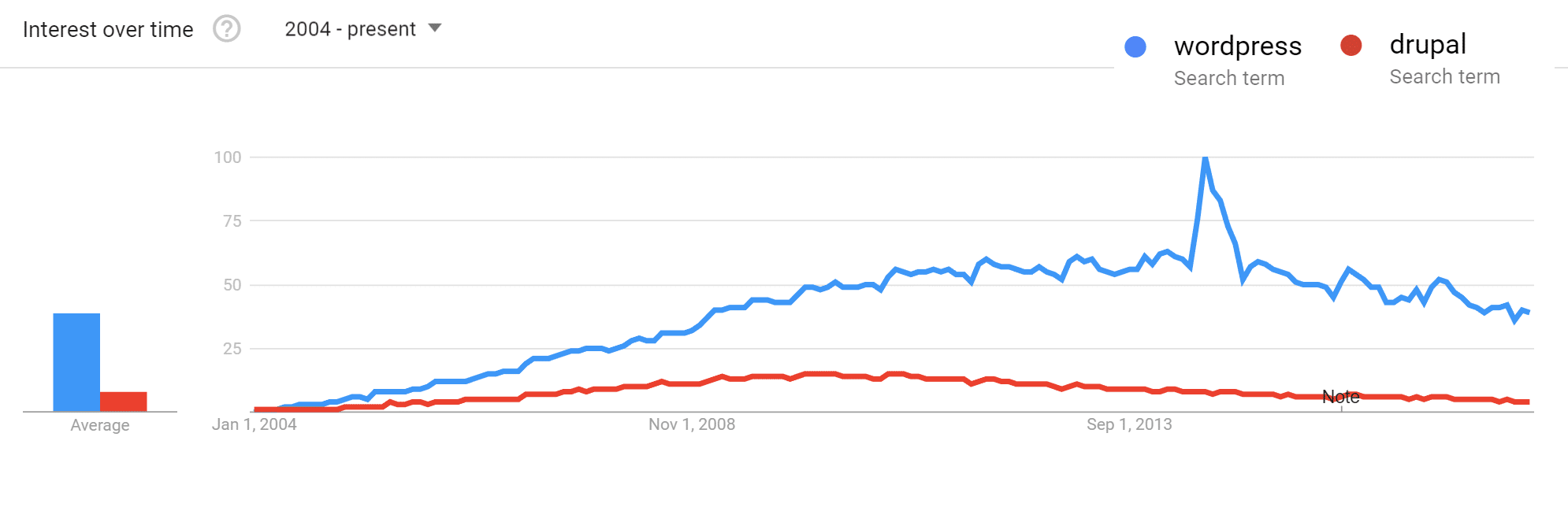
Looking at Google Trends back to 2004, we can see that both had a pretty quick rise in fame but are now simply kind of in a slump. But these are simply trends. Looking at the market share growth, both WordPress and Drupal have grown over the years.
What Are Some Of The Commonly Touted Advantages Of WordPress And Drupal?
If you browse the web for discussions of WordPress vs Drupal, you can find plenty of devotees on each side. Here are some of the most commonly cited reasons for choosing one platform over the other:
WordPress Advantages
- Ease of use – WordPress is significantly more user-friendly, especially for non-developers.
- Extensibility – WordPress’ third-party theme and plugin communities make it similarly easy to extend WordPress without the need for custom development. Some people even claim that, with the right extensions, WordPress can do anything that Drupal can do.
- Ease of getting help – WordPress’ massive global community means that it’s easy to find support for any issues that you run into.
- Lower development costs – WordPress offers more “out of the box” solutions and WordPress developers are usually more affordable than Drupal developers.
Drupal Advantages
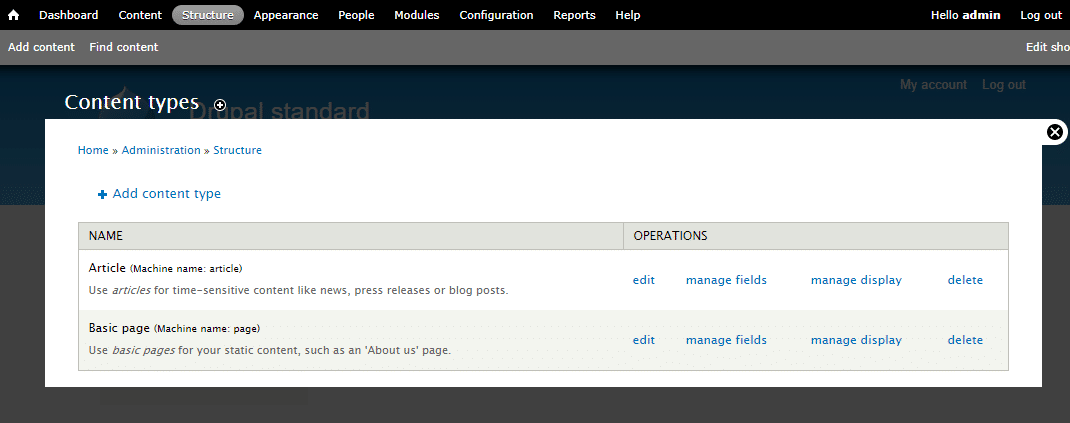
- Custom content types and views – while WordPress does offer custom post types, most people consider Drupal’s custom content types to be a bit more flexible.
- Access controls/user permissions – whereas WordPress single-site ships with 5 basic user roles, Drupal has a built-in access control system where you can create new roles with individual permissions.
- Core support for multilingual sites – in Drupal 8, multilingual functional is baked into the core, whereas WordPress sites need to turn to third-party plugins.
- Taxonomies for handling lots of data – Drupal’s taxonomy system is more flexible than WordPress, which can make it ideal for handling lots of content.
How Easy Is It To Get Up And Running With WordPress And Drupal?
When it comes to how easy it is to build a website with each platform, WordPress is the clear winner.
WordPress Ease Of Use And Learning Curve
WordPress makes it significantly easier to go from “zero” to “fully functioning website that looks good.”
With WordPress, it’s possible to find a niche-specific theme and have a working site all in an afternoon’s work (obviously more complex projects are unlikely to be completed in an afternoon).
What’s more, the WordPress interface is simple for even most casual users to quickly grasp. And tools like the WYSIWYG Theme Customizer and the upcoming Gutenberg editor only make it even easier for casual users to create meaningful and unique content.

Drupal Ease Of Use And Learning Curve
With Drupal, you’re looking at pretty much the opposite. While Drupal themes do exist, most Drupal websites sport a custom-coded theme, or at least a highly customized theme. That means you’re usually going to need a developer just to get something that looks good.
Beyond that, the Drupal interface is incomprehensible for most casual users (and many developers!), at least at first glance. This isn’t an opinion – Drupal itself has a usability page that says, in reference to the Drupal authoring experience:
In general people expect a much richer user experience around content creation than Drupal offers, much of the functionality that people consider standard for a CMS is simply missing.
For example, here’s what the core editor looks like in Drupal 7:
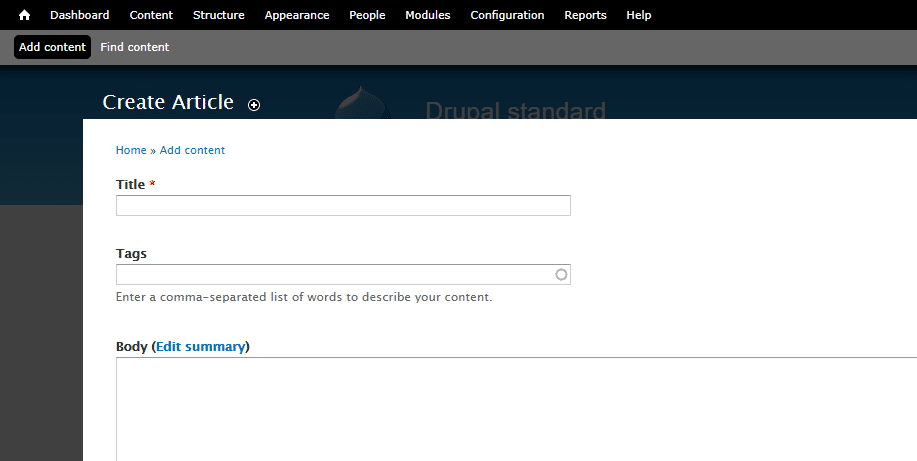
While it’s functional at a very basic level, it’s not exactly the most user-friendly content creation experience, especially compared to the WordPress TinyMCE Editor (and the upcoming Gutenberg Editor).
How Can You Extend Your Website With Drupal And WordPress?
You can extend both WordPress and Drupal with add-ons that affect both:
- Functionality: WordPress calls these plugins, while Drupal calls these modules.
- Aesthetics: Both WordPress and Drupal call these themes
How Many Plugins And Themes Does WordPress Have?
While the raw number of extensions doesn’t inherently mean WordPress is better, it is a good indicator of the size and importance of the third-party WordPress ecosystem.
WordPress has:
- 53,000+ free plugins, plus thousands of more premium plugins.
- 5,000+ free themes, plus thousands of more premium themes.

How Many Plugins And Themes Does Drupal Have?
At its official directory, Drupal lists:
- 39,000+ modules
- 2,500+ themes
With that being said, if you only include modules that are compatible with Drupal 8.x, those numbers drop to:
- 4,000+ modules
- 250 themes
Are WordPress And Drupal Equally Secure?
In a perfect world, both WordPress and Drupal are secure systems. But in the real world (with real people’s update habits and penchant for third-party solutions), Drupal often ends up being more secure.
It’s worth noting that this advantage really does stem more from human error than it does flaws in the WordPress core.
WordPress Security
While the WordPress core itself is secure, WordPress’ massive third-party ecosystem introduces a ton of wildcards that aren’t as prevalent in Drupal sites.
According to a survey from Wordfence, plugin vulnerabilities accounted for a massive 55.9% of all known entry points for malicious actors. And overall, WordPress was the content management system used by 74% of the hacked websites that Sucuri analyzed.
While WordPress’ number should naturally be higher because of its popularity, WordPress’ market share is only 59.8%, so the fact that WordPress accounts for 74% of hacked websites in Sucuri’s analysis is still higher than you’d expect.
Done right, WordPress is secure. But the fact that WordPress relies so heavily on third-party extensions does make it more vulnerable than Drupal.
Drupal Security
One of Drupal’s selling points is its lockdown security, which is why it’s a popular content management system for government institutions and other large, security-conscious players. In contrast to WordPress, Drupal only accounted for 2% of the hacked websites that Sucuri looked at, which is well under its market share of 4.7%:

Beyond its enterprise-level security, Drupal also publishes detailed security reports and is generally more transparent about its security than WordPress.
Migrate From Drupal to WordPress
If you’re currently using Drupal and are looking for an easy way to migrate to WordPress, here are a couple plugins we recommend checking out.
WordPress vs Drupal: Which Is Better?
This is probably the question you came here looking for…but it’s also a flawed question because it’s impossible to say whether WordPress or Drupal is “better”. Instead, a more helpful question to ask is “which is better for this specific website that I’m building?”.
That is – you should focus on choosing the right tool for your specific project, not looking for a proclamation that one is always better than the other.
We do managed WordPress hosting here – so it would be easy to say that WordPress is always the best solution. But that wouldn’t be a fair conclusion for our readers. If you’re building a site with complex data organization that needs to be customized and flexible, Drupal may well be a better choice. Just be aware that it’s unlikely to be accessible unless you:
- Are a developer
- Are willing to hire a developer
In the end, this is probably a good rule of thumb:
WordPress should be the default tool for most people to create a website because:
- It’s user-friendly and easy for non-developers to add functionality.
- You can quickly create an attractive and functional website.
- It’s easy to find both free and professional help.
That doesn’t mean WordPress is the best tool for all situations – just that it’s the best tool for most situations. Unless you already know the specific reasons why you need what Drupal offers, sticking with WordPress will likely make your web journey much easier.
Do you agree or disagree when it comes to WordPress vs Drupal? Let us know in the comments!
Categories
Subscribe Now
10,000 successful online businessmen like to have our content directly delivered to their inbox. Subscribe to our newsletter!Archive Calendar

| Sat | Sun | Mon | Tue | Wed | Thu | Fri |
|---|---|---|---|---|---|---|
| 1 | 2 | |||||
| 3 | 4 | 5 | 6 | 7 | 8 | 9 |
| 10 | 11 | 12 | 13 | 14 | 15 | 16 |
| 17 | 18 | 19 | 20 | 21 | 22 | 23 |
| 24 | 25 | 26 | 27 | 28 | 29 | 30 |
| 31 | ||||||
Recent Articles
-

Posted on : Jul 25
-

Posted on : Jul 07
-

Posted on : Apr 07
-

Posted on : Mar 19
Optimized my.cnf configuration for MySQL 8 (on cPanel/WHM servers)
Tags
- layer 7
- tweak
- kill
- process
- sql
- Knowledge
- vpn
- seo vpn
- wireguard
- webmail
- ddos mitigation
- attack
- ddos
- DMARC
- server load
- Development
- nginx
- php-fpm
- cheap vpn
- Hosting Security
- xampp
- Plesk
- cpulimit
- VPS Hosting
- smtp
- smtp relay
- exim
- Comparison
- cpu
- WHM
- mariadb
- encryption
- sysstat
- optimize
- Link Building
- apache
- centos
- Small Business
- VPS
- Error
- SSD Hosting
- Networking
- optimization
- DNS
- mysql
- ubuntu
- Linux






