
Visual Content Strategy: How to Use Visuals to Get More Traffic
- Category : Marketing
- Posted on : Jul 04, 2018
- Views : 5,077
- By : Barton S.

Having a blog where you can share valuable information with your audience can prove to be essential for your business. A blog is a great source of content marketing and, if you do it correctly, benefits may prove to be higher than expected. Ever wonder why you see all these companies pumping out content? That’s because when done right, content marketing works. In fact, it is three times more effectivethan paid search in regards to leads and ROI for your business.
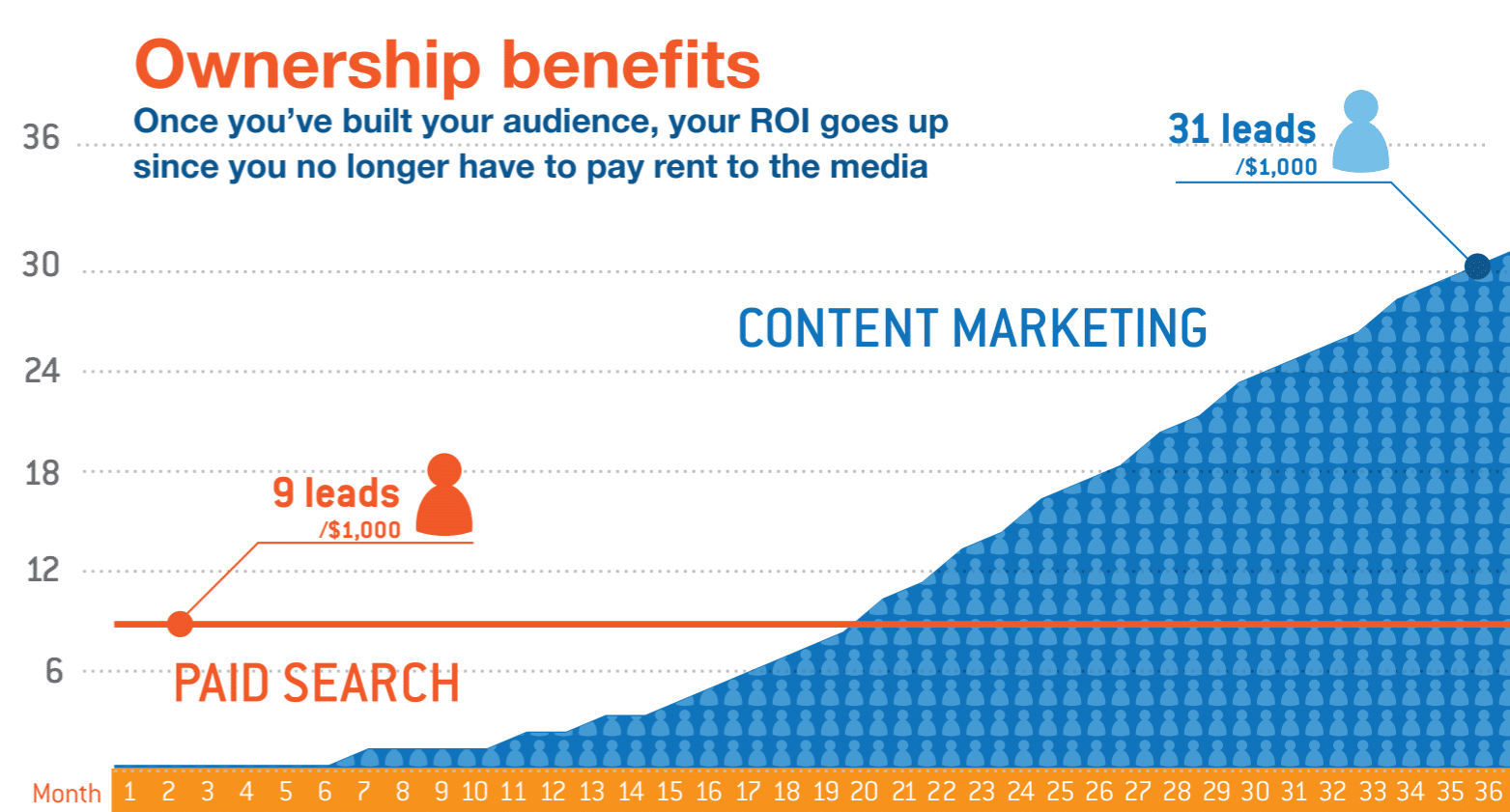
Also, people are more likely to get to know your company or brand through content marketing. 68% of the Internet users spend time reading about brands and 80% of them appreciate learning about companies through custom content. This is probably the main reason why small businesses with blogs get 126% more leadsthan businesses that do not engage in content marketing.
Importance of Visual Content
However, content marketing is not and should not be just text. Visuals are an important part of a marketing campaign. They have the power to attract and retain your audience. They have the power to enhance your entire campaign and make it successful in the long run. Why do you think is that? Why are visuals important for a blog?
According to a report published by Social Media Examiner, 38% of marketers say that blogging is the most important form of content for their business. Visual content comes in second, as 37% of marketers admit it to be the most important part of their content marketing strategy.
Also, the same report states that 68% of marketers use blogging for marketing purposes while 74% use visuals as a common type of content. Overall, content marketing gets you six time higher conversion rates than other types of marketing.

However, we should also consider that people tend to retain only 10% of what they hear. However, if you pair written text with relevant images, 65% of that information is retained three days later. Impressive, isn’t it?
The Featured Image
When it comes to visuals on your blog, the first thing you should start with is the featured image. This type of visual is even more important when you publish blog posts that are mostly based on textual information, without screenshots, graphs, charts and other types of visuals. Also, the featured image is important if you engage in social media marketing as well. Why? This is the first thing a Facebook or a Twitter user sees when you share a link.
How to Add a Featured Image in WordPress?
If you are blogging from a WordPress based blog, and I imagine you are, things are quite simple. Most of today’s themes already feature this option. If not, try to update the theme or ask a professional coder to help you include the featured image option.
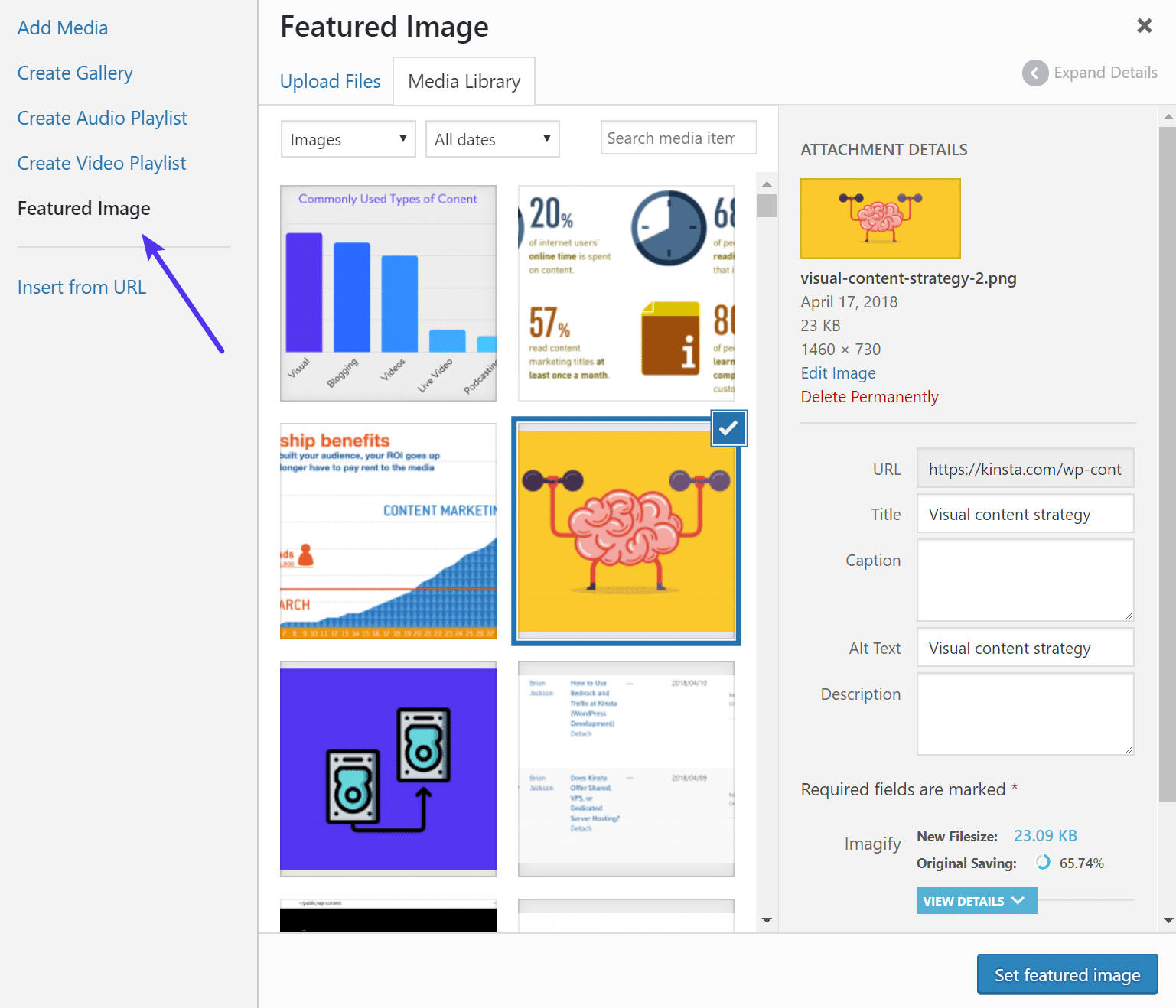
The process is similar to that of a traditional image upload/insert into a post. There is only one slight difference. Once the image has been uploaded, you should click on the “Featured Image” button instead of inserting the image into the post.
Visuals to Include in Your Articles
Now that you know how to add a featured image and why it is important to do it, let’s discuss the other types of visuals that may be paired with the texts you publish. What visuals can you use as a blogger and how to use them according to your overall content marketing strategy?
A. Screenshots
They are your best option if you want to describe certain operations and processes performed on a computer or a mobile device. “How to” guides are popular amongst internet users and screenshots will help you make them more easy to understand. In fact, according to a study, people who follow directions with texts and illustrations, understand and perform 323% better than those who follow the same directions without illustration.
B. Graphs and Charts
According to yet another interesting study published by Nielsen Norman Group, people pay attention to information-carrying images and tend to ignore decorative images. What does this mean?
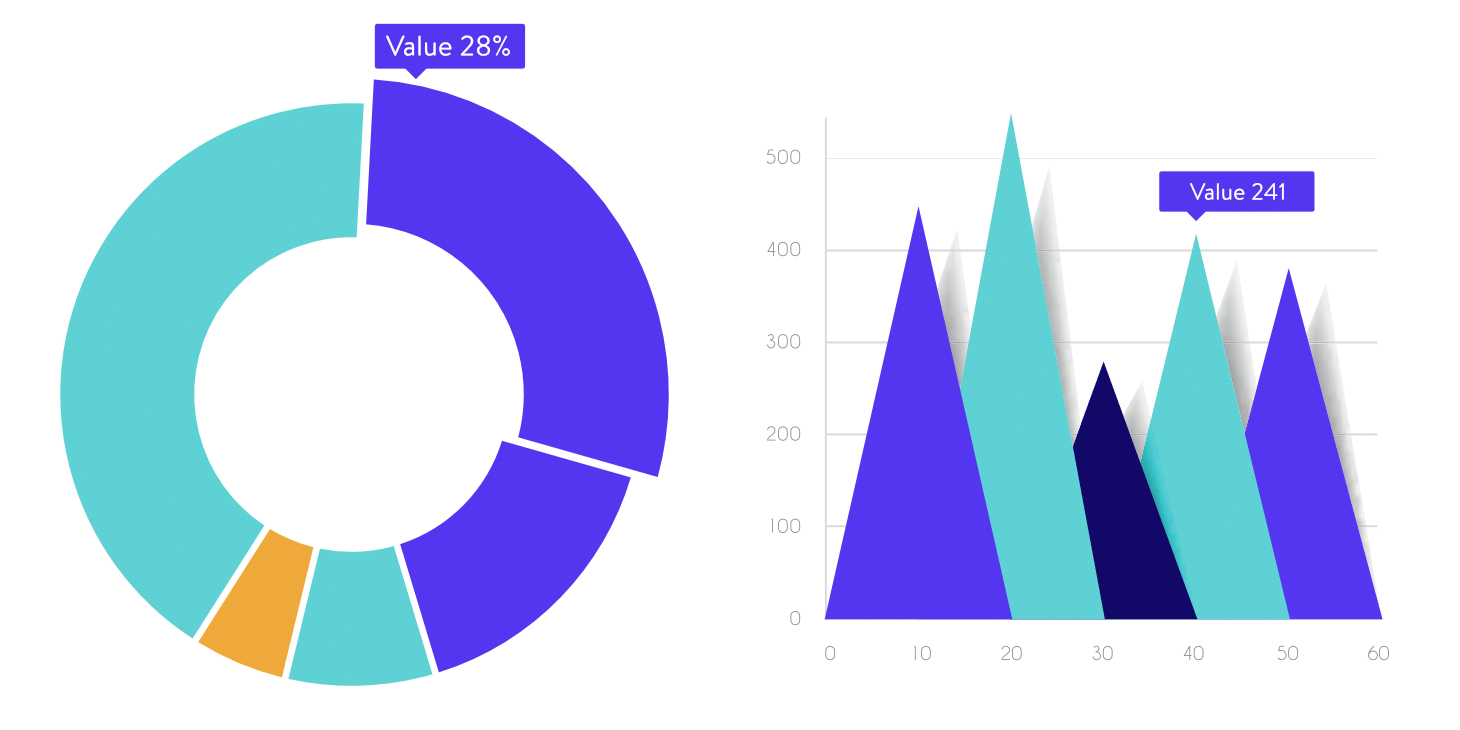
Well, in order to catch the viewer’s attention, you need images that provide a form of valuable content to him or her. Graphs and charts fall into this category, as they help the audience better understand your numbers and stats and at the same time, memorize the information provided easier. Check out how to create graphs and charts in WordPress.
C. Photos
Photos are recommended in case you have something specific to share with your audience. Travel blogs especially need great visuals of the different places they talk about in order to attract and please the audience.
In case you cannot shoot your own photos or, in case you don’t need anything else than generic visual representations to publish along with your texts, you may choose to use stock images. They make great featured images for green content blog posts.
Where to get stock images and how to deal with them?
- Well, the first thing you need to do is to create a budget. There are several premium stock images services available out there, such as Dreamstime and Stock Expert but they all cost money.
- If you don’t have a budget, consider getting your visuals from free sources. There are many options in this area as well but there’s a catch: most of these images are not free of copyright. You get them for free but you should also credit the owner. Check out these 10 places to get free images.
- Always respect the copyright requirements for each photo you use on your blog. This is important if you want to avoid legal problems and of course, if you want to be acknowledged as a professional.
- Don’t just take images found with Google search or other search engines. In case you find the one you need via online search, try to find out who this picture belongs to and ask them if they want to sell the usage rights to you or, maybe, if they allow you to post it for free with credits to the author.
D. Product Images
If you want to market specific products, whether they are from your shop or from a partner’s shop, you need great visuals to pair the descriptions or the reviews with. You can either shoot your own photos or, you can ask the producer to give you theirs.
Make sure you are able to get the best images possible if you ask the producers for them. If you choose to shoot them by yourself, buy or rent the best possible technical equipment and make sure you shoot in the best environment possible. Or, you can always hire a professional photographer for this job, if you have a budget for it.
E. Infographics
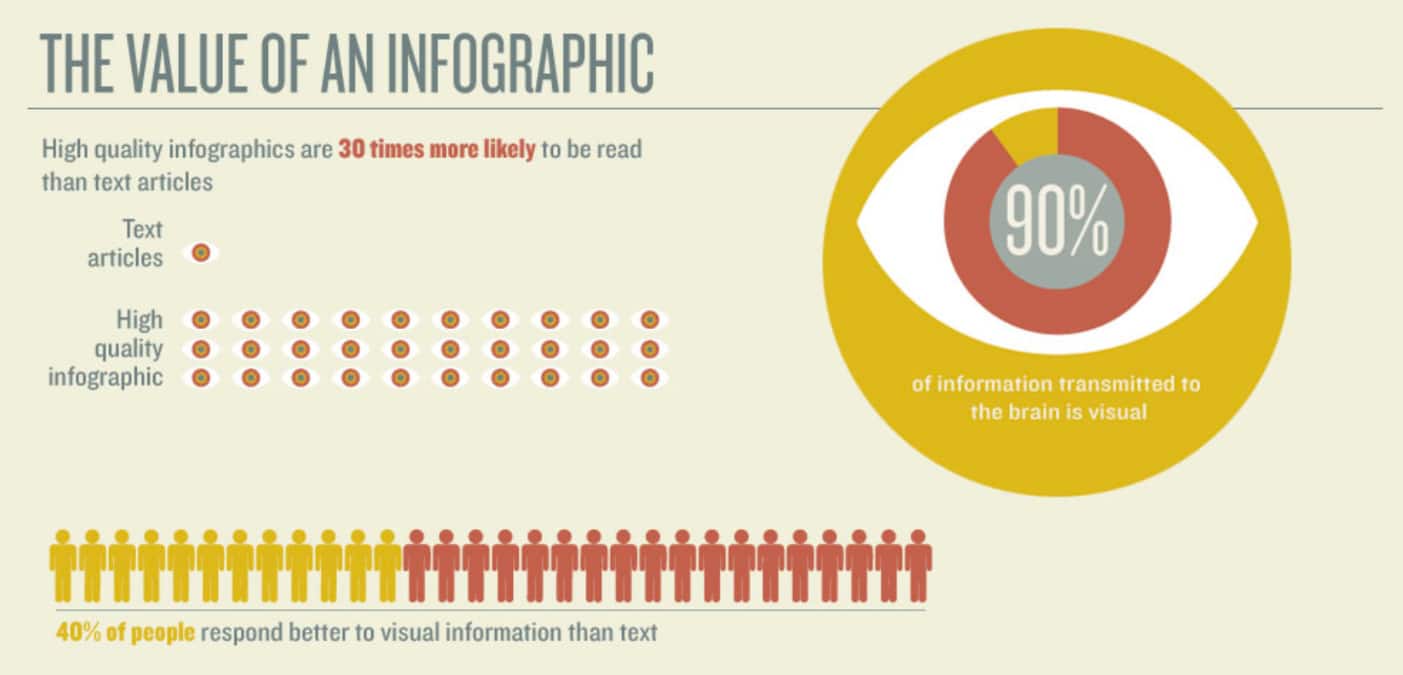
Out of all visuals that can help you market your blog effectively, Infographics, stand by far, as one of the best option available. An Infographic is 30 times more likely to be read than a simple text-based blog post. Moreover, these types of visuals can help you increase traffic to your blog. In fact, according to Customer Magnetism, blogs that use Infographics get 12% more traffic than those who don’t.
F. Flipbooks, Catalogs, and Banners
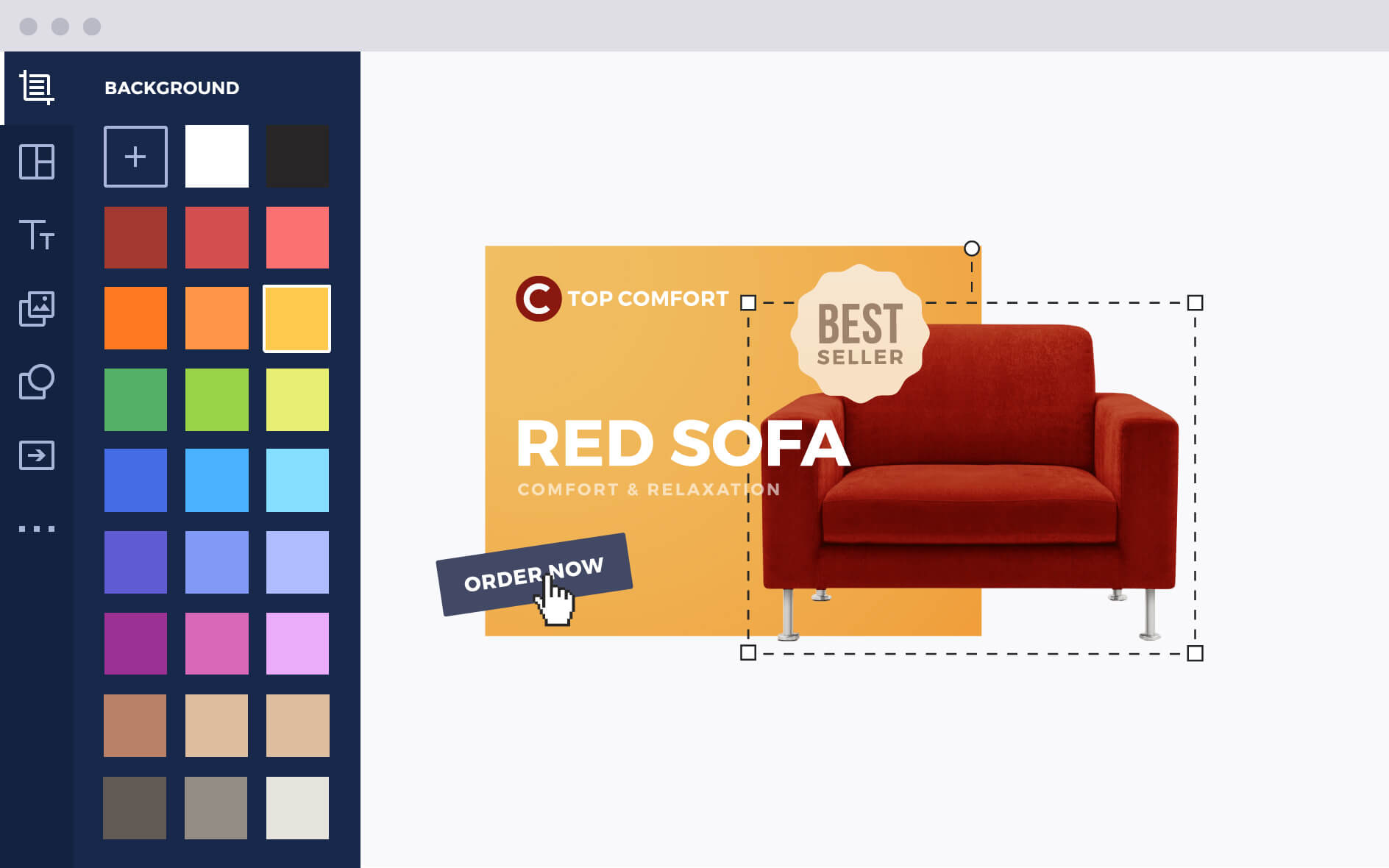
You can also use visuals as banners and post them on other people’s blogs in order to grow awareness and generate more leads. Your success depends on how good looking your banner is and how easy it manages to catch the attention of the viewer. Whether you are a professional designer or an amateur marketer who knows little about visual design, I recommend you to create your banners in HTML5.
Bannersnack, for instance, is a great tool available online that allows you to create really great banners in just a few minutes, animate them if you want and give them a professional look. It generates HTML5 banners almost instantly and it features hundreds of templates to help you get started.
F. Flipbooks, Catalogs, and Banners
You can also use visuals as banners and post them on other people’s blogs in order to grow awareness and generate more leads. Your success depends on how good looking your banner is and how easy it manages to catch the attention of the viewer. Whether you are a professional designer or an amateur marketer who knows little about visual design, I recommend you to create your banners in HTML5.
Bannersnack, for instance, is a great tool available online that allows you to create really great banners in just a few minutes, animate them if you want and give them a professional look. It generates HTML5 banners almost instantly and it features hundreds of templates to help you get started.
G. Videos
Videos can prove to be an important part of your marketing strategy. They are popular among all audiences and most of all, they are able to convert leads into customers or into members of a regular audience in an instance.
The best example, in this case, comes from RedBull, a company that raised the video content to a new standard in content marketing. While you will probably won’t be able to create right away a video channel as popular and as effective ad RedBull Media House, you can still consider using videos in your strategy due to their popularity.
It is believed that video content represents almost ¾ of the total Internet traffic. Also, ¾ of marketers admit having used this types of content in their strategy, at least once. It’s a great choice, considering that people who prefer to watch a video are four times as many as people who would prefer to read about a specific subject.
What makes Red Bull so successful and why their visual content strategy is better than other companies’ strategies?
- Red Bull Media House: Well, the first thing that comes to mind is, of course, the already mentioned Red Bull Media House. It includes many online services such as Red Bull TV, Servus TV, Terra Mater, Red Bull TV Online, The Red Bulletin, Red Bull Mobile and so on. These are all video services, online video services that share valuable content with the fans and the users of each platform in particular. They allowed Red Bull to grow as an influencer company in today’s online multimedia market and grow awareness of their brand through ingenious and original campaigns.
- Social media engagement. Red Bull is more than an energy drinks company and more than a simple online video sharing platform. They have a social media presence as well and it is as engaging as possible when it comes to social media marketing (like Twitter marketing). How and why are they better than other companies? Well, for once, they do not stick to what they are selling. Yes, the brand is important but it is not everything. They built their reputation through effective social media strategies and whilst their product is indeed premium, their content is premium as well. For example, there are more than 48 millions followers on RBs Facebook page. Impressive, yes, but this is not a random fact. They share content based on video but they share exactly what their fans need to see. And this is one of the keys that lead to success.
Use a Content Delivery Network
I am not going into details now about what is a CDN and how it works. However, I will tell you this: In order to attract and retain a wider audience, you need speed. I will talk about this specific subject in the following chapter. However, until then, I will tell you a secret.
Speed depends not only on your hosting provider or the size of your visuals but also on the way you manage to get to the worldwide audiences. As you may already know, local websites load faster than websites hosted thousands of miles away on other continents. This is where a CDN comes in handy. How? Well, it allows you to minimize the distance between the content and the audience by storing a cached copy of your web page on a local server.

Optimization for Google
Page load speed has become, over the past few years, a major ranking factor in mobile search, especially on Google, the most popular search engine. Google search engine ranks websites based on several relevant criteria. One of these criteria is the page load speed.
What can you do? First, you need to think about optimizing your visuals so that they will load fast. You can do it with a tool like Adobe Photoshop, Affinity Designer, or TinyPNG, before you upload them to your server. Or you can utilize a WordPress plugin like Imagify which will allow you to automatically optimize all your images in bulk without losing quality.
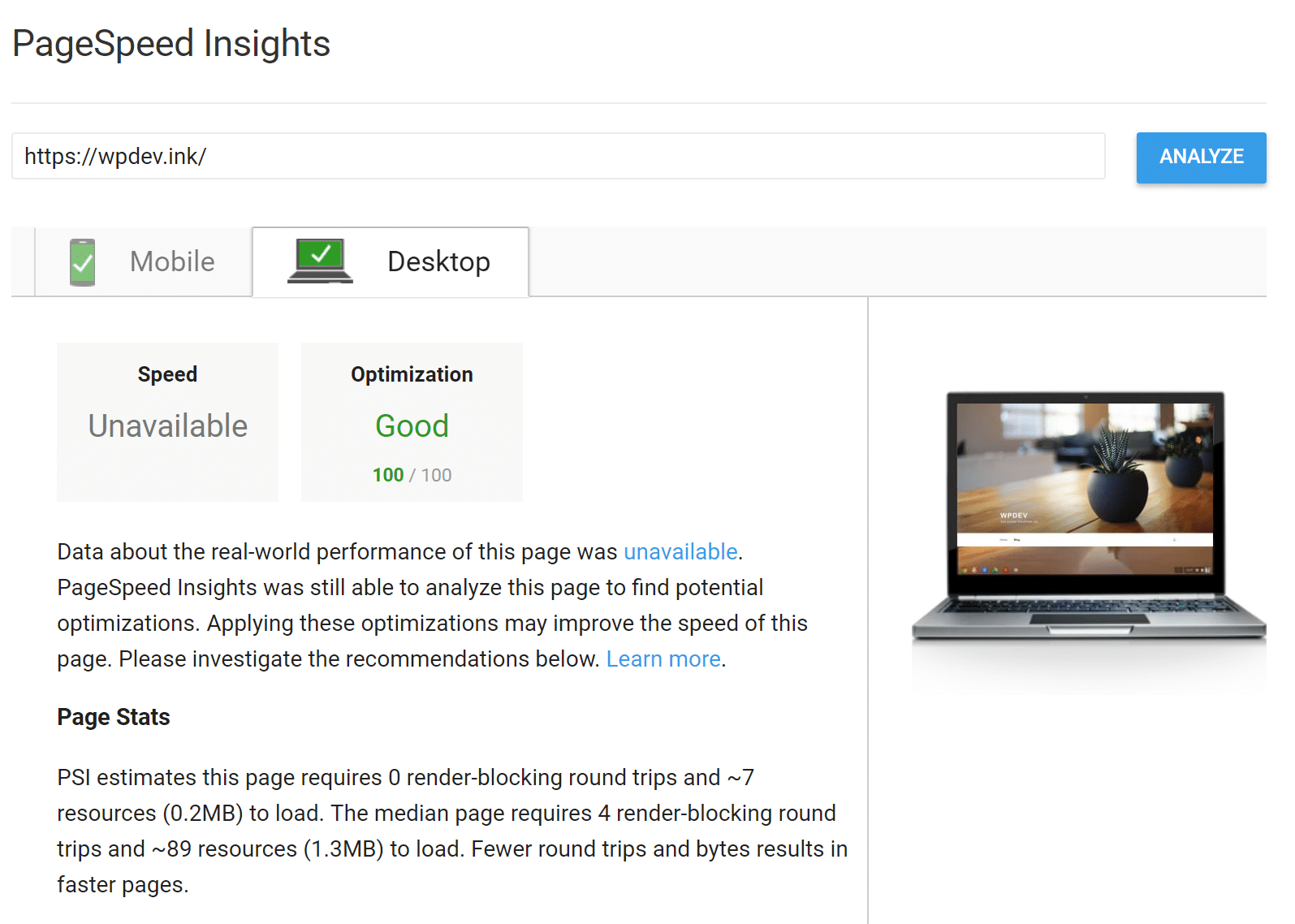
Then, you can check with Google and find out how fast your website loads. Click on “Analyze with PageSpeed Insights and check your website or pages. Or use another speed test tool such as Pingdom or GTmetrix. Remember, the total load time is more important than the scores.
Another important thing you need to consider when optimizing your website for Google, besides the page speed, is the informational value of your content. People are still searching on Google for information. There’s a good chance that if yours is valuable, they will share it. Or, they will take your visuals, embed them in their blog posts and backlink to you. And, these are all great and valuable backlinks, considering that whoever reposts some of your visuals is probably working in, or writing about the same industry you write about.
Therefore, when you optimize your visual content for Google, take these two things into account:
- The size of your images. Optimize them for speed. Make them as small as possible without losing in quality.
- Create great visual content, people may search for on Google. Great and valuable content attracts the audience but they will also generate valuable backlinks to your pages.
Summary
Visuals are important for a blog. They can be decisive in your content marketing strategy, should you choose them according to your audience and of course, in line with your style and visual identity. We’ve learned in this article why visuals matter and also, what types of visuals are recommended for different types of content. We have also learned that they are essential if you want to be successful as a blogger or a content marketer.
Don’t forget that starting with the featured image and up to the visuals you include in your blog posts, every single detail is important. What do you think about visual marketing? How important are visuals in your overall strategy?
Categories
Subscribe Now
10,000 successful online businessmen like to have our content directly delivered to their inbox. Subscribe to our newsletter!Archive Calendar

| Sat | Sun | Mon | Tue | Wed | Thu | Fri |
|---|---|---|---|---|---|---|
| 1 | 2 | |||||
| 3 | 4 | 5 | 6 | 7 | 8 | 9 |
| 10 | 11 | 12 | 13 | 14 | 15 | 16 |
| 17 | 18 | 19 | 20 | 21 | 22 | 23 |
| 24 | 25 | 26 | 27 | 28 | 29 | 30 |
| 31 | ||||||
Recent Articles
-

Posted on : Jul 25
-

Posted on : Jul 07
-

Posted on : Apr 07
-

Posted on : Mar 19
Optimized my.cnf configuration for MySQL 8 (on cPanel/WHM servers)
Tags
- layer 7
- tweak
- kill
- process
- sql
- Knowledge
- vpn
- seo vpn
- wireguard
- webmail
- ddos mitigation
- attack
- ddos
- DMARC
- server load
- Development
- nginx
- php-fpm
- cheap vpn
- Hosting Security
- xampp
- Plesk
- cpulimit
- VPS Hosting
- smtp
- smtp relay
- exim
- Comparison
- cpu
- WHM
- mariadb
- encryption
- sysstat
- optimize
- Link Building
- apache
- centos
- Small Business
- VPS
- Error
- SSD Hosting
- Networking
- optimization
- DNS
- mysql
- ubuntu
- Linux






