
How to Hunt Down and Capture Featured Snippets for More Traffic
- Category : SEO
- Posted on : May 13, 2019
- Views : 4,333
- By : Edgardo D.

Would you like to get Google to send more traffic to your website? Of course you would. But how can you do this without producing more content, building more backlinks or hiring an SEO expert?
Two words: Featured snippets.
In this guide, I’ll explain what they are, why you should care and walk you through the exact steps you can use to get into the featured snippet.
TL;DR – How to Rank Featured Snippets in Position Zero
Here’s a quick summary of some of the tips we’ll share on how to optimize for featured snippets:
- Target question-based keywords.
- Check if there is a featured snippet on the SERP and what type it is (paragraph, list, table etc) using a tool like Ahrefs.
- Keep your paragraph and sentences fairly short.
- Answer the query as directly as possible.
- Structure your content with logical subheadings (H2, H3, H4 etc).
- Use tables to display any data.
- Include the question within the answer if possible.
- Include a summary at the start or end of the content.
Now let’s take a deep dive into featured snippets.
- What Are Featured Snippets?
- What Is NOT a Featured Snippet?
- What Are the Different Types of Snippets?
- Why Should You Care About Featured Snippets?
- How to Find Featured Snippets Opportunities
- How to Rank for Featured Snippets
What Are Featured Snippets?
A featured snippet (also known as position zero) is a brief summary of an answer to a users question. They are displayed at the top of the search engine results page (SERPs) and are pulled from a webpage (hopefully from your webpage).
The goal here is to provide users with a quick and direct answer to their question without having to even click through to a specific search result/website.
Want to know how to make a pizza? Here you go:
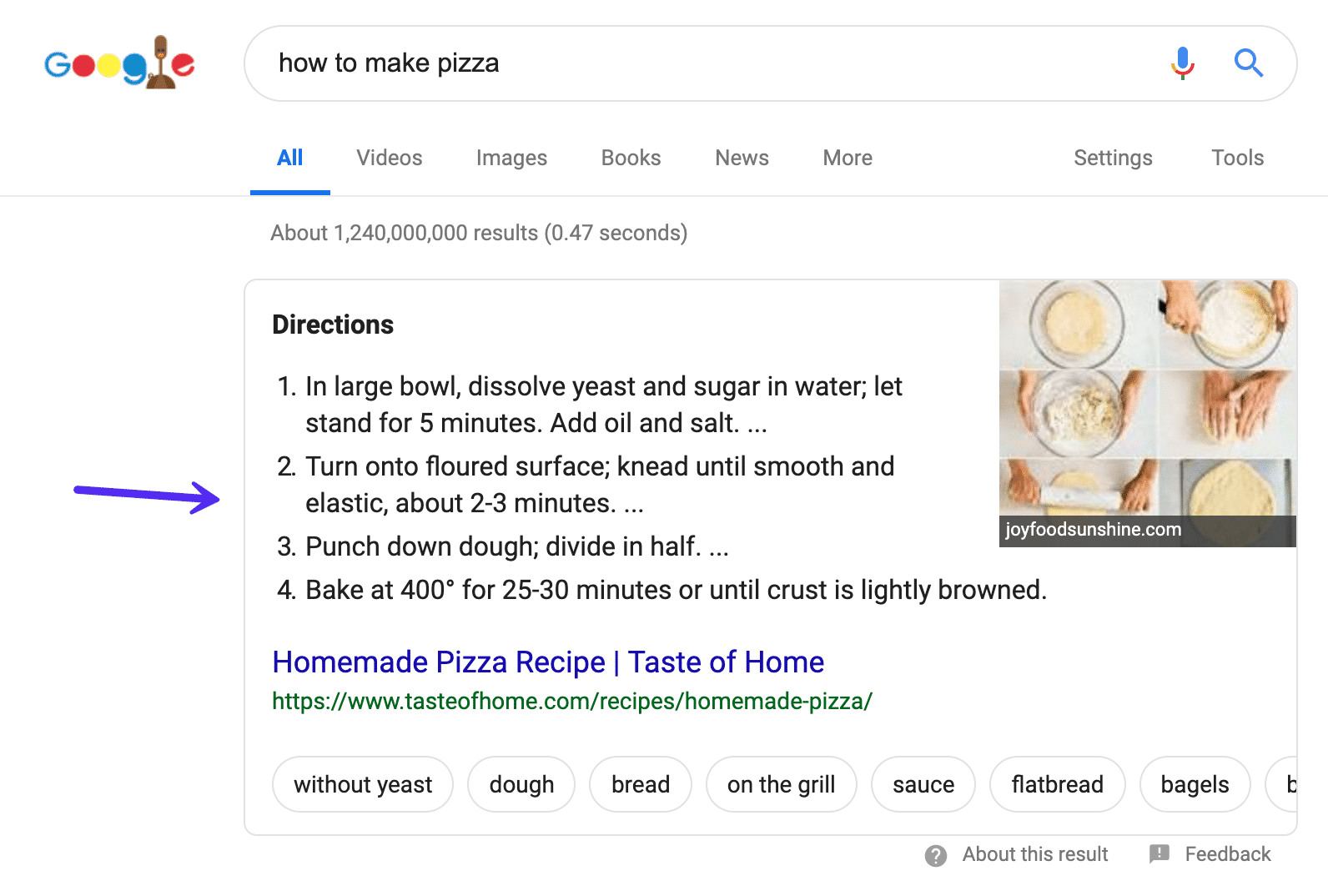
Or maybe you want to know when is the best time to book flights

Or maybe you want to know who is Batman’s secret identity:
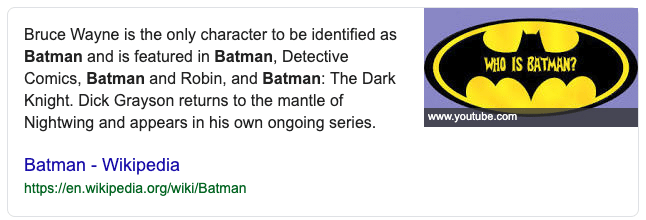
Sorry for the spoiler! According to Google, snippets are meant to “enhance and draw user attention on the results page”.
What Is NOT a Featured Snippet?
Just to make things slightly confusing, not all features that appear in the search engine results pages (SERPs) are featured snippets.
For certain searches, Google can show special search results. These ARE NOTfeatured snippets and can include:
Rich Answers
Rich Answers (or Instant Answers) are answers by generated by Google which don’t require you to click through to a site.
These answers generally cover factual things like how big is Uranus (sorry, not sorry) or how tall is the empire state building (381m, 443 m to tip if you were wondering):
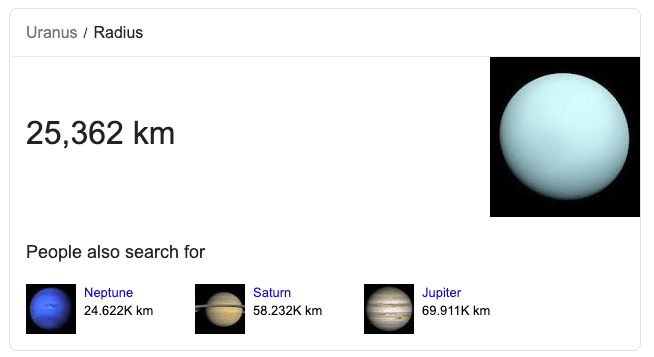
Google doesn’t provide credit to websites with rich answers like these, as according to them, this information part of the public domain.
Knowledge Graphs
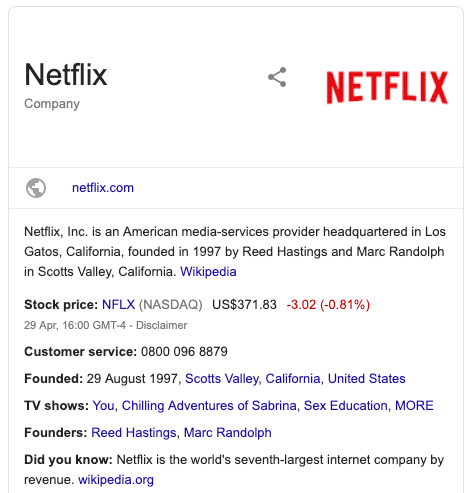
Knowledge Graph answers are generated from a variety of sources and appear on the right-hand side of the SERPs.
Searching for brands, people, or organizations trigger these:
Rich Snippet
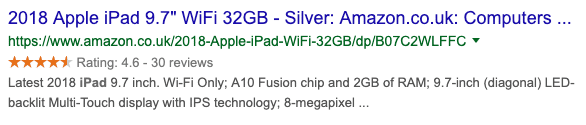
Although this one contains the word snippet, it has nothing to do with featured snippets. A rich snippet is an enhancement for organic results powered by structured data (or schema markup).
Often, you’ll see these on ecommerce sites. The purpose is to help results stand out with rating stars, product availability, and pricing information:
Now we’ve got that out of the way, did you know there are actually a couple of different types of featured snippets?
Let’s take a look at them:
What Are The Different Types of Snippets?
Featured snippets come in all shapes and sizes. Well, five main types to be honest:
- Paragraphs
- Numbered lists
- Bullet point lists
- Tables
- Youtube
1. Paragraph Snippets
Paragraph snippets are the most common snippets you’ll see. Their job is to provide a direct answer to a searcher’s query:
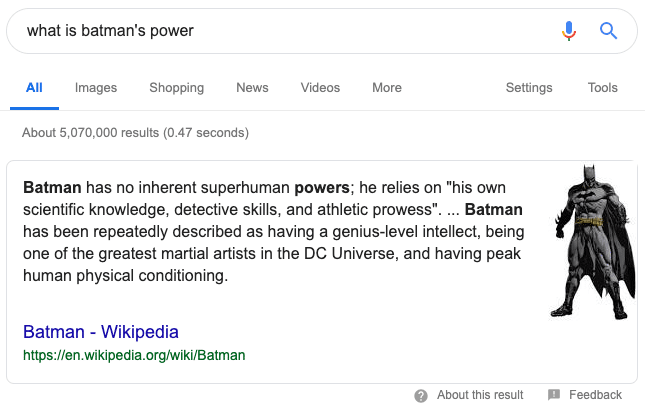
Quite often, these snippets also display an image. However, these are often from different sources (not the website in the featured snippet).
Paragraph snippets generally show for keywords that contain search terms such as:
- How to
- How do I
- How to get
- Who is
- Why is
- What is
2. Numbered List Snippets
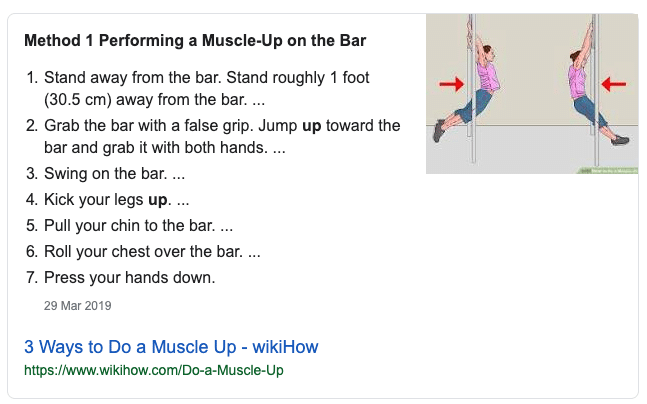
Google generally show numbered list snippets when it thinks a user wants to see a series of steps in order to complete a task, like with this snippet for how to do a muscle up:
3. Bullet Point List Snippets
Everyone loves a list post right? Well, Google’s no exception. Just check out this snippet for data studio templates:
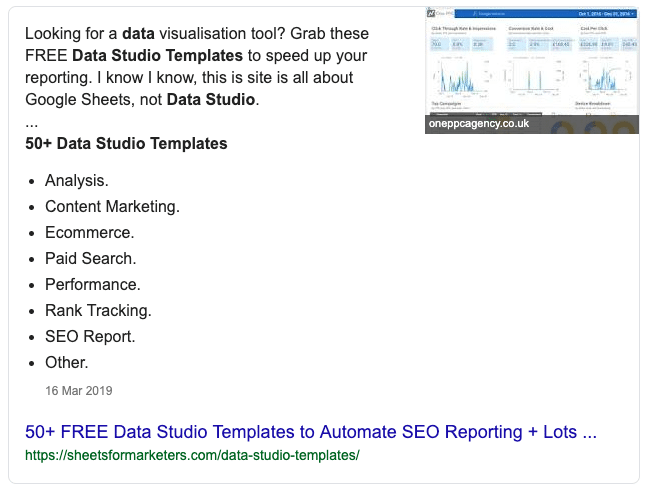
For these featured snippets, Google formats the bullet point list by pulling the headings of each section of the post.
4. Table Snippets
Although less common, Google’s crawlers can read data in tables quite well.
Often, it won’t grab all the information from the table. Instead, it will re-format the data for the snippet into what it thinks is most useful (and for better readability).
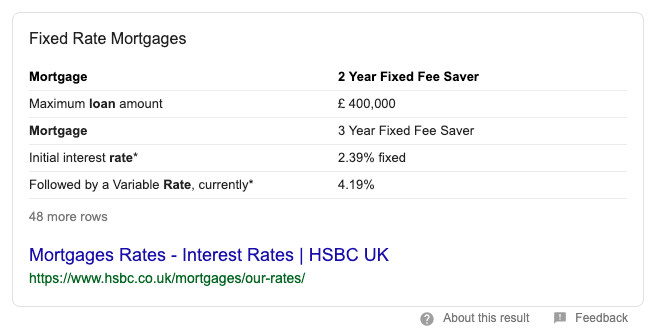
Take the above example for the search term ‘mortgage rates’. If you look at the page the data is being taken from, you’ll see that Google has removed lots of the rows & columns in order to provide a succinct answer in the snippet.
5. YouTube Snippets
It’s not just web pages that Google can construct featured snippets from, but also from places like YouTube (if it thinks that a video best answers the query):

For a query like ‘how to fix a bike chain’ a video results make sense: it will be more useful to help you by following along than reading a blog post. Something to consider when it comes to creating content for a searcher’s needs.
Why Should You Care About Featured Snippets? (Hint: To Get More Clicks)
If you are ranking in the top ten positions you are in luck: you have a chance to get in a featured snippet.
But what’s the benefit?
Well, the obvious one is more clicks to your website.
According to a study of 2 million featured snippets by Ahrefs, 8.6% of all clicks go to the featured snippet.
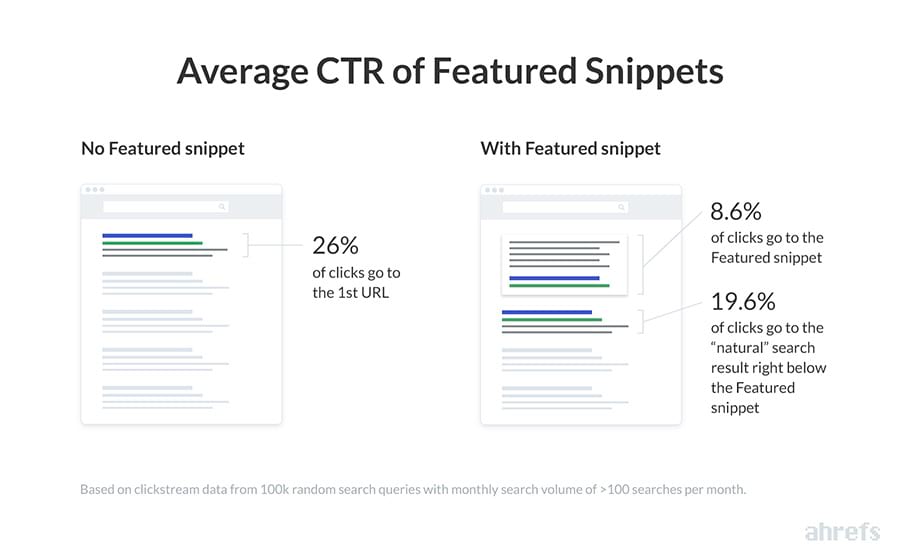
In a way, when you rank in the featured snippet, you are ‘stealing’ traffic away from the other organic results.
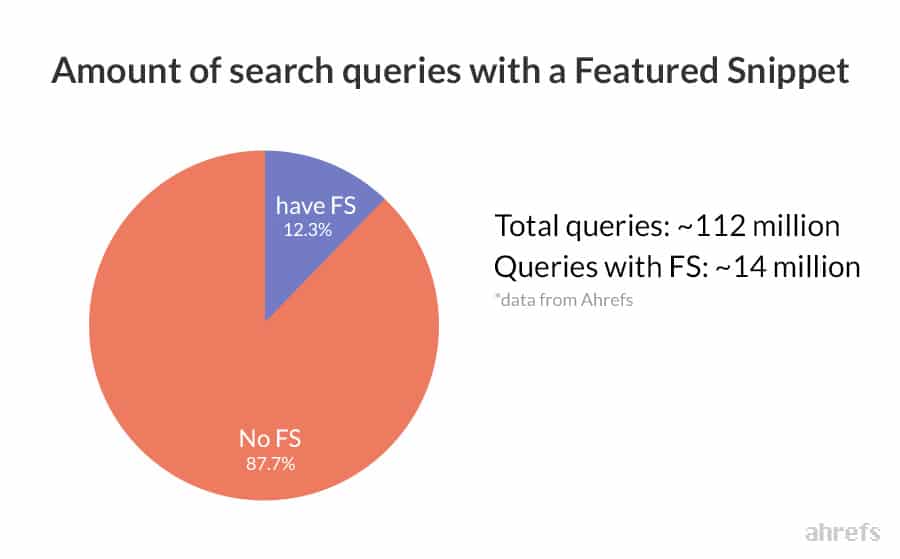
Now, consider that the amount of keywords that display a featured snippet is over 12% of all searches, that’s a lot of potential traffic to steal.
There is also an additional benefit here with going after position zero:
With just a few adjustments to your content, you can potentially increase traffic almost instantly if you get in the featured snippet. Providing your website is ranking obviously.
It’s not all good though…
Since the snippets take up so much valuable real estate at the top of SERPs, they get a lot more impressions and clicks. Which is great if your site is in them, but not so much if you are competing against it.
Also, getting in this SERP feature could cause you to see a drop in traffic and clicks. If the featured snippet is providing an answer to a users question without the need of leaving the SERPs, your traffic is going to take a hit.
After all, a user doesn’t need to click through to your site if their question has been answered right there on Google.
That’s not to discourage hunting down featured snippets, just to make you aware that they are not the holy grail of SEO.
How to Find Featured Snippets Opportunities
Finding featured snippet opportunities is quite easy with the right tools. When it comes to hunting them down, there are two types of keyword opportunities here:
- Keywords your site already ranks for on page one where a snippet is active
- New keyword opportunities you can rank in the snippet for
Let’s explore these two options in more detail:
How to Find Snippets You Already Rank For
Arguably the quickest way to win a featured snippet is with keywords you are already ranking for on the first page, where there is a featured snippet showing.
Thankfully, finding these are opportunities is pretty quick when you use a tool like Ahrefs.
Here’s how to find them:
Step 1
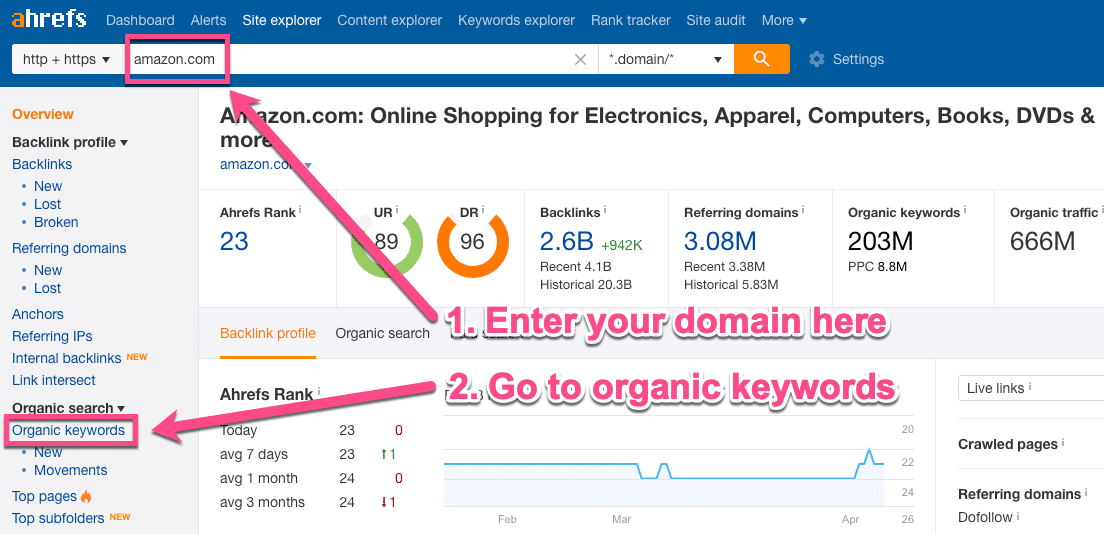
Head over to the Ahrefs Site explorer and enter in your domain. Next, go to Organic keywords in the panel to the left.
Step 2
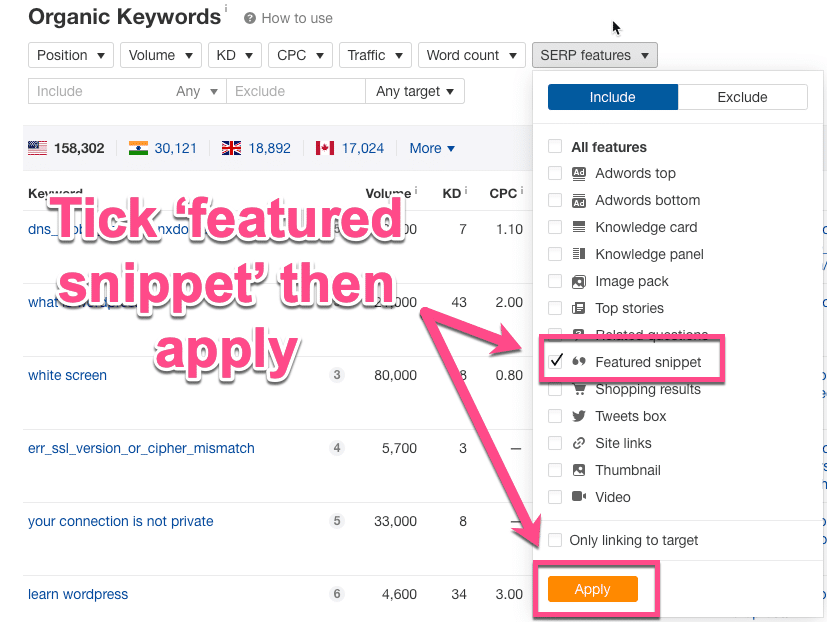
On this report, you’ll see all the organic keywords your domain ranks for. From here, Ahrefs’ keyword filtering options make it super easy to find featured snippets.
At the top of the page, click SERP features, select featured snippets and hit apply.
Step 3
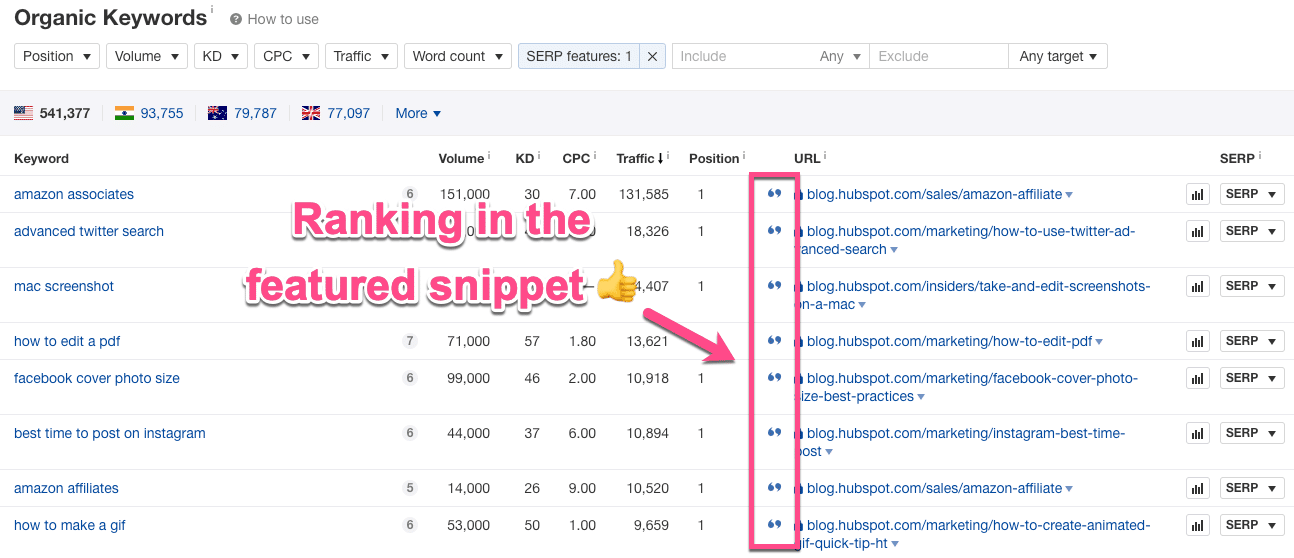
Now you’ll be able to see all the keywords your site ranks for that contains a featured snippet.
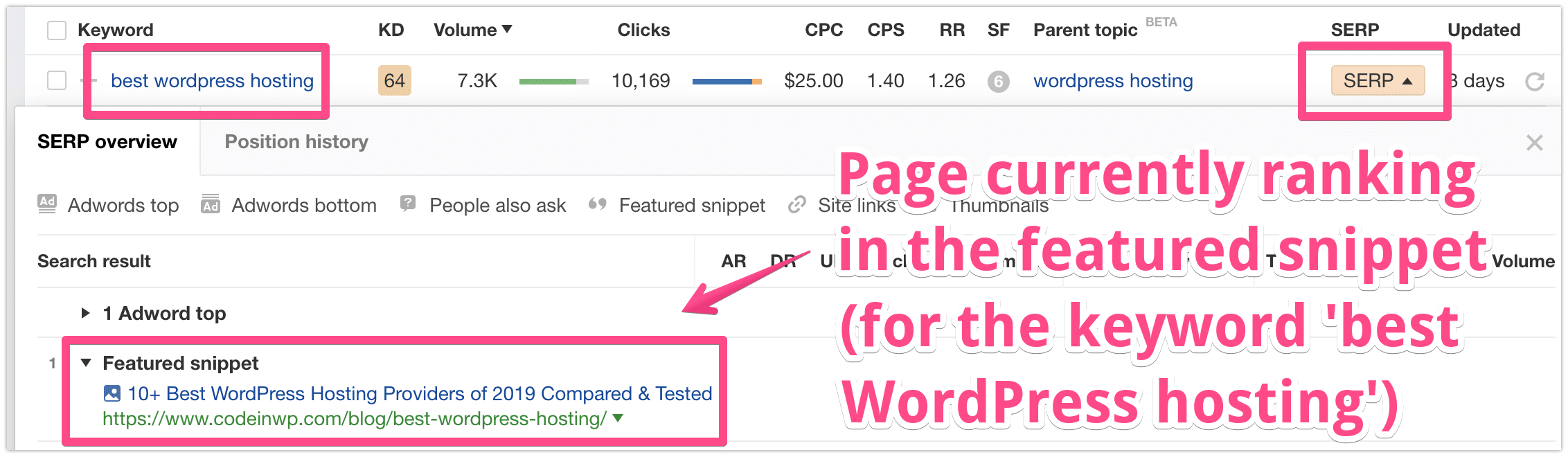
Look out for the little speech marks symbol next to your pages, this means that page is currently showing in the snippet. Nice
Step 4
You can actually filter this list down even more if you want to find some quick win opportunities.
Go to the position filter at the top of the page. Add 10 in the ‘To’ box and hit apply.
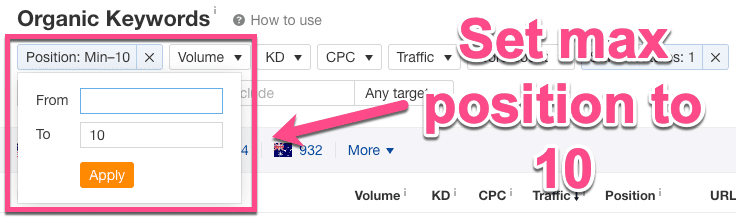
This will show you pages on your site that are ranking in positions 1 – 10 (aka on the first page) where there is also a featured snippet.
These are your quick-win opportunities – they allow for you to quickly audit your pages and see what snippets you want to go after.
How to Find New Snippets to Rank For
Okay, so we’ve just covered how to find featured snippets you are already rank for.
Now, let’s find some new ones:
Step 1
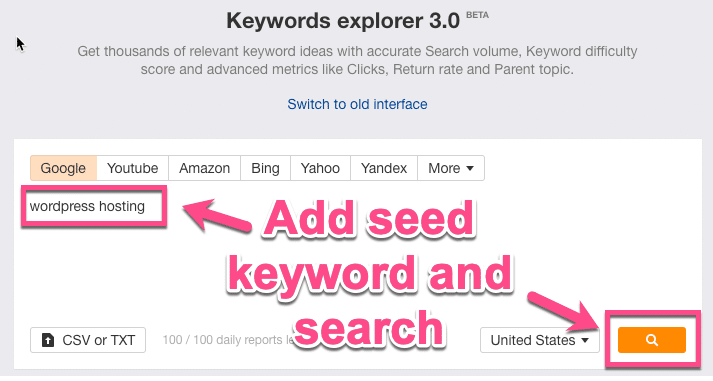
Head back over to Ahrefs, but this time go to the Keyword Explorer Tool. Add a ‘seed keyword’ here. Think of this as an overall topic for the type of content you want to produce:
Step 2
From the left-hand panel, select phrase match. Then, under SERP features, tick ‘featured snippet’ and apply.
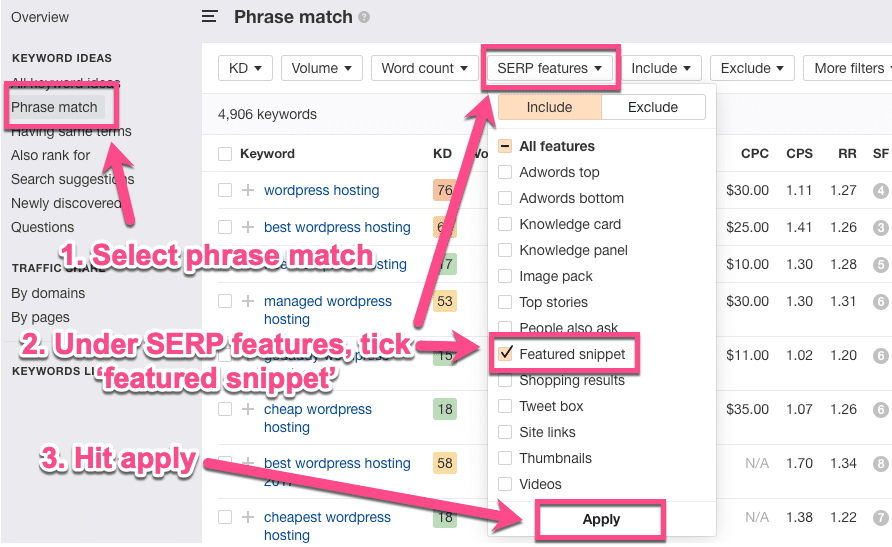
Step 3
Now you’ll have a nice big list of new keywords + featured snippet opportunities for the seed term you entered.
There’s one final thing you can do here.
For each keyword, you can click on the SERP dropdown to see what site is currently in the featured snippet.
How to Rank for Featured Snippets (In 3 Steps)
So now you know what featured snippets are, the different types and how to find them. There’s just one thing left: how to actually get them.
Let’s get the bad news out of the way first:
In order to rank in the featured snippet, you need to rank on page one first.
Almost all snippet results are pulled from pages ranking on page one. So if you aren’t quite there yet, you’ll need to improve your SEO and up your rankings.
Make sure your site loads fast, write content that people want to read, get up to speed with Google’s ranking factors, write unique metadata for every page and have a solid SEO checklist for publishing your content.
There is obviously lots more to optimizing a site for SEO performance, but they are some of the basics you should have covered.
Right, let’s jump into how to rank for featured snippets:
Step 1: Do Some Question-Based Keyword Research
Creating good content should start with keyword research. Targeting featured snippets is no different.
In fact, Ahrefs discovered that the majority of featured snippets are triggered by long-tail keywords.
If you are wondering, long‐tail keywords are highly‐focused search queries. Generally, they have lower search volumes (but not always) but a higher chance of converting.
How to quickly find long-tail keywords:
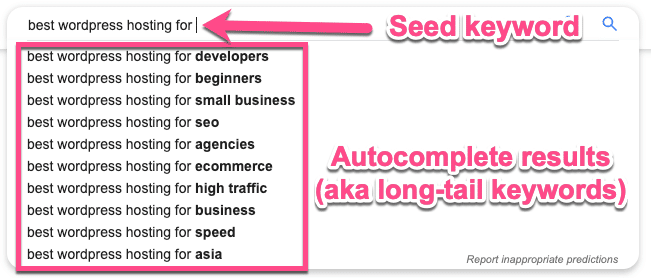
Head over to Google, and type in a keyword. Now watch autocomplete generate long-tail keyword ideas for you:
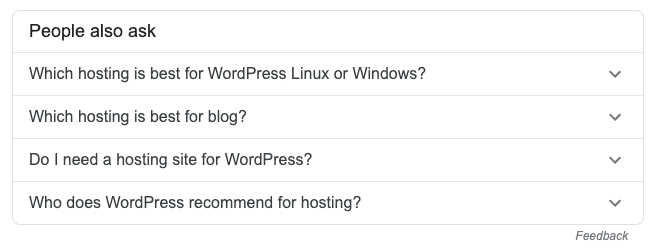
Scroll down the page a bit and you’ll be able to check out the “People also ask” box:
And then, right at the bottom of the page, there’s the “searches related to” box
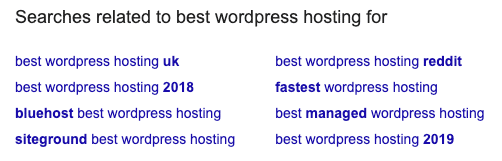
That’s some pretty useful long-tail keyword research you can do without ever leaving Google.
Alternatively, you can head over to the Ahrefs Keyword Explorer. Add in your seed keyword, go to all keyword ideas and filter to only show keywords with 6 words or more. You can play about with this number depending on your niche:
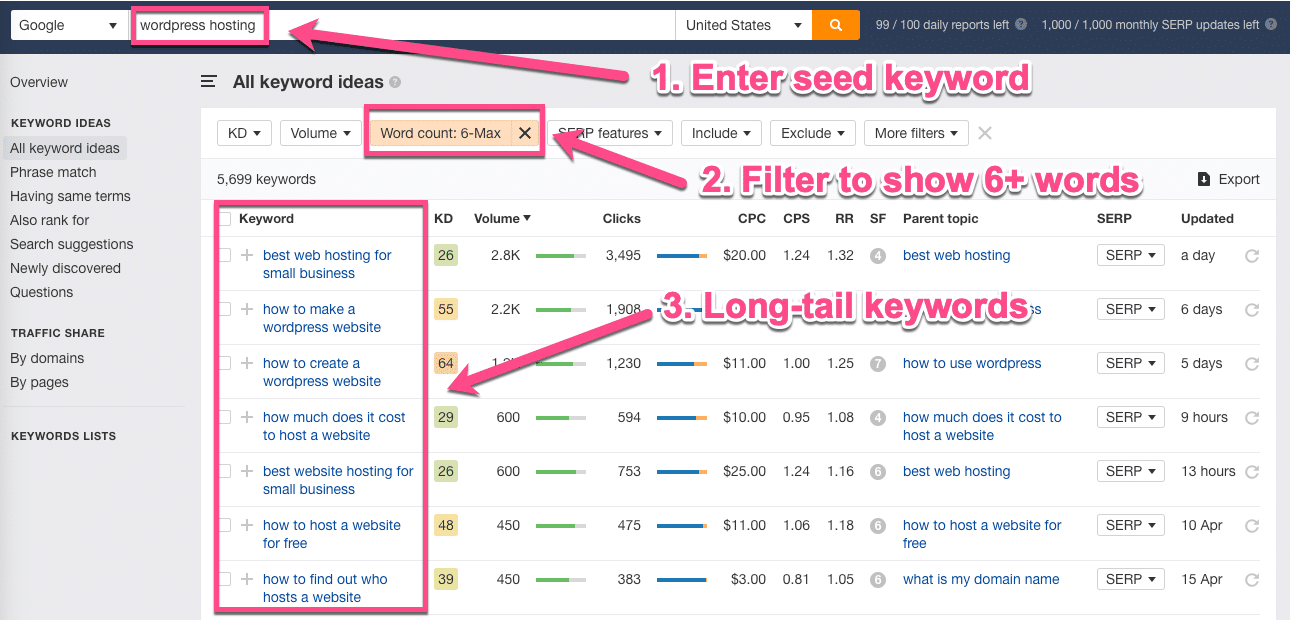
Generally speaking, featured snippets are designed to answer questions.
So one of the best ways to get in position zero is to reverse engineer this goal by doing keyword research.
Find question-related keywords and create content that answers this…
Answer the questions people are asking
Understanding your audience helps. Finding loads and loads of keywords might not be the best use of your time. Instead, look for questions people are actually asking.
Free tools like Answer The Public allow you to generate long-tail question keywords super fast.
Just enter a seed keyword (or topic) and it will generate a great selection of questions that people ask for, in a visual map divided by type. Don’t worry, there’s also an export by CSV option too:
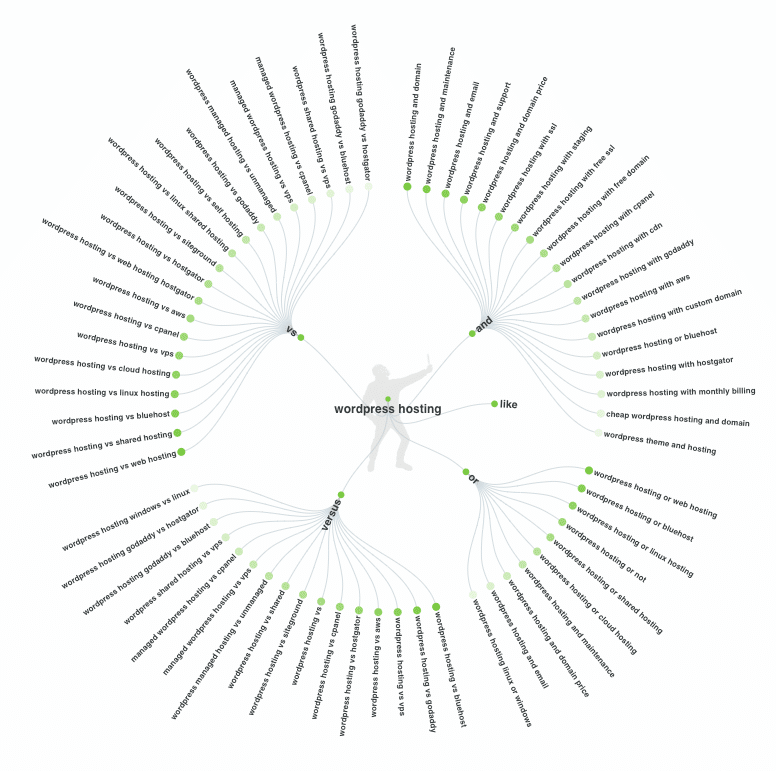
Don’t forget, when it comes to researching questions people are asking, use what you know about your target users.
Where do they hang out online? On forums, Quora, Reddit, or specific social channels? The point is: go to where your potential customers are, and look at the questions they are asking.
Then all you have to do is create the content that answers these questions, which can easier said than done.
Step 2: Create and Format Your Content (So Google Can Easily Read It)
Knowing what keywords to target and what content to write is only half the battle. To get in the featured snippet, formatting plays a big part.
Snippets tend to show just a few lines of a table or text. In fact, Moz analyzed 1.4 million featured snippets and found the optimal length of a featured snippet paragraph to be roughly 40 to 50 words.
To maximize your chances of getting featured, you want to directly answer the question in an introductory sentence, and then go deeper in the rest of your content.
For example, here is the featured snippet for the keyword ‘what are directory backlinks’:
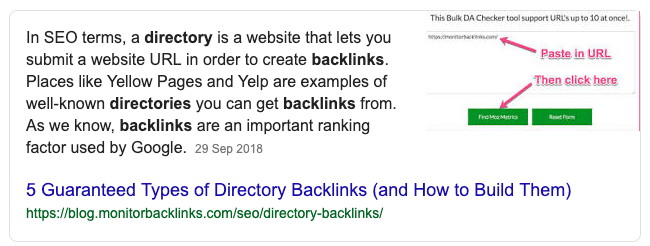
This snippet directly answers the question in a few sentences. If you are then to look at the actual ranking page, you’ll see the answer being pulled from here:
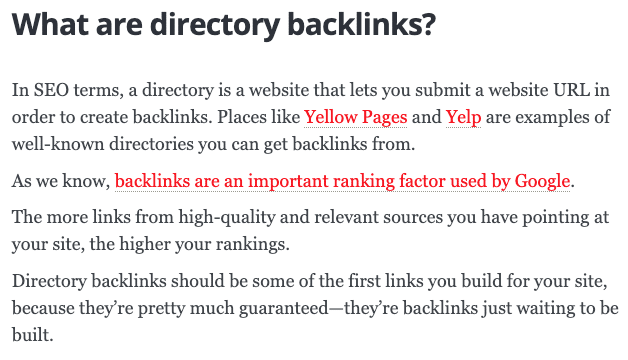
This section at the beginning of the article directly answers the question and then the rest of the content goes into more depth about the topic.
Formatting Your Content for Position Zero
Formatting your content correctly has two SEO-driven goals: to help your users to read it and to help Google to read it.
First and foremost, you want to be using headings and subheadings to structure your content, as well as to divide it up into logical sections.
You’ll want to format your page using basic HTML tags so Google can crawl it effectively. For featured snippet hunting, your best friends are:
<h2>and<h3>tags for the questions,<p>paragraph tags for the main body text<ol>or<ul>and<li>for the list items.
For WordPress, you have H2, H3, H4 tags as well as the standard paragraph (<p>) tags. Follow a hierarchy here so you not only get a natural flow, but a logical one.
Where possible, you want to include keywords in your subheadings and if possible, include a list summary of the content towards the top of your page.
For example, let’s look at this how to make an app article briefly:
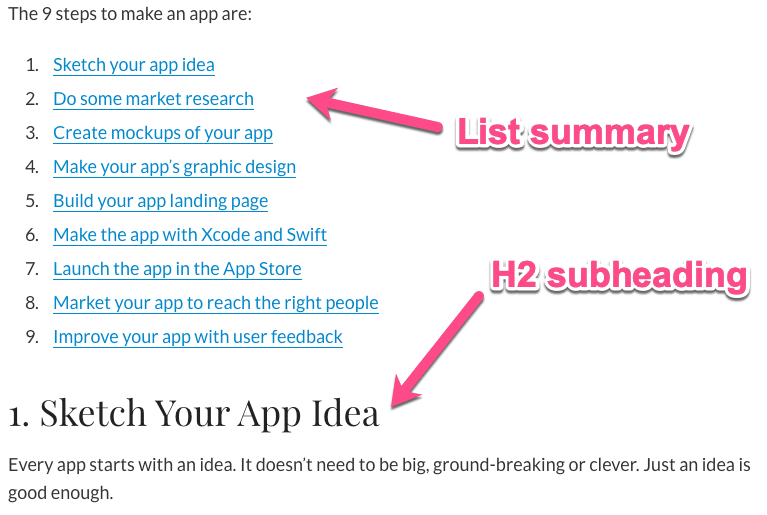
And here’s a quick overview of the headings structure of the article:
- H1 – How To Make An App (In 9 Steps)
- H2 – 1. Sketch Your App Idea
- H2 – 2. Do Some Market Research
- H2 – 3. Create Mockups Of Your App
- Ect.
This isn’t the whole structure of the article, but just a snapshot to give you an idea.
There’s the overall title (H1) telling us and Google what the page is about. Next, there are the subheadings (H2) that go into detail on aspects of a speed test.
If the article wanted to expand on some of the information, it could use H3 headings go into more detail under their relative H2s.
Think of it this way, if someone was going to skim-read your content, could they work out the overall meaning of your article by reading just the subheadings?
If you can confidently answer yes to this, you are on the right track.
Once you have your headings in place, you want to also format the main body of your content. This will depend on the type of information you are presenting, here’s some fast and loose rules:
- For definitions or answers – use paragraphs
- For lists of items or multi-step processes – use bullet points or numbered lists
- For data or comparisons – use tables
And don’t forget, where possible, use relevant images to help illustrate and explain your answers.
Oh, and just one more thing: make sure you format for snippet you are trying to get in.
Step 3: Format Content for the Snippet You Want
We’ve briefly touched upon this, but each type of featured snippet requires some different formatting.
The most popular types of snippets, according to this study by SEMrush of 10 million SERPs are:
- Paragraphs 53.2%
- Lists 35.5%
- Tables 11.5%
And here’s some optimal featured snippet lengths put together by Moz:
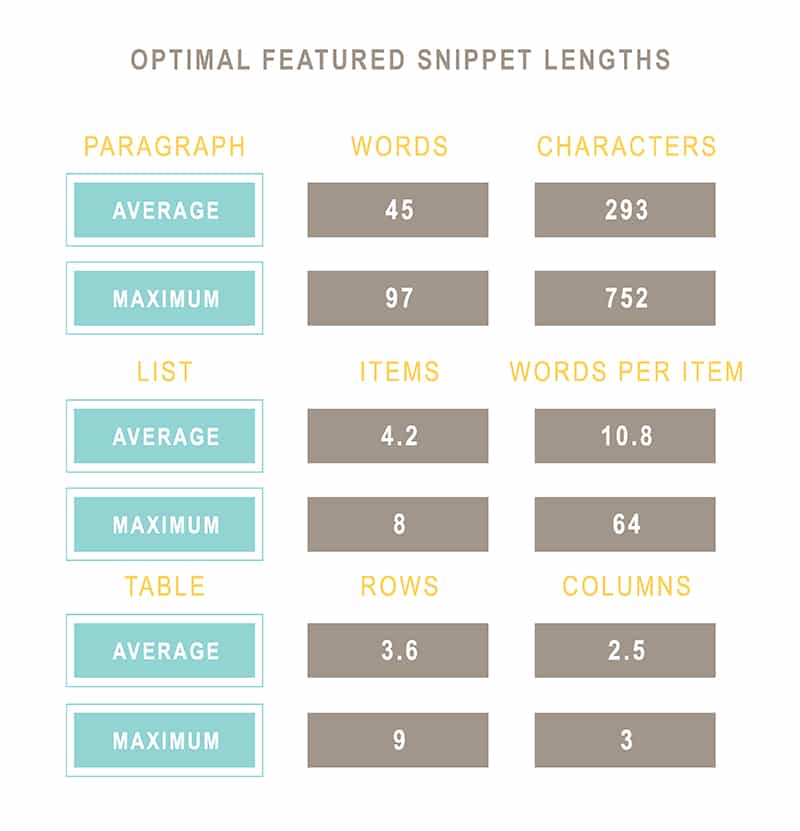
Let’s look at some formatting tips to keep in mind for each one of these:
Formatting for Paragraph Type Featured Snippets
For paragraph snippets, Google will only show an extract of your content. So make sure you answer the question in 40 – 50 words and include the keyword/question in a subheading:
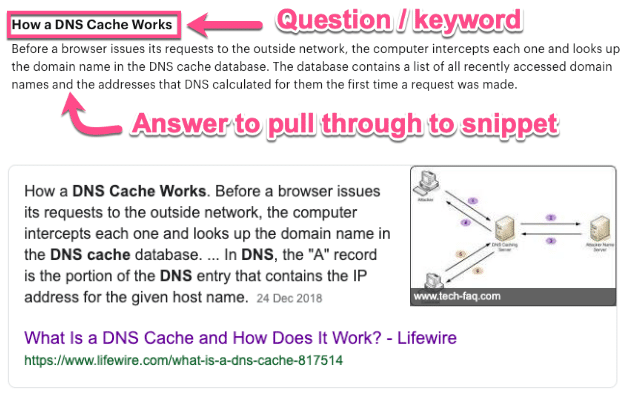
To get in the paragraph featured snippet answer, you may need to adjust the format of your content to:
- Include the question in your subheading
- Follow the question with a one-paragraph direct answer
- Then go into more detail further in the article.
You want to have the most important information (that answers the question) at the top of your page. Then, as the article goes on, you can include more detailed information.
Formatting for List Type Featured Snippets
For getting in the list type snippet, you want to make sure your content is formatted in a logical way. Either by putting your list items in bullet points or organized subheadings.
To make it clear, you can put numbers in your headings to make it obvious there is a logical flow:
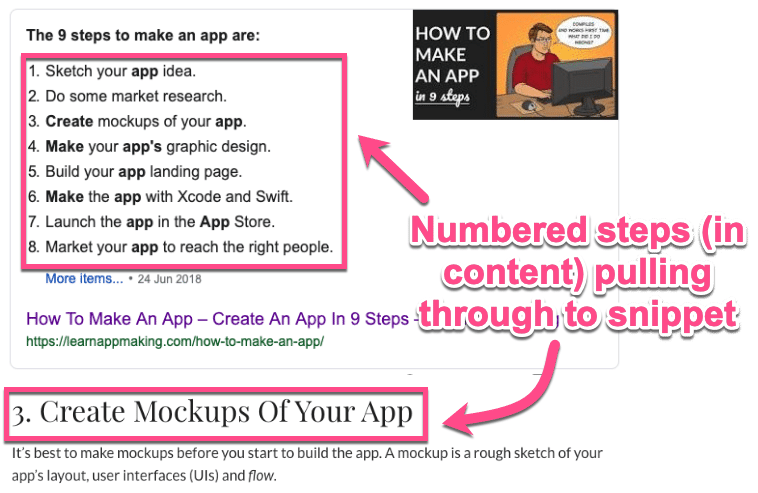
When creating a list, try to make it longer than eight points. Why? Because this is the maximum that Google will show, so it will add a ‘More items’ link. For example:
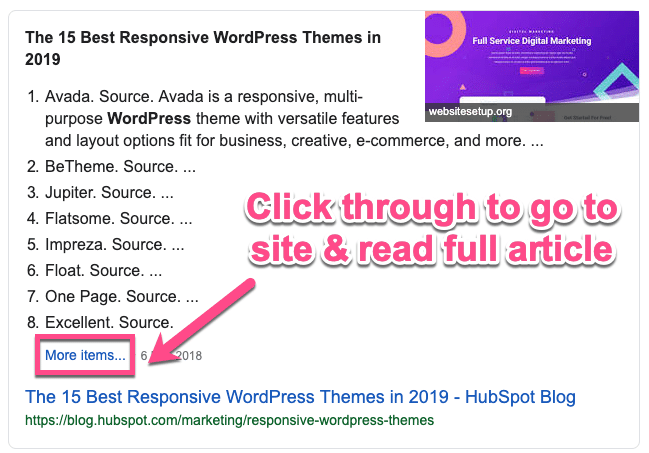
This means people will have to click through to your site to find out the remaining points. Hello traffic!
Formatting for Table Type Featured Snippets
Table featured snippets are perfect for showing data.
Give yourself a head start and put any data that’s useful to your users in tables, with relevant headings for a chance to get picked up for the featured snippet.
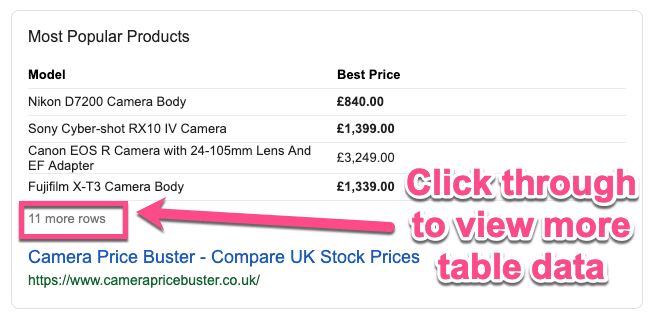
For table snippets, Google shows a maximum of 3 columns and 9 rows. However, like the list snippet, if your table has more, Google will add a click-through link.
Searching for ‘camera prices’, brings up this snippet which adds ‘11 more rows’ to the link for more data:
Summary
Getting your content to rank in the featured snippet spot in SERPs can be hard work. Ranking in the top ten in the first place is likewise hard work.
But like lot’s of things, some hard work and persistence will pay off. SEO is a marathon, not a sprint. And if you already have awesome content, featured snippets can be a quick win.
Now go forth, hunt down, and capture some featured snippets. We’d love to hear how it goes below in the comments.
Categories
Subscribe Now
10,000 successful online businessmen like to have our content directly delivered to their inbox. Subscribe to our newsletter!Archive Calendar

| Sat | Sun | Mon | Tue | Wed | Thu | Fri |
|---|---|---|---|---|---|---|
| 1 | 2 | |||||
| 3 | 4 | 5 | 6 | 7 | 8 | 9 |
| 10 | 11 | 12 | 13 | 14 | 15 | 16 |
| 17 | 18 | 19 | 20 | 21 | 22 | 23 |
| 24 | 25 | 26 | 27 | 28 | 29 | 30 |
| 31 | ||||||
Recent Articles
-

Posted on : Jul 25
-

Posted on : Jul 07
-

Posted on : Apr 07
-

Posted on : Mar 19
Optimized my.cnf configuration for MySQL 8 (on cPanel/WHM servers)
Tags
- layer 7
- tweak
- kill
- process
- sql
- Knowledge
- vpn
- seo vpn
- wireguard
- webmail
- ddos mitigation
- attack
- ddos
- DMARC
- server load
- Development
- nginx
- php-fpm
- cheap vpn
- Hosting Security
- xampp
- Plesk
- cpulimit
- VPS Hosting
- smtp
- smtp relay
- exim
- Comparison
- cpu
- WHM
- mariadb
- encryption
- sysstat
- optimize
- Link Building
- apache
- centos
- Small Business
- VPS
- Error
- SSD Hosting
- Networking
- optimization
- DNS
- mysql
- ubuntu
- Linux






