
Diving Into Zero BS CRM and Advantages of Going Self-Hosted
- Category : WordPress
- Posted on : Oct 17, 2018
- Views : 2,834
- By : Zane P.

No matter what business you operate in, customers are your lifeline. Without them, you wouldn’t generate any sales, get referrals, or develop new relationships. True customer relationship management helps you better understand your customers and engage with them throughout the entire customer lifecycle. By analyzing data, you can determine what they need or want, and how you can improve your business model. That is why having a CRM should be central to what you do. In this post, we’ll dive into the Zero BS CRM plugin, why you should use a CRM and some of the advantages of going with a self-hosted solution.
- Why You Need a CRM
- A CRM Sounds Great. But Which One?
- What About a WordPress Self-Hosted Solution?
- Diving into Zero BS CRM
Why You Need a CRM
CRM. It’s a term which you may be familiar with. It stands for customer relationship management or client relationship management. You don’t need to run an e-commerce store or even sell to people to call them customers. A CRM can be used for anything that involves managing relationships. But why would you want to do so? Knowing the history of your customers lets you tailor your communications to their exact needs and give them what they want when they want it. And beyond that, it is one of the easiest ways to stay organized!

You might be wondering, surely this could be done with a mailing list? Yes, you could manage your leads via your email list and tag them if they’ve become a customer. You can then target your communications to them based on the tag they have. Right? Yes, you can do that, to an extent, but it’s incredibly limited. There are many things you can do with a CRM that you can’t do as easily with an email list, such as:
- Know exactly what that person has purchased
- Keep notes on that person (e.g. they tweeted you about XYZ)
- Know that person’s full purchase history
- See exactly when they first made contact with you
- Track what they purchased, when (timelines)
- Send emails based on exact criteria (give a gold member VIP reward to anyone spending over $1k with you)
- Dive into your churn rate by analyzing past trends
70% of respondents said engaging, qualifying and following up with leads was their biggest challenge and 61% said prioritizing and tracking activities and follow-ups for their sales team was also a problem. – Zoho Study
You can do much more with a CRM too. What about giving your customers access to their own Customer Portal where they can view the documents you have exchanged with them? Or give them a central place to view and pay for invoices. It is easy to become disorganized and waste time looking for invoices for a client. With a CRM I can just send them a link to a Client Portal and let them log in and access their information. Using a CRM really becomes central to your business when you realize you can leverage this kind of power. Even if you don’t have an e-commerce or service based system you can use a CRM setup to:
- Manage your address book
- Add custom fields (like birthdays, notes)
- Send communications based on certain events (never forget your Mom’s birthday again!)
- Keep track of invoices you’ve received from people
A CRM Sounds Great. But Which One?
There are a lot of choices out there when it comes to a CRM and we could write for days about all the different solutions. Traditionally these have been offered via a SaaS model and come with limitations (some of which may not worry you when you start out). Some popular ones you are probably familiar with include Sales Force, HubSpot, Agile CRM. But, with these types of solutions they have the potential following drawbacks:
- You trust someone else with the security of your data
- You trust someone else that they’ll keep it backed up
- It can become expensive fast once you scale
- They come packed with too many features for everyday users
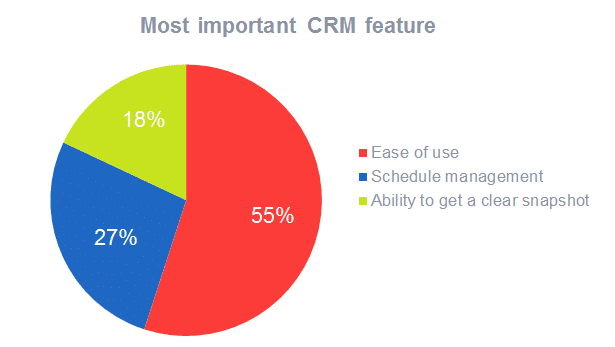
For example, Agile CRM is a nice solution, however, as soon as it starts asking you to modify MX records to be able to send emails to customers and contacts, this can definitely scare average business owners away. It also has a lot of options and panels, which means you might end up paying for features you don’t need, like an appointment booking system. Research by Inside CRM found that 55% of users said ease of use was their most important CRM feature. So sometimes simple is better!
These types of solutions also get very expensive fast, as you’re paying for hosting and paying for databases with more and more contacts. Some CRMs offer a per customer payment levels or email restrictions (first 10,000 free, but can only send 5000 emails, etc.).
What About a WordPress Self-Hosted Solution?
WordPress has evolved massively over the years, from a simple blogging platform to including REST API capabilities which take it towards being a strong performer and kit for building web-applications. This new functionality added to WordPress over the years has helped to make it flexible for developers to build CRMs which can run right from your WordPress website. At Host SEO, we offer high-performance WordPress hosting and going with a self-hosted CRM using WordPress as the content management system is becoming possible (and more popular). Here are a couple reasons why you might want to self-host your CRM:
- You control the database of contacts (leads, customers, etc.)
- You can create your own CRM team and give them access
- You can control their own user levels and permission
- If you decide to stop paying, you keep all the data and can keep using the CRM (for free)
- Even if you have extensions, and do not renew these, they still operate after they expire
- You have more control over your backups and retention policies
- Utilizing a provider with secure hosting can give you peace of mind
If we take a look at the WordPress repository, there are 21 pages of results for the term “WordPress CRM.” But when looking through them, only a few stand out as true, self-hosted and well-supported CRMs that actually utilize WordPress as the content management system. It’s one thing to build a CRM for WordPress that sites on top of it, it’s another to build a CRM for WordPress that actually integrates with it and takes advantage of the already powerful platform.
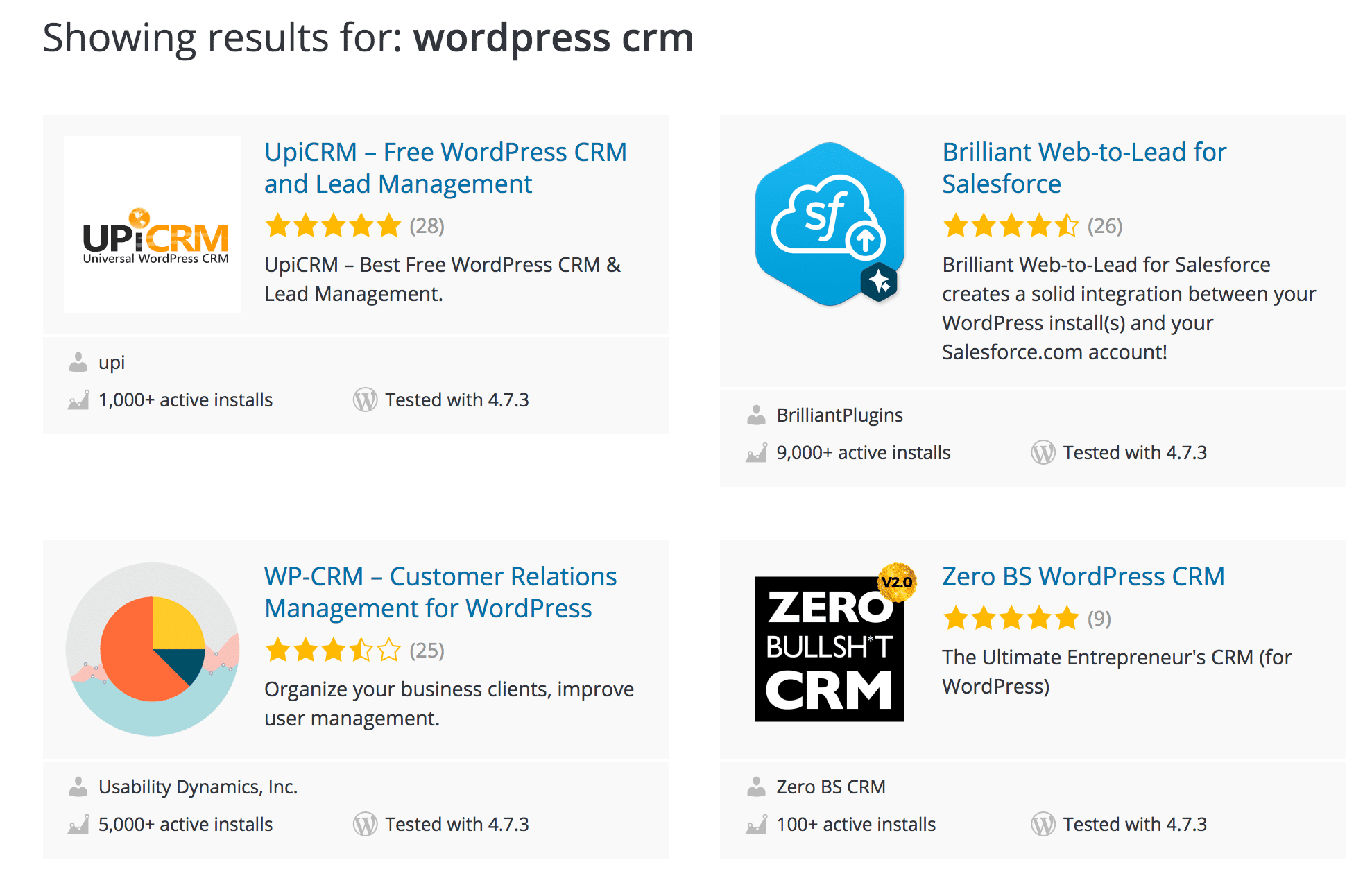
We covered 12 of the WordPress CRMs in this post and to recap on the top results for “WordPress CRM” the following four come up
- Zero BS CRM
- WP-CRM (and WP-INVOICE)
- UpiCRM
- Brilliant Web-to-Lead for Salesforce (not a WordPress CRM)
A lot of the other results are WordPress plugin integrations which simply add forms to your WordPress site. These forms then post the data to your CRM (such as Salesforce) and do not give you a CRM from your WordPress website, but rather give you tools to get leads from your site into an externally hosted CRM. When comparing the features of the CRMs that give you full CRM capability in your WordPress install, one stands out as heads above the rest. Zero BS CRM.
And don’t let the name fool you! This CRM plugin is packed full features. Zero BS CRM has recently done a feature comparison against WP-CRM and UPiCRM (you can see the full comparison here). They’ve also included WP-Invoice which is an add-on to WP-CRM. Each of these solutions come with optional extensions to take the CRM to the next level, with the exception of UPiCRM.