
How to Diagnose High Admin-Ajax Usage on Your WordPress Site
- Category : WordPress
- Posted on : Mar 02, 2019
- Views : 2,983
- By : Edgardo D.

A very common scenario when dealing with WordPress is diagnosing high admin-ajax.php usage. If you have been working with WordPress for a while, you have most likely encountered this when running speed tests or checking your server access logs. This is generally caused by 3rd party plugins or from frequent un-cachable admin dashboard requests, due to the Heartbeat API, such as autosaving drafts. It is important though that you diagnose high admin-ajax.php spikes when you see them, as they have been known to bring a site to a crawl. Check out the following recommendations below on some ways to tackle the admin-ajax.php issue in WordPress.
- What is the admin-ajax.php File?
- Plugins Can Cause admin-ajax.php to Spike
- CPU Issues with admin-ajax.php on Back-end
What is the admin-ajax.php File?
The admin-ajax.php file itself is not a bad thing when used correctly. It is part of core, and was added by the WordPress development team in version 3.6. The purpose of admin-ajax.php is to create a connection between the browser and the server using AJAX. This allows for extended functionality such as improving auto-saving, revision tracking, login timeouts, session management, and notifications about a post being locked when there are multiple editors. Which are all great features, especially for those working with multiple admins and authors.
The idea is to have a relatively simple API that sends XHR requests to the server every 15 seconds and triggers events (or callbacks) on receiving data. Other components would be able to “hitch a ride” or get notified about another user’s activities. This can be used to block simultaneous editing of widgets and menus or any other tasks that require regular updates from the server. — Make WordPress Core
And for those of you who perhaps aren’t as tech-savvy, your only exposure to admin-ajax.php might simply be that you are trying to figure out why it is slowing down your speed tests in tools such as Pingdom (as seen in the example below). Or you might be seeing tons of requests to it in your host’s access logs.
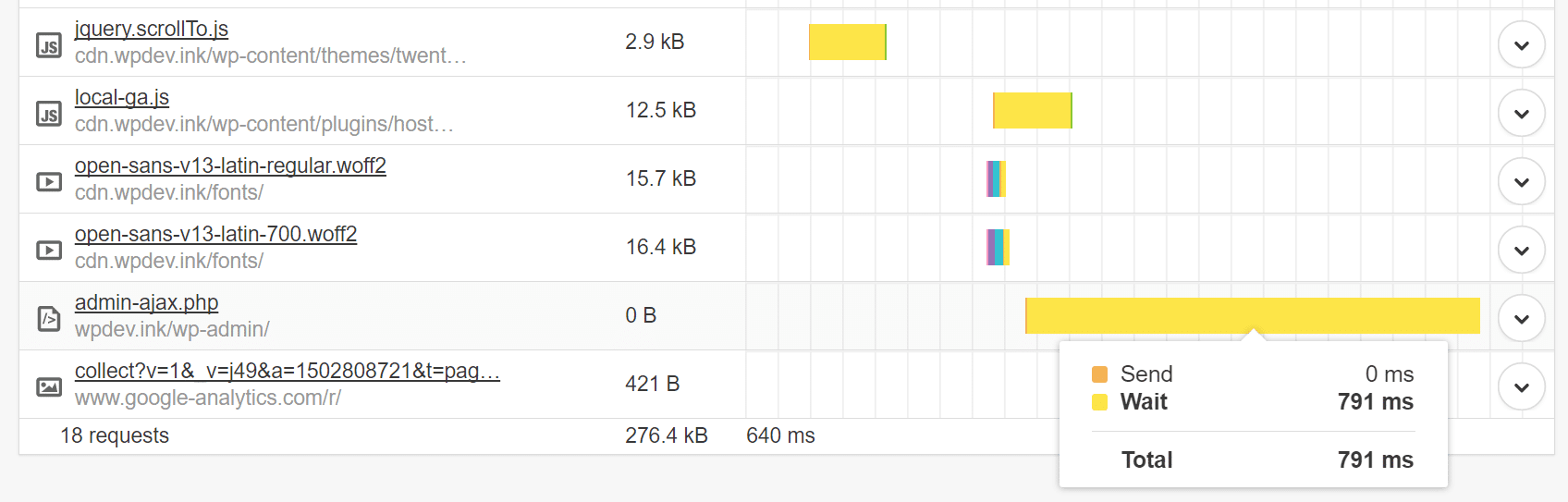
Seeing admin-ajax.php in speed tests and access logs are typically the result of two different scenarios happening, one front-end, and the other back-end, of which we will dive into below.
1. Plugins Can Cause admin-ajax.php to Spike
The first and most common issue that people see with admin-ajax.php is those generated from 3rd party plugins. This is typically seen on the front-end and show up in speed tests. Developers utilize this file and or AJAX to add functionality to their plugins. But just because you see a request to admin-ajax.php doesn’t necessarily mean it is slowing down your site. AJAX loads after the page loads and certain requests can be loaded asynchronously. However, this also doesn’t always mean the developer is doing it in the correct way or that it is coded effectively for performance. For developers, here are some tips on how to properly use AJAX in WordPress themes and plugins.
Below are a couple examples on how we quickly diagnosed an admin-ajax.php spike. We are using GTmetrix, due to the fact that it allows us to dig into the individual post and response data. Pingdom, unfortunately, doesn’t let you see request form data. You can also use Google Chrome Devtools or WebPageTest.
High admin-ajax.php Spike From Visual Composer Plugin
Here is a 3rd party WordPress site we found that was encountering some very large spikes with admin-ajax.php. As you can see, GTmetrix is reporting a spike of over 8 seconds! The rest of their waterfall looks ok, but this is something that definitely needs to be addressed by the owner of the site.
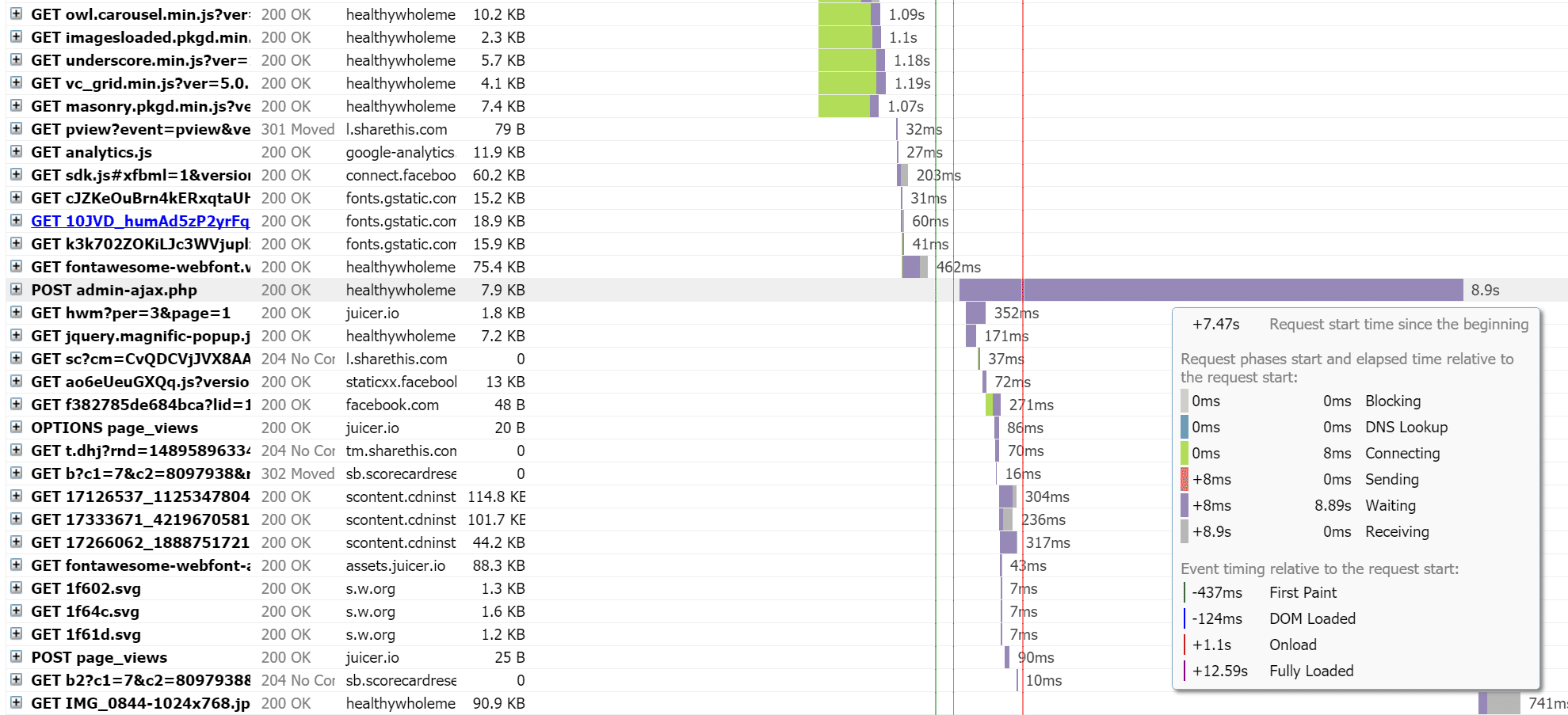
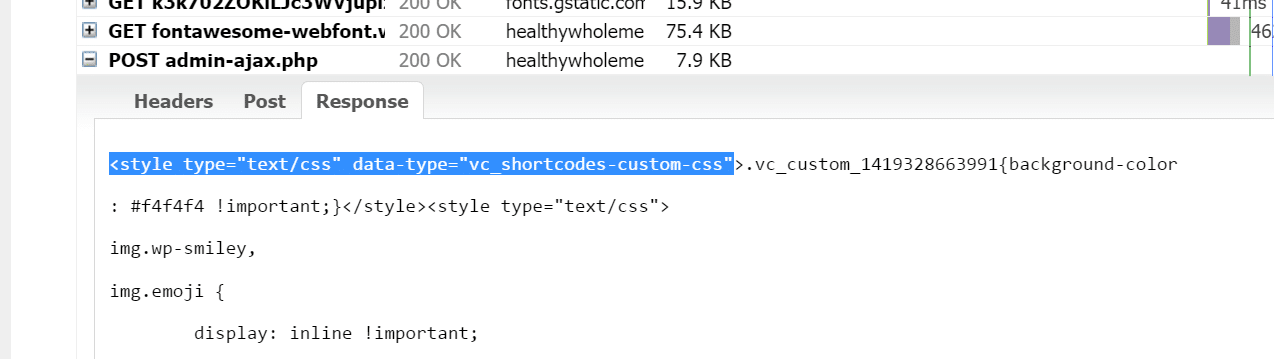
If you click into the POST admin-ajax.php request, you can see three different tabs: Headers, Post, and Response. When diagnosing these types of issues, you really are interested in the contents of the Post and Response tabs. For this site, we can instantly see clues in the Response tab. We can see that part of the request has to do with the “vc_shortcodes-custom-css” script.
A quick copy and paste into Google and we can instantly see that this is coming from the Visual Composer page builder plugin for WordPress. You would be surprised just how much Google indexes.
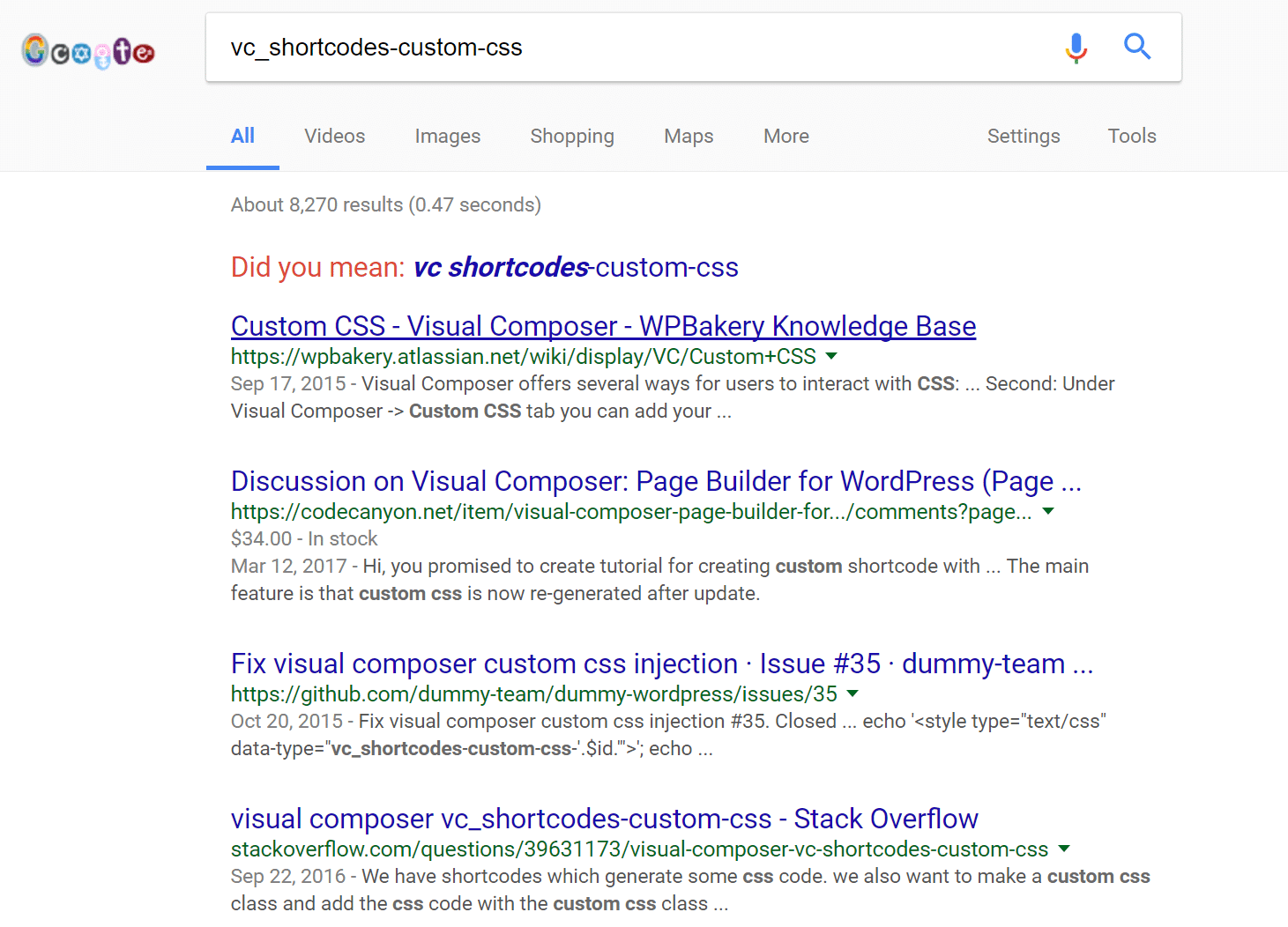
The next step for this person should be to ensure that their Visual Composer plugin is fully up to date. If it is, they should reach out to the developers of the plugin and report the issue with admin-ajax.php. In fact, this appears to be a common issue with this plugin, as seen in this post on Stack Overflow. The great thing about WordPress is that if a developer is unable to resolve your issue with the plugin, there are most likely alternative plugins out there for you try that do the same thing. For example, when it comes to page builders you could also try out Beaver Builder or Elementor.
High admin-ajax.php Spike From Notification Bar Plugin
Here is the second example on our developer site. Upon installing a certain 3rd party plugin, we instantly saw a huge spike to admin-ajax.php.
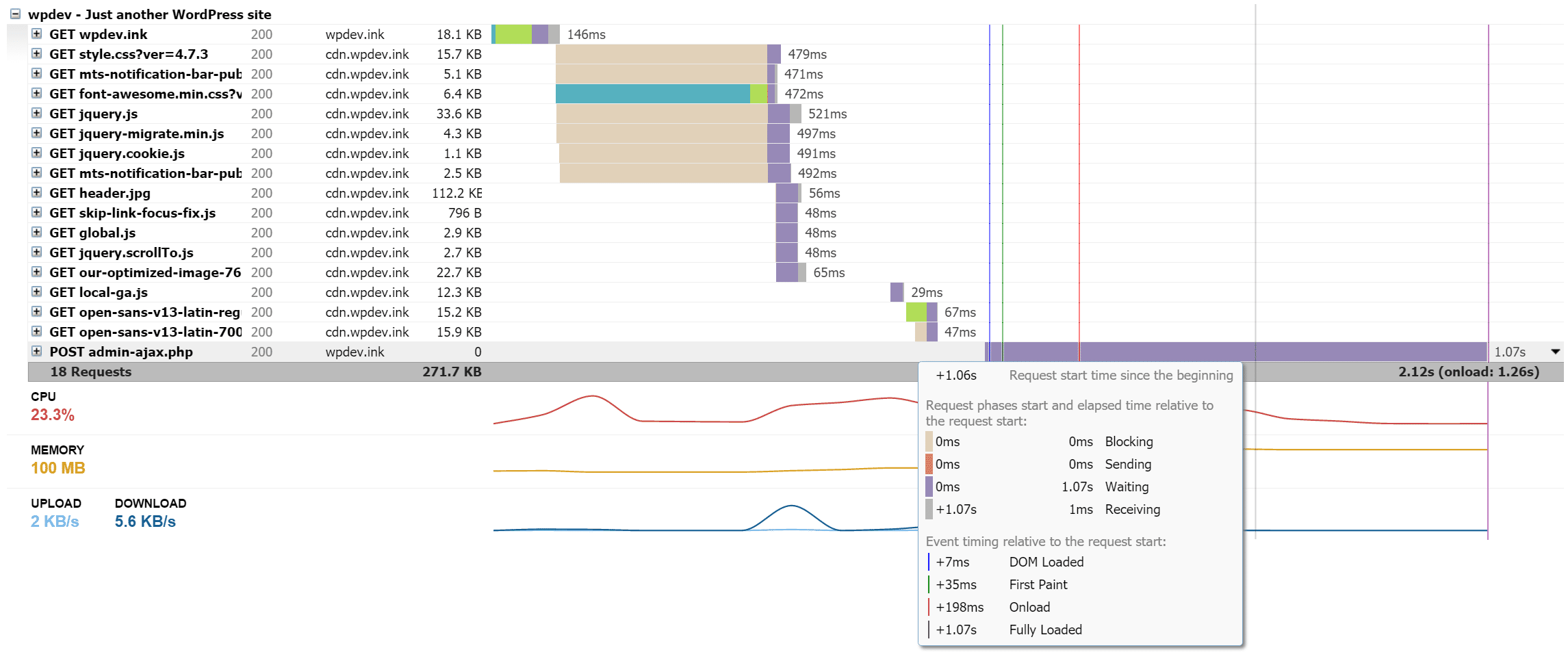
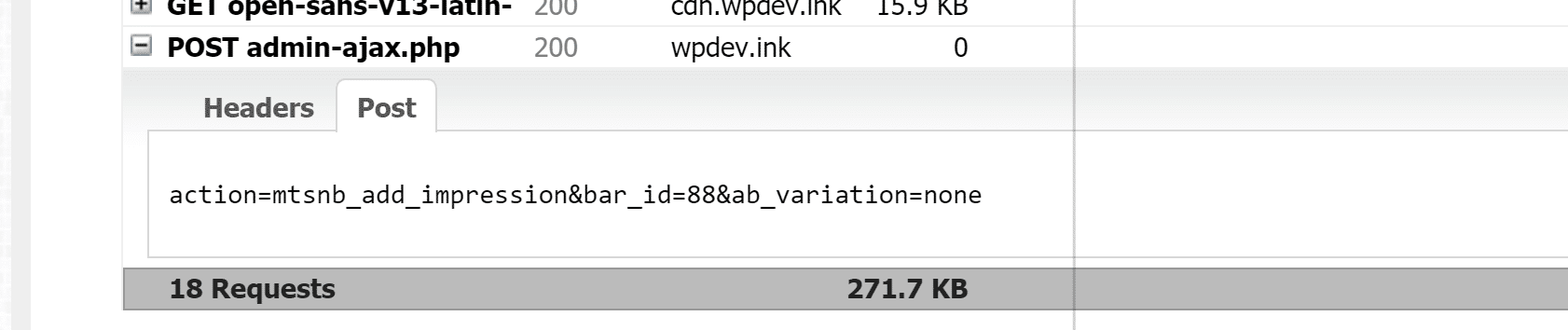
Again, if you click into the POST admin-ajax.php request, you investigate further. We can see that in the post data it has “action=mtsnb_add_impression&bar_id=88&ab_variation=none.”
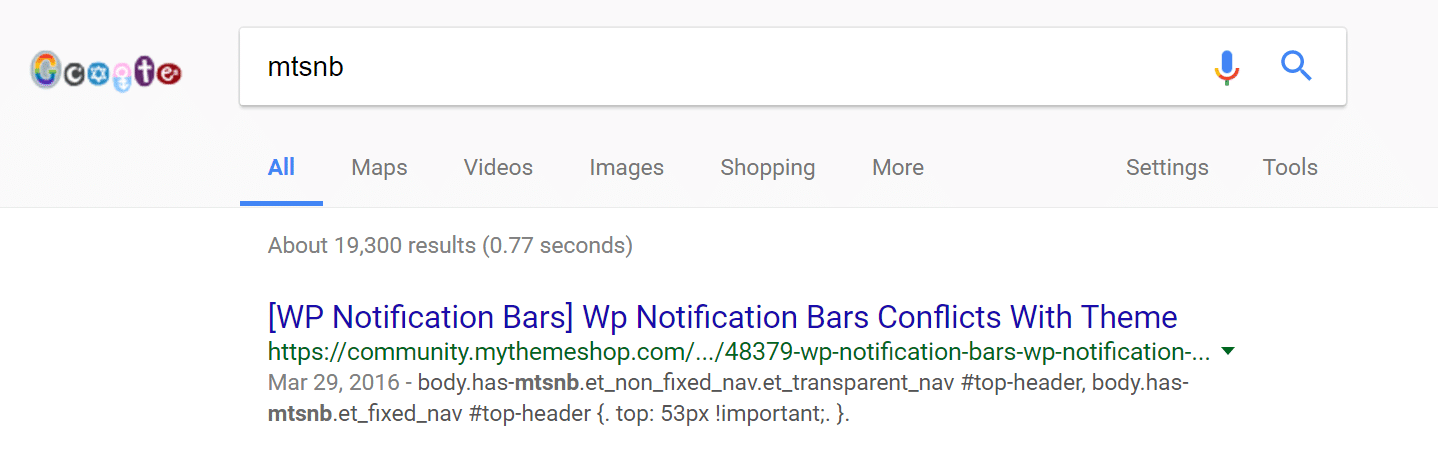
Typically the first part of a post action will also relate to a CSS class in a plugin. So again, we do a quick Google search of “mtsnb” and the first result that pops up is in fact, the Notification Bar plugin we have running on our development site.
If you are a developer, there are of course other ways to track down which plugin might be generating POST response, but we have found that a quick speed test and Google search can also be quite effective.
Surefire Way to Determine Origin of admin-ajax.php
Above are a few easy ways to quickly find the plugin on your WordPress site that might be causing the issue. In our experience, that works 99% of the time. But for the other times where the post data or actions might not be as clear, you can always do it the old school way. Simply disable all the plugins on your WordPress site. Run a speed test on your site, if admin-ajax.php is nowhere to be found, re-enable each plugin one by one while you run tests each time. Using a process of elimination is a sure fire way to find the origin.
This is also a perfect time when Host SEO’s staging environment comes in handy. Simply copy your WordPress site to staging and run your tests without affecting your live site. Once you determine the cause, you can make the changes to your live site.
2. CPU Issues with admin-ajax.php on Back-end
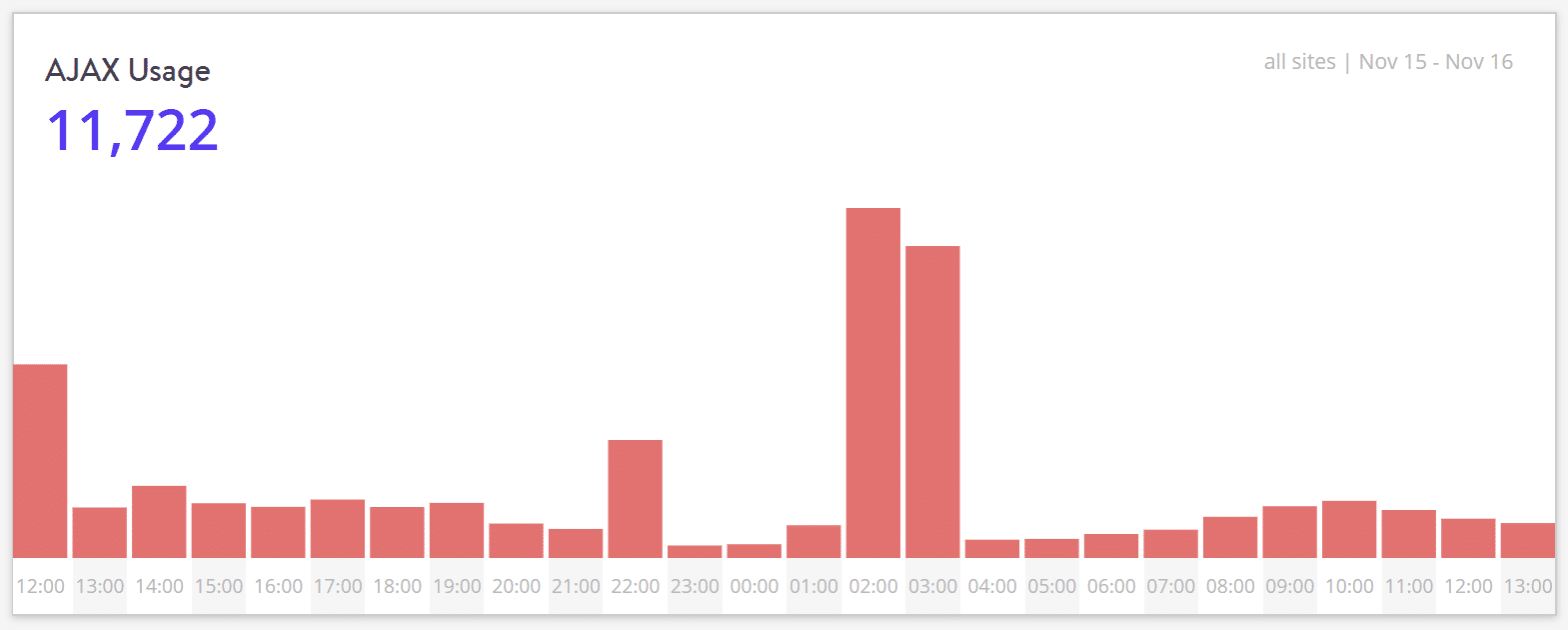
The second major issue is that the WordPress Heartbeat API uses admin-ajax.php to run AJAX calls from the web-browser, and it can cause high CPU usage. Each AJAX request also loads the full WordPress back-end while circumventing all forms of caching. Typically you won’t see this in speed tests. This is especially important to know for those who are using cheap shared hosts, as they don’t have much wiggle room when it comes to CPU usage. WP Tavern experienced this first hand and actually migrated away from HostGator due to multiple suspensions.
That is a lot of requests on the back-end for just one person. But what happens if you are dealing with a site where there are multiple editors? These requests can multiply quite rapidly. We actually experienced this in our recent case study with DARTDrones, in which we were helping them scale their WooCommerce site for Shark Tank. They received over 4,100 admin-ajax.php calls in a 24 hour period with only 2,000 unique visitors. That is not a great ratio of requests-to-visits. We were able to determine this from the wp-admin referrer URL, which was being generated due to their admins updating the site in preparation for the show.

There is a way though to help fix some of the issues with the polling on admin-ajax.php on the back-end when it comes to auto-saving, revisions, locking, etc. That is where the free Heartbeat Control plugin from Jeff Matson comes into play.

The Heartbeat control plugin currently has 80,000+ active installs with a 4.5 out of 5-star rating. You can download it from the WordPress repository or by searching for it within your WordPress dashboard under “Add New” plugins.
The plugin allows you to manage the frequency of the WordPress heartbeat API with just a few simple rules. We recommend disabling everywhere except for your post edit pages. So first add a rule that disables heartbeat on the “WordPress dashboard” and the “Frontend.”
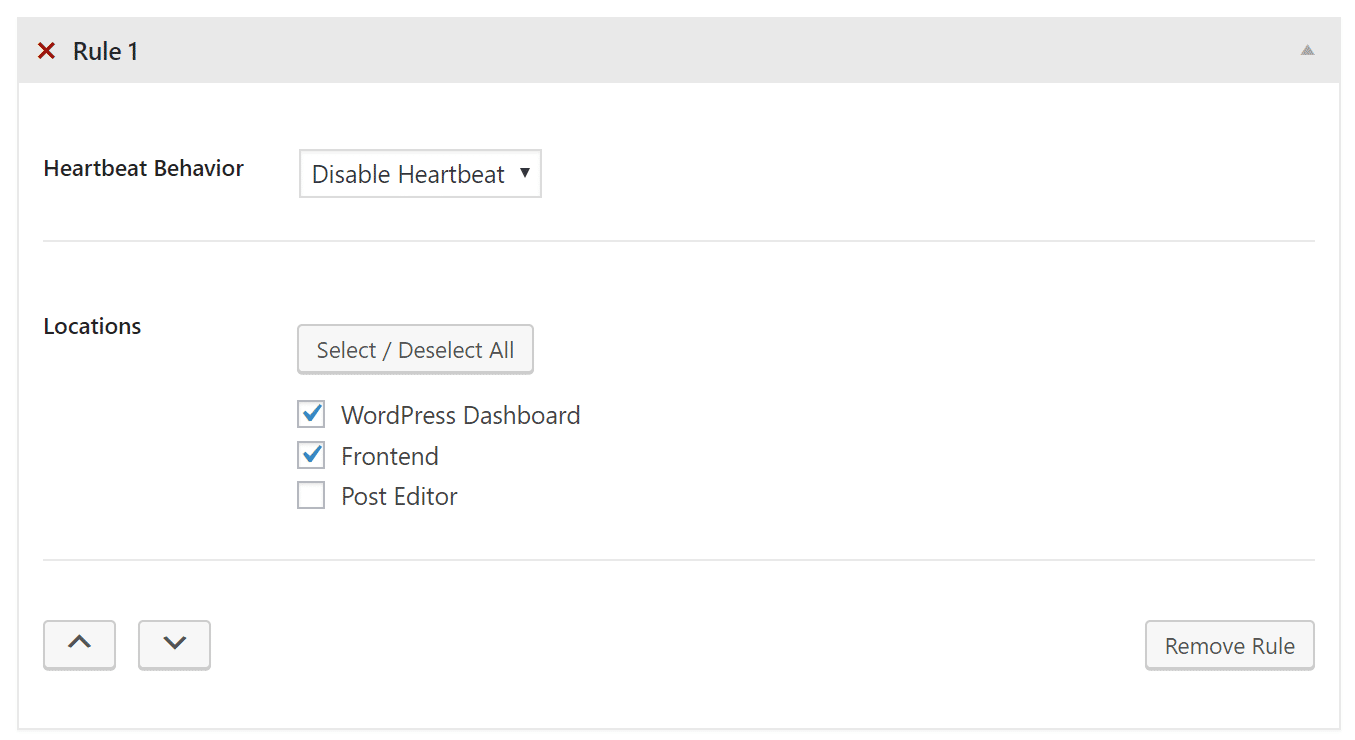
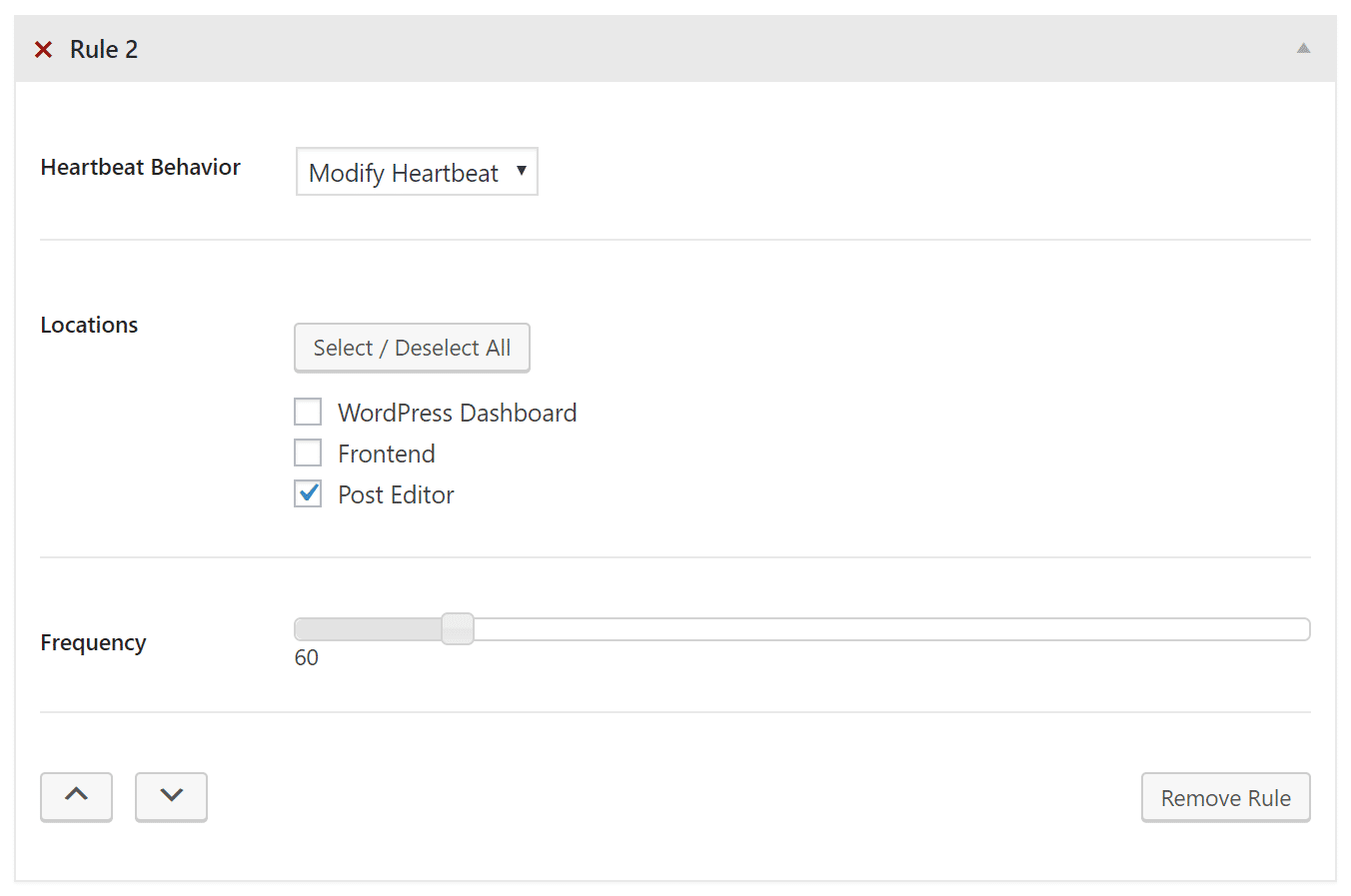
Second, you’ll want to modify the heartbeat behavior. So make sure the “Post Editor” is selected and change the frequency from the default 15 seconds to 60 seconds. This can help you drastically reduce the number of requests and save on server resources (reduce CPU load).
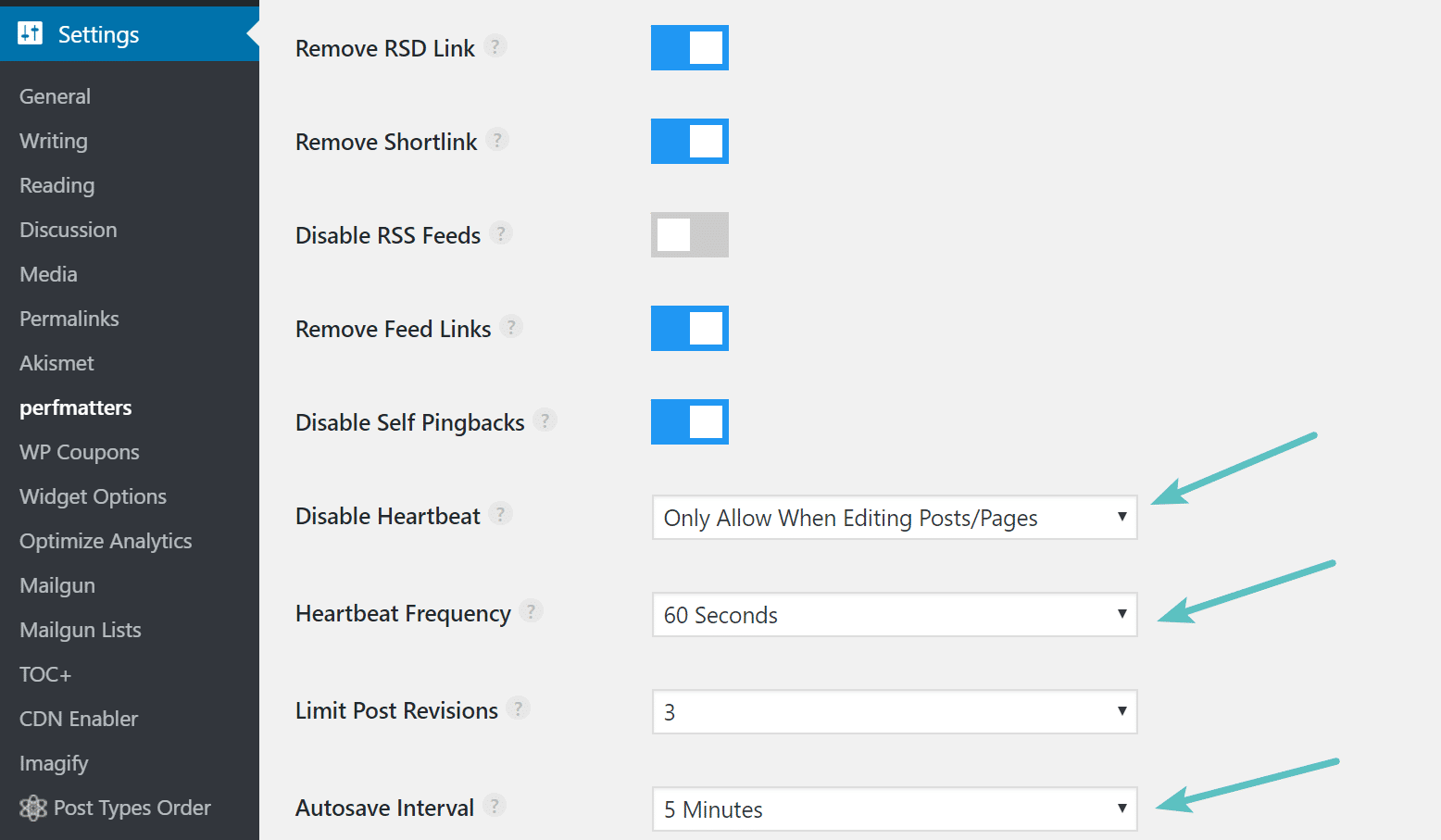
You could also use a premium plugin like perfmatters, which allows you to disable heartbeat, change the heartbeat frequency, and modify the autosave interval.
Summary
As you can see there are some quick and easy options to both diagnose and resolve admin-ajax.php issues. Typically they arise from 3rd party plugins that might be conflicting with one another or are perhaps badly coded. If you are experiencing CPU load on the back-end as a result of admin-ajax.php, you might also want to consider a managed WordPress host like Host SEO who is more experienced with dealing with these types of performance issues.
Categories
Subscribe Now
10,000 successful online businessmen like to have our content directly delivered to their inbox. Subscribe to our newsletter!Archive Calendar

| Sat | Sun | Mon | Tue | Wed | Thu | Fri |
|---|---|---|---|---|---|---|
| 1 | 2 | |||||
| 3 | 4 | 5 | 6 | 7 | 8 | 9 |
| 10 | 11 | 12 | 13 | 14 | 15 | 16 |
| 17 | 18 | 19 | 20 | 21 | 22 | 23 |
| 24 | 25 | 26 | 27 | 28 | 29 | 30 |
| 31 | ||||||
Recent Articles
-

Posted on : Jul 25
-

Posted on : Jul 07
-

Posted on : Apr 07
-

Posted on : Mar 19
Optimized my.cnf configuration for MySQL 8 (on cPanel/WHM servers)
Tags
- layer 7
- tweak
- kill
- process
- sql
- Knowledge
- vpn
- seo vpn
- wireguard
- webmail
- ddos mitigation
- attack
- ddos
- DMARC
- server load
- Development
- nginx
- php-fpm
- cheap vpn
- Hosting Security
- xampp
- Plesk
- cpulimit
- VPS Hosting
- smtp
- smtp relay
- exim
- Comparison
- cpu
- WHM
- mariadb
- encryption
- sysstat
- optimize
- Link Building
- apache
- centos
- Small Business
- VPS
- Error
- SSD Hosting
- Networking
- optimization
- DNS
- mysql
- ubuntu
- Linux






