
Ad Blockers – Are They Affecting Your Income? (What to Do)
- Category : Marketing
- Posted on : Oct 26, 2018
- Views : 3,676
- By : Ingavar J.

At least 40% of internet users in the US have an active ad blocker installed, according to some reports. When you consider that Chrome has come prepackaged with ad-blocking capabilities since February of 2018, along with the multitude of other ad blocking extensions available to install, the picture for online advertising looks bleak. Or does it? ?
For business owners who rely on advertising to monetize their websites, however, that’s not an immediate concern. What you really want to know is this: Are ad third-party ad blockers, including Chrome’s built-in ad blocker causing your income to take a hit? Or has it already? Short answer: it depends. Long answer: on a lot of different factors.
Ad blocking and advertising are a nuanced coexistence, and there’s no cut-and-dry answer. Today, we’ll dive into the relationship between ad blocking, advertisers, Google, and your website. Then, we’ll cover actionable alternatives for monetizing your site.
How Third-Party Ad Blockers Work
Let’s backtrack a bit and talk about how ad blockers work and the state of them before Chrome’s new addition.
It’s estimated that as much as 41% of consumers between 18 and 29 years old use ad-blocking technology. Kids between the ages of 13 and 17 trail behind at 29%. Then, the further you move up the age spectrum, the lower the usage becomes.
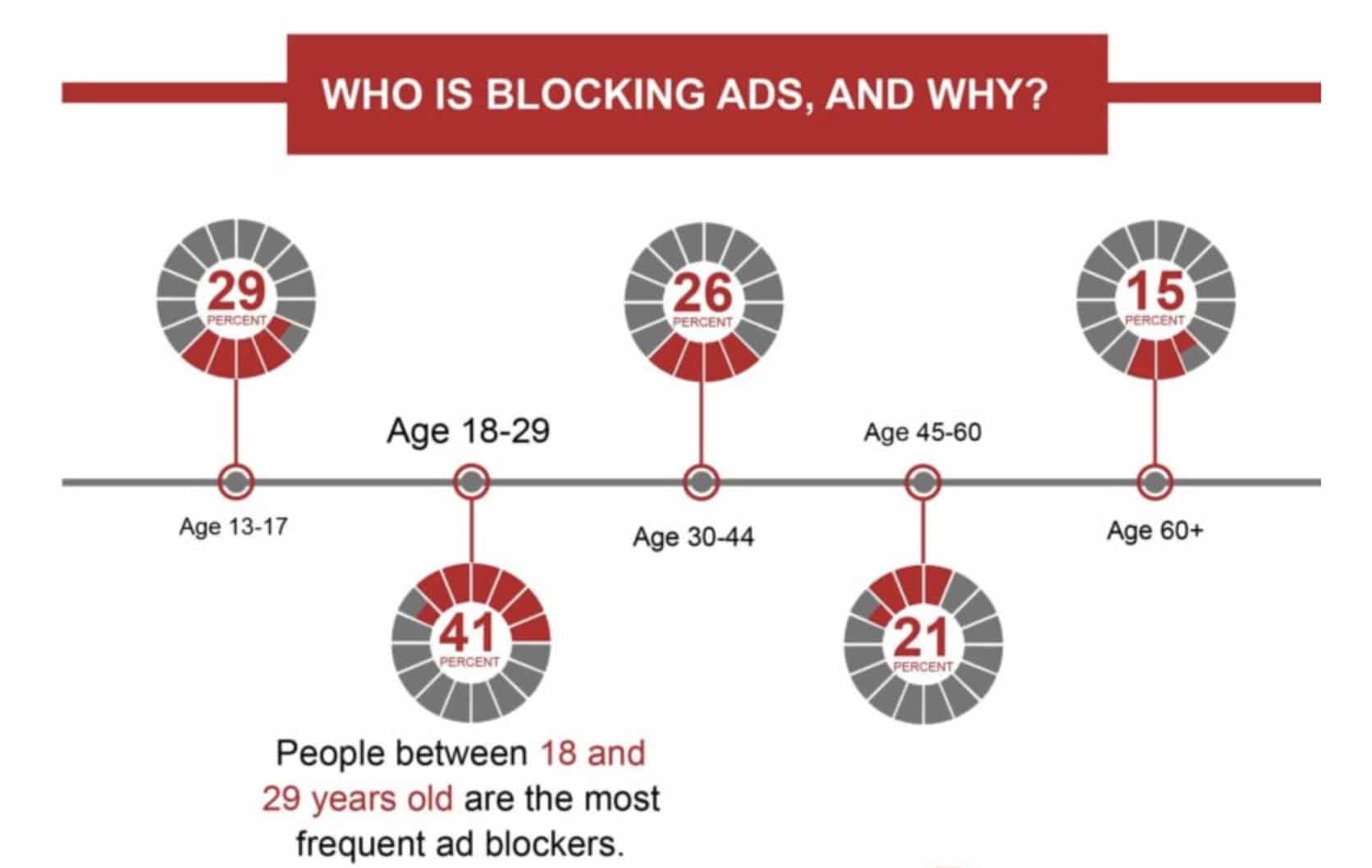
It follows that industries with more tech-savvy users will experience higher incidences of ad-blocking technology.
There are two key reasons that users say they start using ad-blocking technology:
- Their computers were infected with a virus (not distinguished from malware and spyware).
- They were made aware of ad blockers.
So while publishers may not love ad blockers, users very clearly do. But just what are ad blockers doing to earn their acclaim? Ad blockers work like gatekeepers for users and prevent them from downloading unwanted elements. It interrupts the conversation between server and user before ads can be displayed.
You can see this point nicely illustrated below.
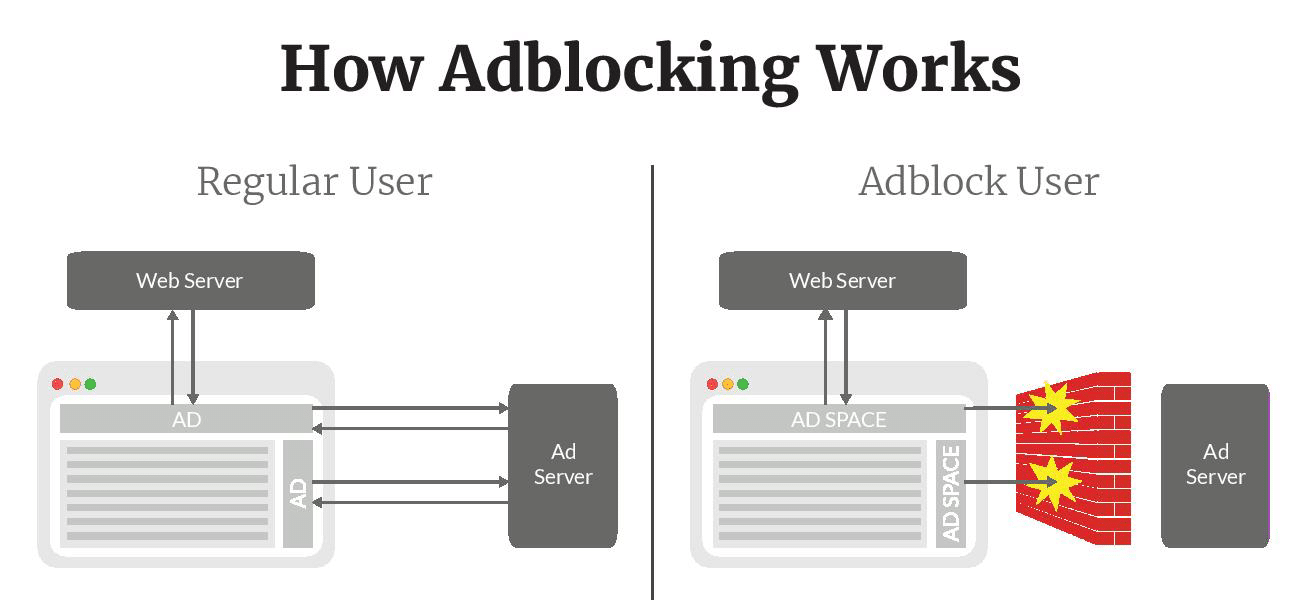
They don’t just interrupt the conversation between ads and users, however. Some also stop tracking codes from sending information about the user’s activities back to the website. For marketers, this can be a serious analytics killer.
A lot of these new ad blockers and privacy features block Google Analytics by default. ? Which means you if you’re using Google Analytics to track traffic, conversions, and even send data back to AdWords, your entire data set could be seriously skewed.
- The uBlock Origin ad blocker Chrome extension blocks Google Analytics by default (prevents the
gtag.jsandanalytics.jsscripts from loading.). This extension has 10+ million users. - The Adblock + Adblock plus Chrome extensions both block Google Analytics if the Easylist option is enabled.
- The Tracking Protection feature in Mozilla Firefox automatically blocks Google Analytics.
- Browsers like Ghost block Google Analytics by default.
- Hundreds of other extensions and tools like Disconnect also block Google Analytics.
- GDPR plays a role in this now as well.But for users, it’s a major privacy concern. And it’s not an unnecessary concern. Just consider the case of Stylish, a now-banned browser extension that let users customize their web experiences and cut down on clutter. It was well-loved by its fans until one discovered a serious breach of privacy.
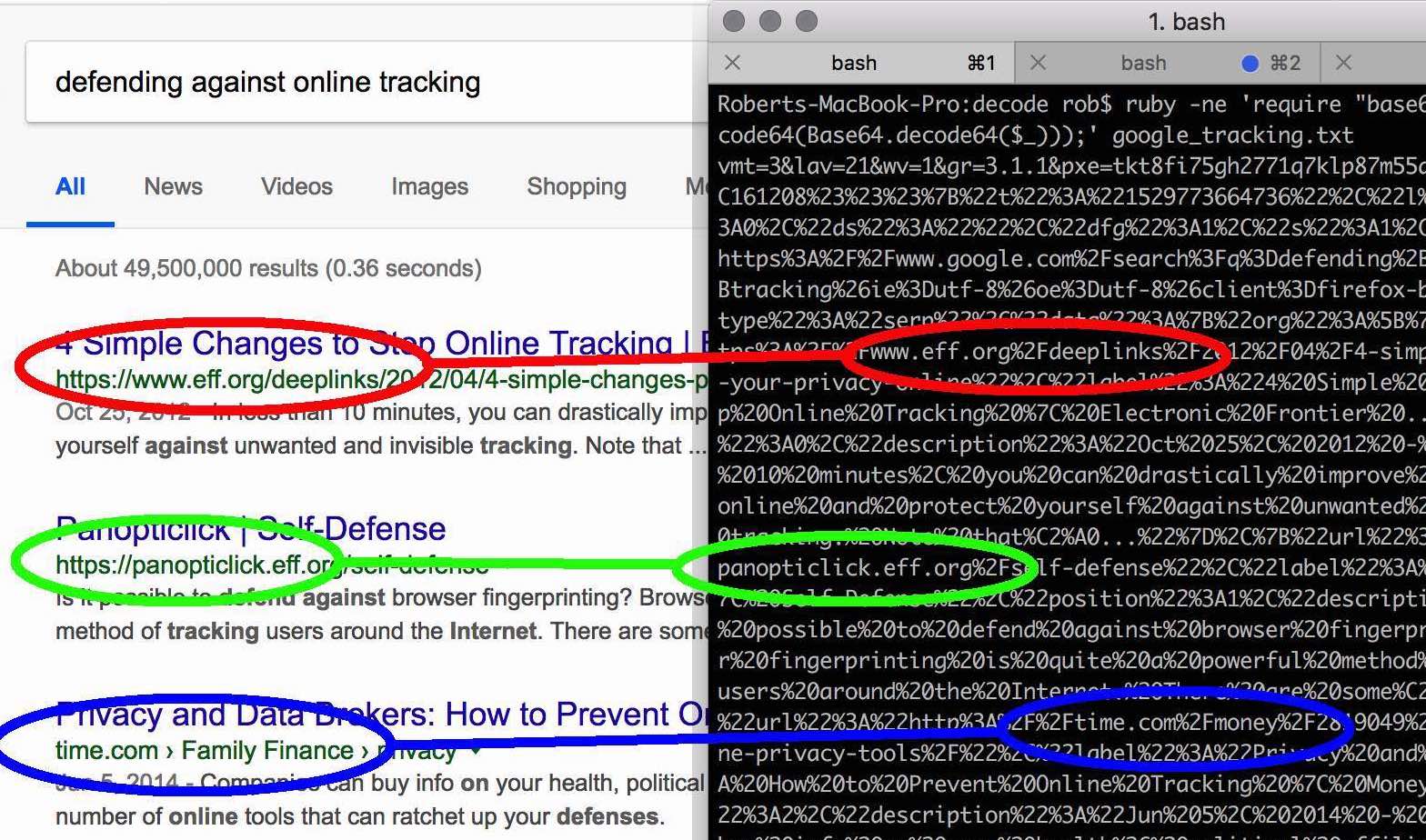
It was sending back every URL visited, and it had been storing the web history of every user since January of 2017. While this story takes it to the extreme and is technically a browser extension, it illustrates the point well: trackers can be a real problem, and ad blockers are an equally real way for regular users to deal with it.
Still, it puts website owners who rely on advertising for income in a tight spot. There are a few solutions to contending with third-party ad blockers, but they’re not always easy or worth the effort.
You can always gate your content, similar to how Business Insider does it here. On the one hand, this may help you capture revenue by getting users to sign up for special memberships (more on that later).

On the other, you may lose that lead entirely if they decide to move on to greener, more ad-block-friendly pastures.
Alternatively, you can take an even more aggressive approach and circumvent the technology altogether by “blocking the adblocker,” but that’s even more of a gamble.
You could just end up investing funds in forcing ads in front of prospects who’ve already indicated that they don’t want to see them. At best, you’ll lose money. At worst, you’ll frustrate your users. And keep in mind that this approach is only valid for users who aren’t already on Chrome, the world’s most popular browser.
So, your mileage may vary on that approach. Plus, you can always just ask. The fastest way through a locked door is often knocking, after all.
Here’s an example from Nexus Mods.
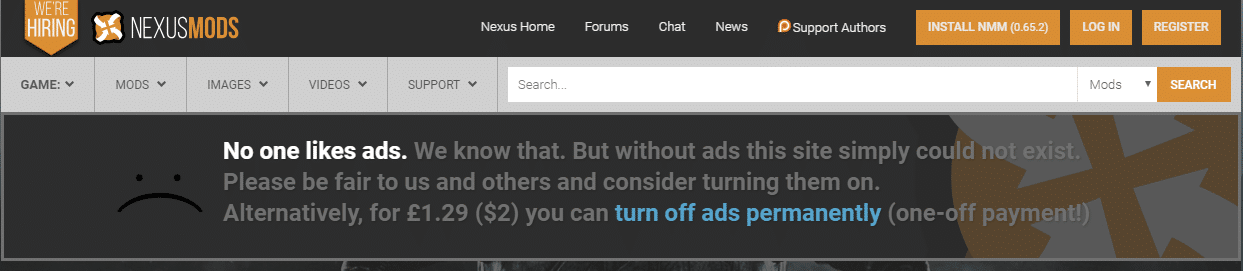
This request unobtrusively fills the space where the advertisement would be. It maintains the user’s experience and gives them something to think about. Here’s another example from Credit One Bank, a financial services/credit provider.
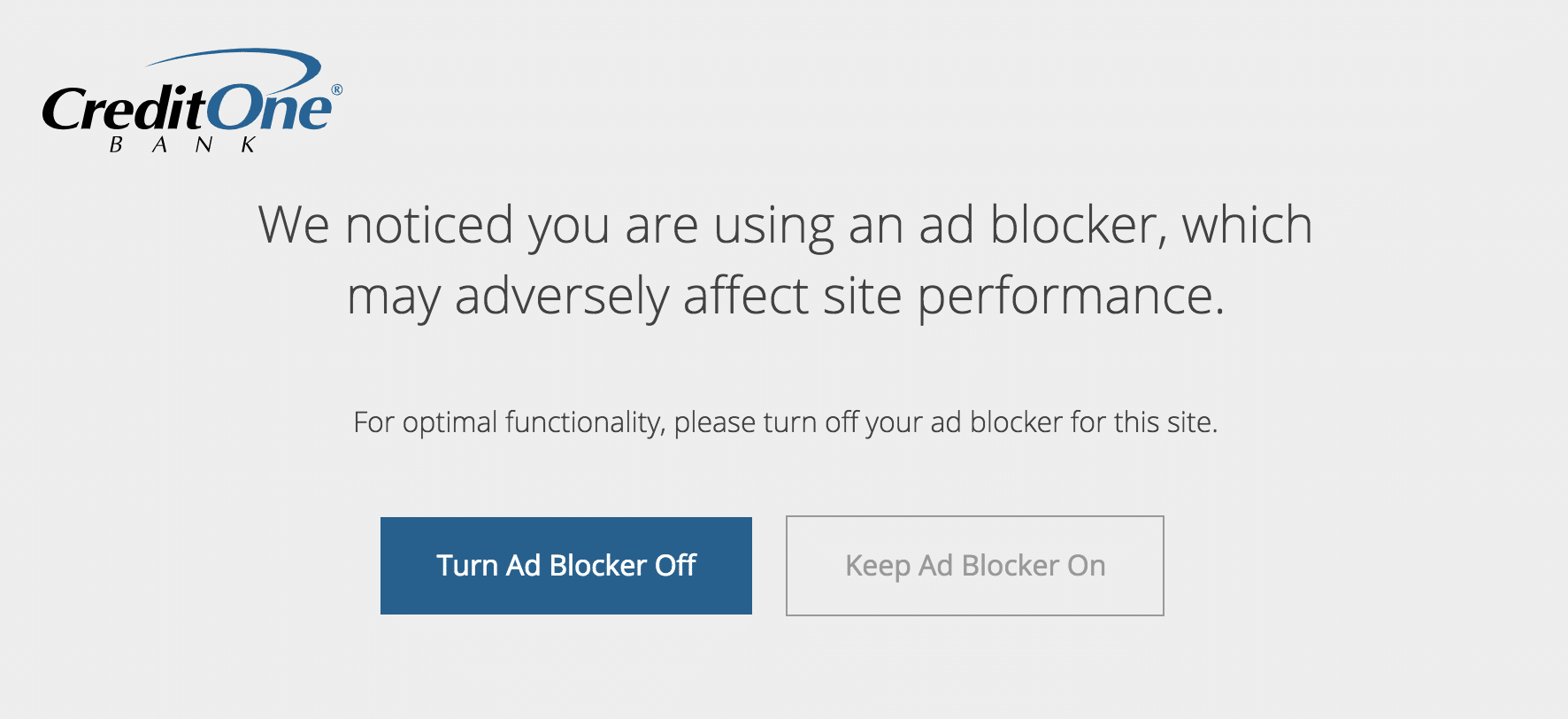
In both cases, users are given a request (but not a compulsion) to whitelist the provider. If they’re interested in browsing the website or using the service, they can still get to know the website with the security blanket of an ad blocker.
By contrast, users who visit Business Insider have to decide then and there between a purchase, removing their ad blocker, or leaving.
If they’re not already sufficiently motivated to pay or turn off their ad blocker, they won’t have the opportunity to find that motivation on their own.
Now that you know how third-party ad blockers work and your potential solutions, let’s talk about how Chrome differs — and how it doesn’t.
How Google Chrome’s Ad Blocker Works
We’ve mentioned already that Chrome is the most popular browser. But just how popular is it? According to StatCounter, as of August 2018, Chrome claims 59.69% of the browser market share. That’s a lot! ?
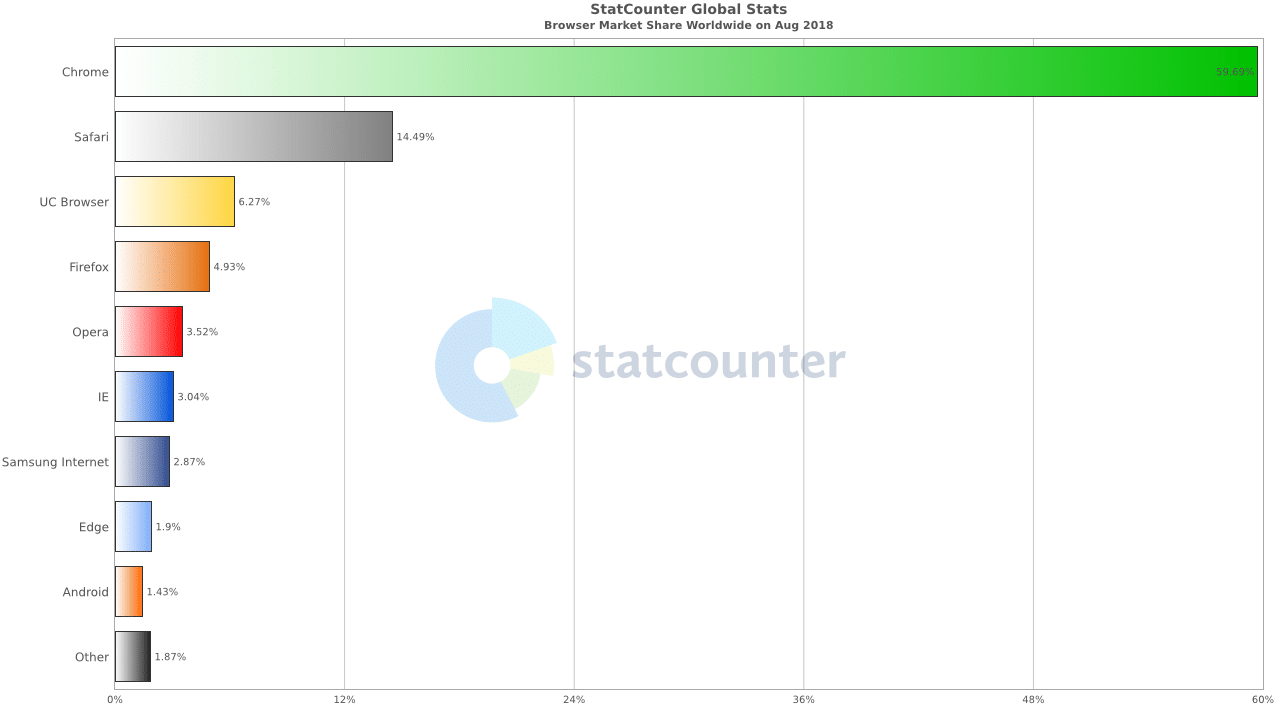
So no matter how you cut it, the ad blocker is going to hit anyone with online advertising. Unless it doesn’t.
Let me explain. Chrome’s new ad blocking feature functions the same way as third-party ad blockers by interrupting the dialogue between the server and end user. How it assesses “unwanted elements,” however, is based on the usability of a websiteand how compliant it is with the Better Ads Standard.
This standard was developed based on research with over 25,000 users across both the US and Europe to identify the types of ads that compel users to adopt ad blockers. In other words, the most cringe-worthy ads that are detrimental to the user’s experience.
The results are pretty interesting. Here are the four types of ads that make desktop users crave an ad blocker.
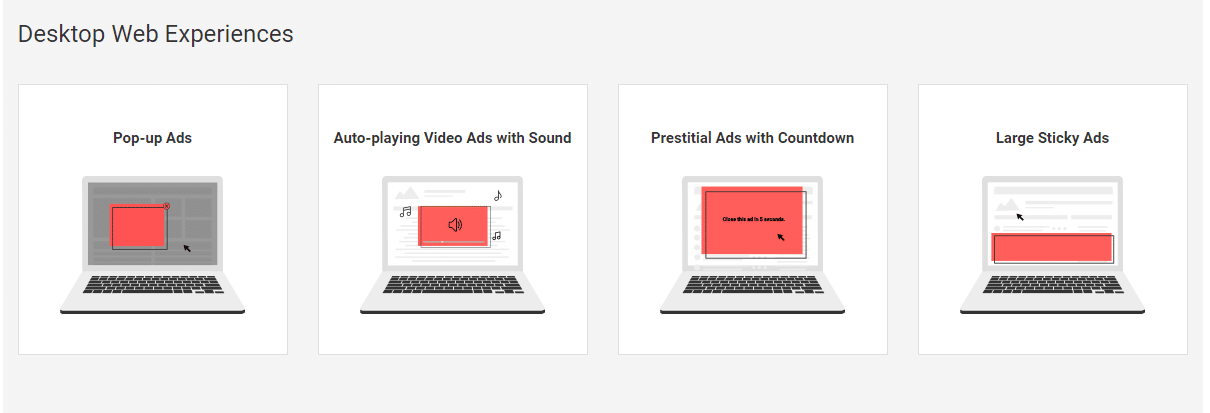
Note that ads specifically refer to advertisements and not modals or opt-ins that may take the same format. Mobile users identified twice as many ad types that repel them.
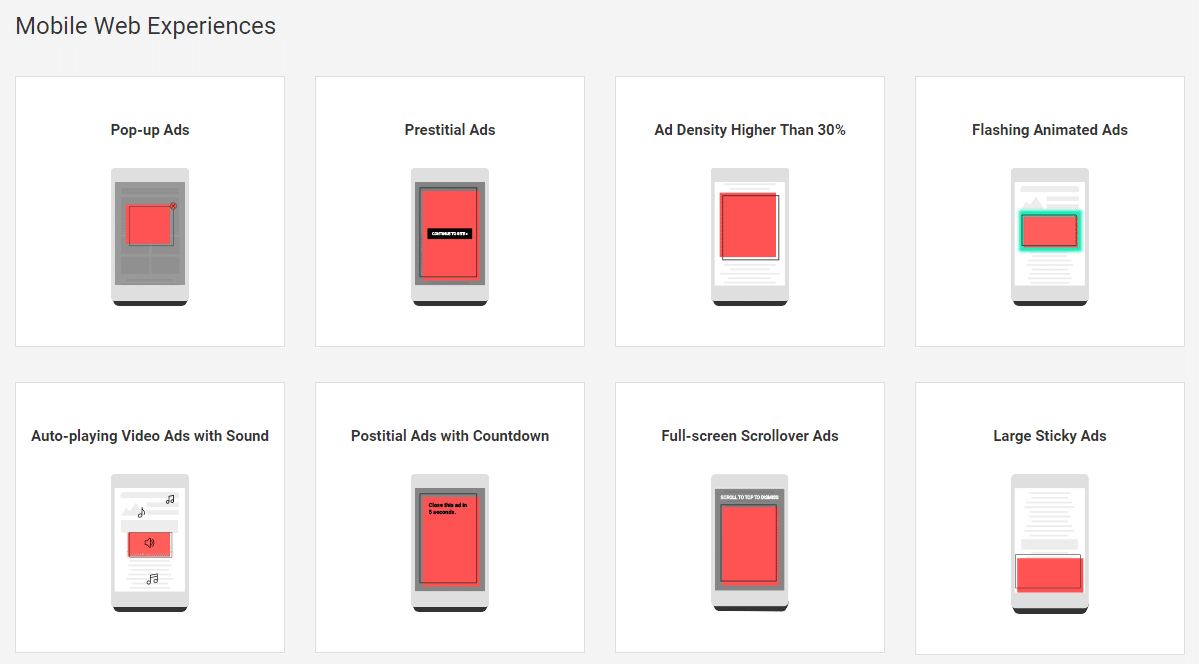
If your current ads don’t fall into any of these categories, you’re golden. But if they do, and if your site is flagged as violating the Better Ads Standard for more than thirty days, you can expect Chrome to block all advertisements on your website.
John Mueller, a webmaster trends analyst at Google, explains during one of Google’s Webmaster “office-hours” hangouts:
If we recognize a site that violates the standard the way that it’s defined, then Chrome would choose to not show any ads. So that’s specifically with regards to Chrome.
Those aren’t typos, by the way. Unlike third-party ad blockers, Chrome doesn’t work ad-by-ad. If you’re found violating the Better Ads Standard and don’t submit for re-review within the 30-day window, all ads, compliant or not, will be blocked.
Here’s an example of Chrome in ad-blocking action.
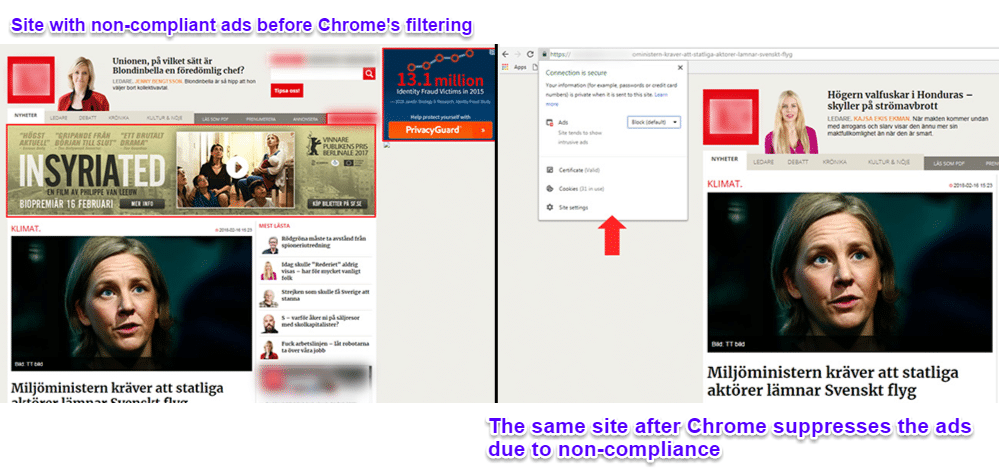
It’s worth noting that violations are considered on a device basis. For example, if the mobile version of your website is in violation but the desktop version isn’t, then the desktop version will display normally. And vice versa.
In other words, if your advertisements are compliant with the Better Ads Standard, then this change won’t impact you at all. You can check your site in Google Search Console. If you see “Status: Not reviewed,” then your site isn’t in violation.
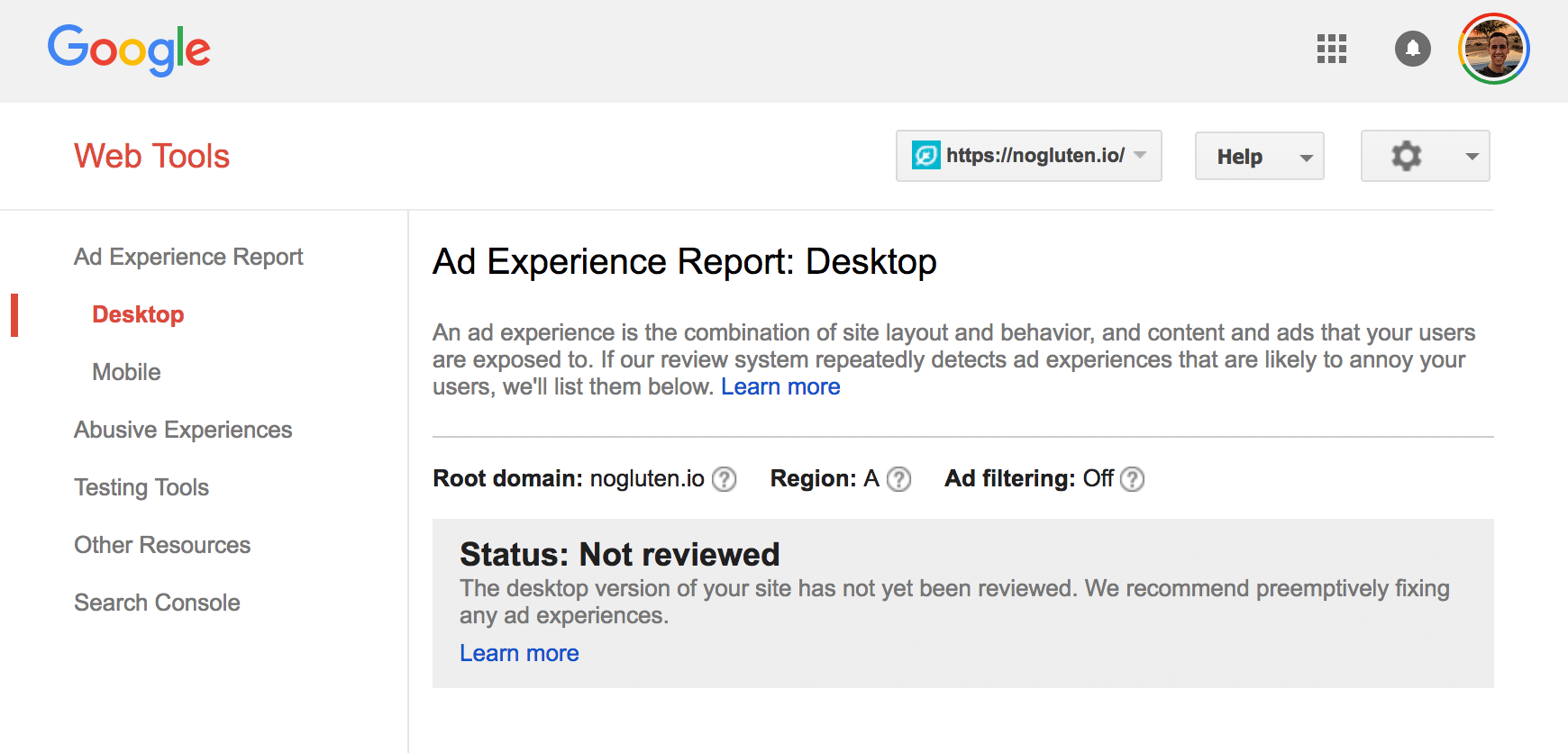
If your site is in violation then check the Site design issues tab or Creative issues tab. These will have additional information to inform you why, and what you can do to fix it.
However, you’ll want to check out the end of this article for our five alternative methods for monetizing your site.
How to Disable Chrome Ad Blocker on a Site
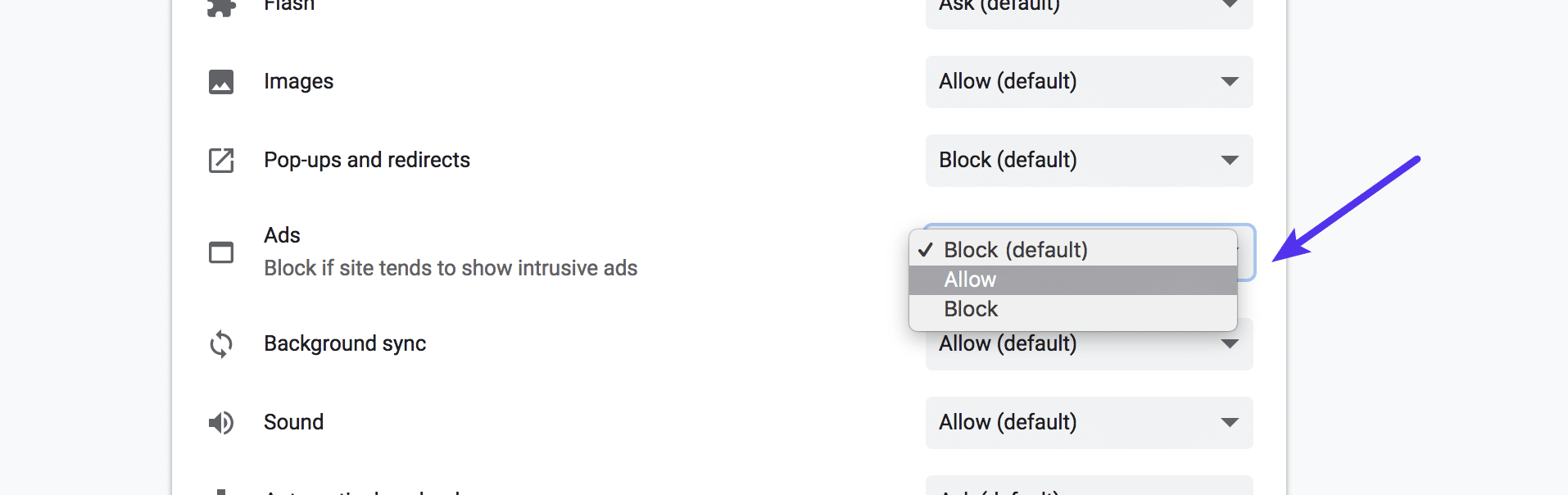
Chrome’s Ad Blocker is built right into the browser now and by default, it’s enabled for every site. If you want to disable the Chrome Ad Blocker on a site (allow ads), simply click on the little icon next to the site’s name in the address bar and click on “Site settings.”
You can then choose whether or not to allow intrusive ads on the page or not. Again, these settings are on an individual site basis.
What The Future of Ad Blocking Holds
Swing by the Chrome store if you get a chance and check out their ad-block section. It’s (still) booming.
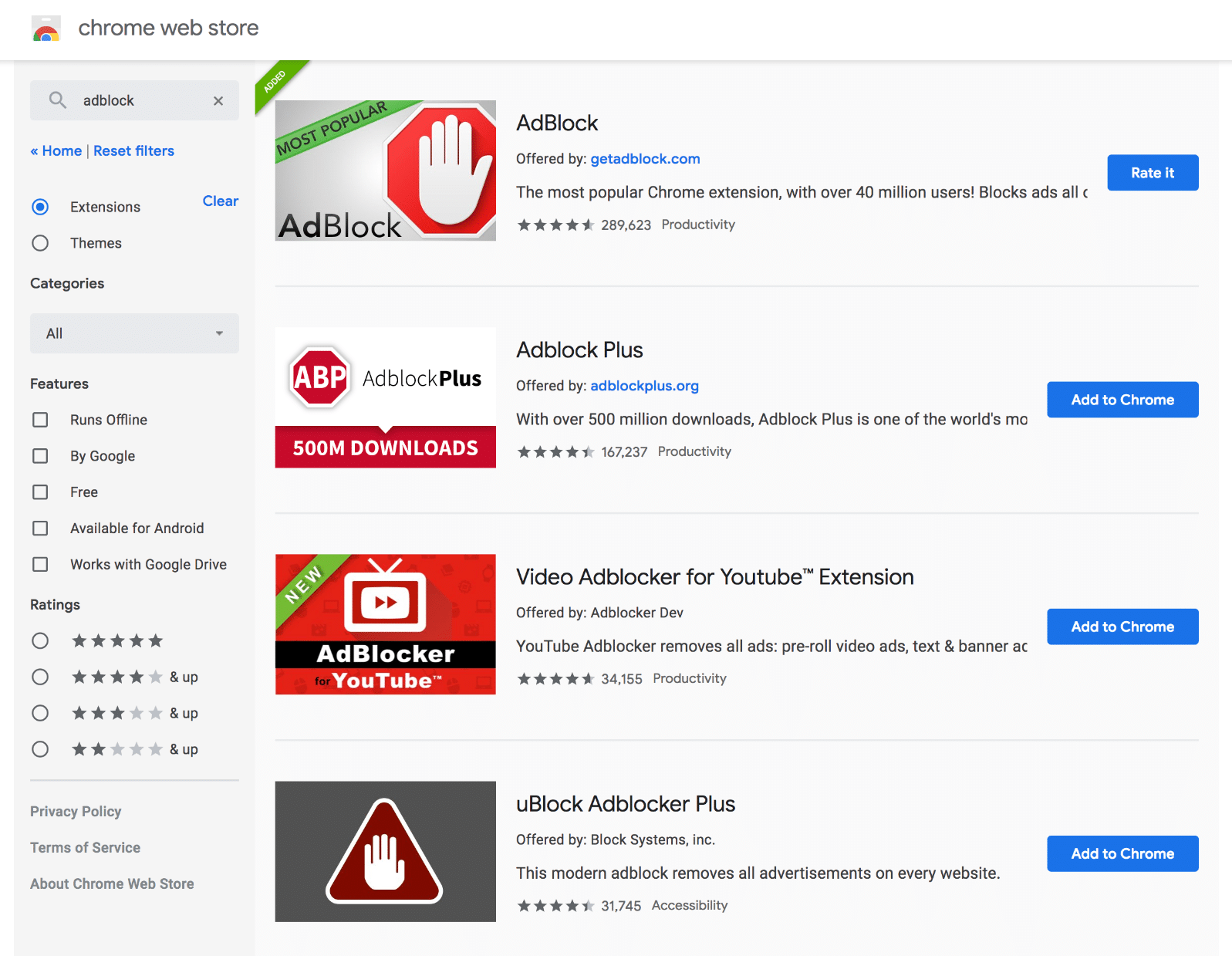
Over time, however, the momentum is expected to decline. And that’s great news.
Although these ad blockers will continue to work, experts anticipate that fewer and fewer users will seek them out as more become aware of and benefit from Chrome’s new ad block feature.
Which means that, over time, Chrome may actually lead to more Google-friendly (and user-friendly) ads landing in front of users than if the third-party market was left unchecked.
And that, in turn, can only benefit advertisers in the long run. That, however, is the long game. And it’s not without some ethically-hairy problems regarding the position of one company dominating advertisements and browser use.
In the meantime, it’s a complex web (no pun intended) for business owners to navigate. A lot of the same things that can hurt your search engine ranking on Google’s “mobile first” index overlap with the Better Ads Standard.
One business watched their organic rankings steadily decline thanks to advertisement-heavy layouts, compliance notwithstanding.
No one wants to see that kind of performance drop. Although SEO and advertising aren’t synonymous, they can both be detriments to your bottom line, and untangling them is a headache best saved for the marketers.
Plus, there are better ways.
6 Alternative Ways to Monetize Your Site
Instead of trying to wrangle compliance and make your old advertisement strategy work in this brave new ad blocking world, why not turn to alternative (and often lucrative) solutions for monetizing your site?
Let’s talk about six of them now.
1. Fallback to Alternative Ad Format or Show Warning
You can use a solution like Detect AdBlock to figure how just how much of your site is being impacted. You can then fall back to alternative ad formats if an ad blocker is detected or show them a warning.
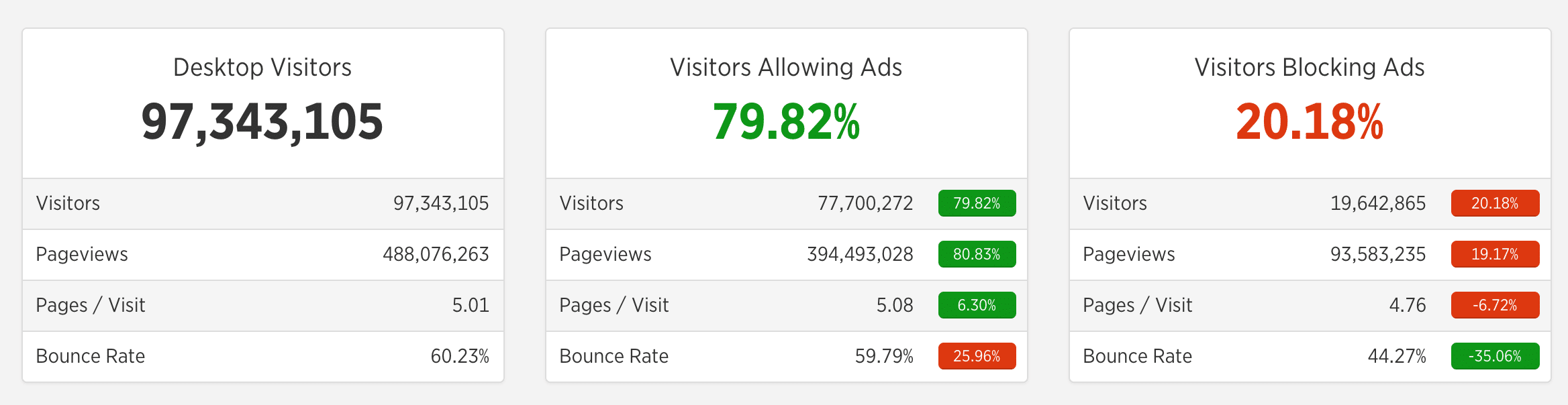
For example, perhaps you run Google Adsense. If an ad blocker is detected you could have it fallback to an affiliate ad instead. Typically affiliate ads are just image banners and shouldn’t be impacted by ad blockers. The Ad Inserter WordPress plugin is one that has a function to serve different ads for users using ad blockers.
Or you could go down the route of showing a warning to visitors running an ad blocker, with something like the Ad Insanity add-on. The idea here is that you encourage visitors to disable ad-blocking (whitelist) on your website to help support the costs of running it.
Make sure to check out our post on some other WordPress advertising plugins you could use.
2. Sell an Ebook or Digital Download
How does $3000 in two weeks sound? How about with a tiny email list you built over time? If you’re Doug Beney, it sounds like your first ebook launch.

Very nice, right? Doug’s story proves two things:
- First, you don’t need to be a big publishing house to make a digital download lucrative.
- And second, that G Suite really can do anything.
He made his ebook in Google Slides, after all. Impressive!
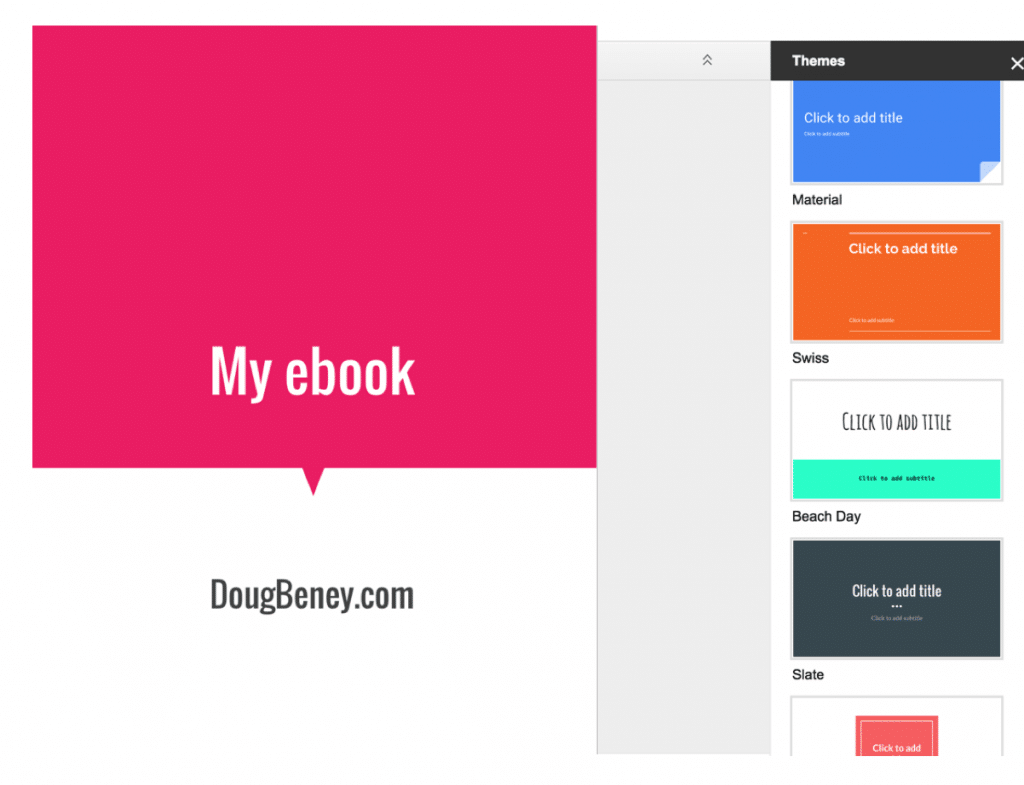
But in all seriousness, the ebook industry is thriving. Traditional publishing houses felt a 10% drop in 2017 ebook sales, but that’s good news for the website owner. Why? Because that loss came at the hands of indie publishers.
So get in while the getting is good. If you have a story or knowledge to share, find your market, test out your ideas like Doug did, and load up Google Slides.
3. Create an Online Course
The e-learning market is another untapped hotspot. It’s expected to balloon to $325 billion by the year 2025. And there are a ton of LMS plugins that can integratedirectly with your WordPress site.
Setting up an online course is easy. And if the booming market growth isn’t enough to convince you of its merits, consider the story of Nick Stephenson. Nick pulled in $130,208 in his first week of sales.
With an email list of around 3,500. What could you do with a list that size or bigger to launch your online course? Install an LMS WordPress plugin today to find out.
For our third monetization alternative, let’s talk memberships.
4. Offer Premium Memberships
Memberships aren’t an overnight profit-turner, but their slower burn is worth the wait. Why? Because memberships are a scalable and, most importantly, recurring source of revenue.
What is a membership site? It largely depends on who you ask. But generally, it’s any site that charges a regular fee (monthly or annually) and provides members with exclusive content.
Usually, the content includes webinars, articles, podcasts, and a community forum. For instance, Copyblogger’s “My Copyblogger” fits this definition to a T.
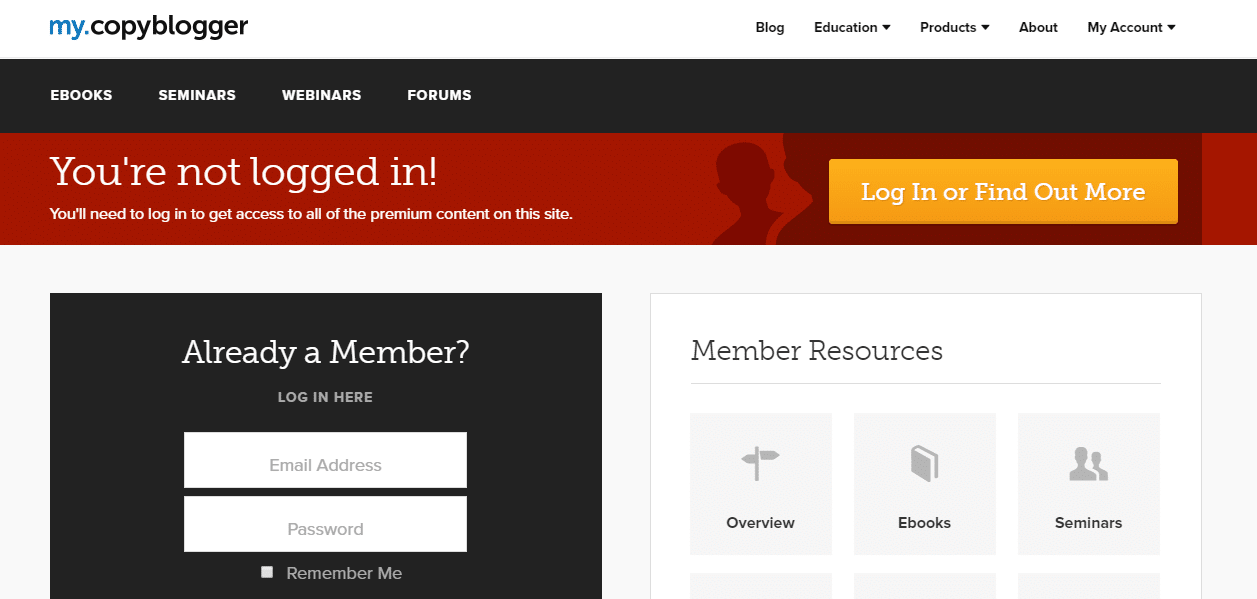
The site offers free content and lead magnets for visitors, but they save their best features for their paying subscribers.
How do you know if a membership model is right for your site? It depends on what you produce. If you’re an e-retailer, a premium membership package may not be an easy leap to make.
But if you’re already pumping out ridiculously awesome long-form articles, it may be a perfect fit.
Another factor to consider is the technical demand on your WordPress host. Due to the concurrent users and unique challenges for WordPress membership sites, it’s best to have a performance-backed plan if you want to pursue this avenue.
But have I mentioned how profitable membership sites can be? It’s pretty astounding. One creator was able to translate her social media following into an $8,000 membership launch. Another maintains a revenue stream of $5,000 a monthwith her course-based membership site.

So if you’re already in the content world and looking for a way to monetize your website, a membership program is definitely worth considering. You can check out our actionable tips and favorite plugins for running a WordPress membership site.
Our last tip of the day may be the best yet. What’s better than extra income? Extra income that fills up your editorial calendar.
5. Feature Sponsored Content and Reviews
If you follow any food blogs, you’ve probably seen a sponsored post in action. For instance, here’s one from Pinch of Yum on behalf of Land O’Lakes Butter.

Sponsored content is, as the name implies, content that’s paid for by a sponsor and posted on a website or platform by the owner or an influencer.
However, it’s important to distinguish it from advertising. Although it serves as a form of advertising for the sponsor, the content itself is created to be genuinely valuable to the users, such as the recipe above. Plus, when done well, sponsored content can absolutely dwarf advertising in terms of engagement and brand impressions.
Consider the case of Lula Kids. Creating three pieces of unique, engaging content that were distributed to the Parent Co. audience as sponsored content netted them over 125,000 impressions.
And it achieved a click-through rate that’s four times higher than the standard on Facebook. Which is why companies are willing to pay for it.
How much should you charge or expect to make? Nailing down an average price is difficult. Factors like domain authority, niche, follower size, and more will change it. But the writing brains behind Hobo with a Laptop have put together an excellent “rate card” for bloggers interested in accepting (or creating) sponsored content.
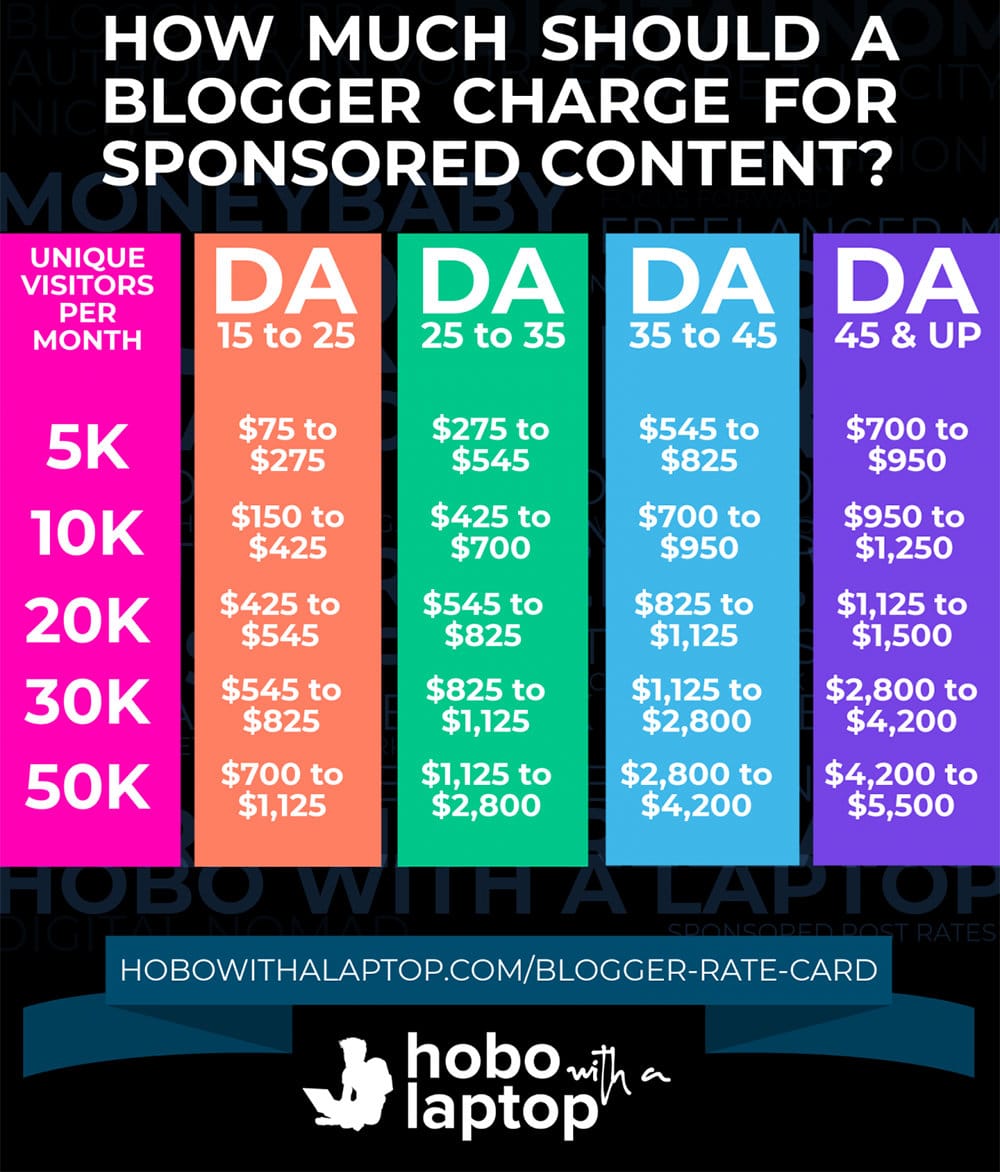
But there’s one last thing to keep in mind with this monetization strategy: if you accept sponsored content in exchange for revenue, services, or goods, then you absolutely must disclose your relationship in the content.
It can be as simple as the example you see from Pinch of Yum. Or, it could be a note about the product such as, “Thanks, Company X, for sending me a free sample.” But skipping this step creates legal problems, so if in doubt, always make it bold, clear, and at the top.
Here’s the wrap-up: if you have an active blog, you can increase revenue by accepting or creating sponsored content. Just make sure that you’re disclosing it and charging a rate that’s fair to both the sponsor and yourself.
6. Diversify Income Streams with Affiliate Marketing
And last but not least, you have affiliate marketing! This is a type of marketing where you receive a commission based on selling someone else’s service or product. Typically this involves a visitor clicking a special link on your website which results in a cookie being placed in the visitor’s browser for a pre-defined time period (typically 30 to 60 days). If the visitor ends up purchasing the service or product during that time period, the website owner who was promoting it gets a commission.
This can be an excellent alternative to ad revenue. You can utilize a multitude of different affiliate programs, therefore never putting all your eggs in one basket. ?Or even combine affiliate marketing with your existing ad revenue.
Sometimes affiliate marketing gets a bad stereotype, as some marketers tend to bend the truth just to make the sale. But many make a full-time living promoting only high-quality products they use and love. This could be anything, a travel blog, a food blog, or even a site where you just chat about WordPress products you use!
We know this works very well because we, in fact, have an affiliate program at Host SEO. You can earn up to $500 for every referral + 10% monthly recurring lifetime commissions. Many are already making a lot of money each month.
Summary
To understand how Chrome’s new ad blocker will impact your income, you have to understand how it does and doesn’t differ from third-party ad blockers. Third-party ad blockers, for instance, work by interrupting the communication between a user’s computer and the server responsible for the ad. Some of them also block tracking codes such as Google Analytics.
Chrome’s ad blocker is both more and less discriminating. Unlike third-party ad blockers, Chrome works on a site-by-site basis. If it flags your site for violating the Better Ads Standard and you don’t fix it within a 30-day window, it will suppress all ads on your website. Even the compliant ads.
But this change is actually a positive one for the advertising industry. In the long run, it’s expected to lead to a decline in third-party ad blockers and help advertisers get more compliant ads in front of users.
Here’s the bottom line: if your current ads are compliant, you shouldn’t expect any change. If they’re not, you’re going to have to change tactics. Fast. Better yet, why not change your monetization strategy altogether?
Ebooks (or digital downloads), online courses, membership sites, sponsored content, and affiliate marketing are all easy and lucrative alternatives for monetizing your site. And, best of all, you won’t have to wait for the other advertising shoe to drop.
However, when it comes third-party ad blockers and new browser privacy tracking features, these are having a huge impact on website owners. Both from an income perspective and from a marketer’s perspective as Google Analytics for a lot of users might simply be blocked altogether.
Have ad blockers affected your income or data? We’d love to hear your thoughts below.
Categories
Subscribe Now
10,000 successful online businessmen like to have our content directly delivered to their inbox. Subscribe to our newsletter!Archive Calendar

| Sat | Sun | Mon | Tue | Wed | Thu | Fri |
|---|---|---|---|---|---|---|
| 1 | 2 | |||||
| 3 | 4 | 5 | 6 | 7 | 8 | 9 |
| 10 | 11 | 12 | 13 | 14 | 15 | 16 |
| 17 | 18 | 19 | 20 | 21 | 22 | 23 |
| 24 | 25 | 26 | 27 | 28 | 29 | 30 |
| 31 | ||||||
Recent Articles
-

Posted on : Jul 25
-

Posted on : Jul 07
-

Posted on : Apr 07
-

Posted on : Mar 19
Optimized my.cnf configuration for MySQL 8 (on cPanel/WHM servers)
Tags
- layer 7
- tweak
- kill
- process
- sql
- Knowledge
- vpn
- seo vpn
- wireguard
- webmail
- ddos mitigation
- attack
- ddos
- DMARC
- server load
- Development
- nginx
- php-fpm
- cheap vpn
- Hosting Security
- xampp
- Plesk
- cpulimit
- VPS Hosting
- smtp
- smtp relay
- exim
- Comparison
- cpu
- WHM
- mariadb
- encryption
- sysstat
- optimize
- Link Building
- apache
- centos
- Small Business
- VPS
- Error
- SSD Hosting
- Networking
- optimization
- DNS
- mysql
- ubuntu
- Linux






