
How to Optimize the Critical Rendering Path in WordPress
- Category : Development
- Posted on : Sep 24, 2018
- Views : 3,284
- By : Naftali P.
The Critical Rendering Path is the sequence of tasks the browser performs to first render a page on the screen, i.e. to download, process and convert HTML, CSS, and JavaScript code into actual pixels, and paint them on the screen.
The Critical Rendering Path Optimization is the process of minimizing the time spent by the browser to perform each step of the sequence prioritizing the display of content related to the current user action.
Much of this process pertains to the portion of the page that is visible without scrolling down the browser window. That section is also known as Above the Fold. For a better usability, the ATF should be rendered as soon as possible, and this can be done reducing the number of network round trips at a minimum. The resources required to render the ATF are considered critical, and optimizing the Above the Fold means minimizing the impact of critical resources on the time to first render of the page.
In this post, we will walk through the Critical Rendering Path optimization sequence.
- First, I will provide a general overview of the tasks the browser performs to render a page’s content.
- Following, I will dissect the most relevant actions we can carry out to optimize the Critical Rendering Path.
- Finally, I will list some useful (and popular) WordPress optimization plugins.
The Critical Rendering Path Sequence
Here is the sequence of steps performed by the browser to render a page:
- First, the browser downloads and parses the HTML mark-up and builds the DOM
- Then it downloads and processes the CSS mark-up and constructs the CSS Object Model
- It combines DOM and CSSOM nodes required to render the page in the Render Tree, which is a tree structure of all visible nodes
- It calculates dimensions and position of every object in the page
- Finally it paints pixels on the screen
The DOM
As well explained in Google’s Critical Rendering Path Optimization guide, the browser builds the Document Object Model in a four step sequence:
- First, the browser reads the row bytes and translates them to individual characters
- Then it converts the strings of characters enclosed within angle brackets into tokens
- These tokens are converted into node objects
- Node objects are linked in a tree-like data structure that contains HTML content, properties, and all the relationships between nodes. This structure is the Document Object Model.
What is important to note here is that the browser constructs the DOM incrementally. This gives us the opportunity to speed up the rendering of the page by creating efficient DOM structures.

The CSSOM
When the parser encounters a link tag that refers to an external CSS stylesheet, it blocks the parsing and sends out a request for this resource. Once the CSS file has been received, the browser starts building a tree data structure of CSS nodes.
- The browser reads the row bytes of the .css file and translates them to individual characters
- It converts the strings of characters enclosed within curly brackets into tokens
- These tokens are converted into node objects
- Node objects are linked in a tree-like data structure that contains the CSS properties of each node, and the relationships between nodes. This structure is the CSS Object Model (CSSOM).
Unlike DOM construction, CSSOM construction is not incremental. The browser can’t use a portion of a stylesheet, because styles can be refined and redeclared in the same stylesheet. For this reason, the browser blocks the rendering process until it receives and parses all the CSS. This means that CSS is render blocking.
The Render Tree
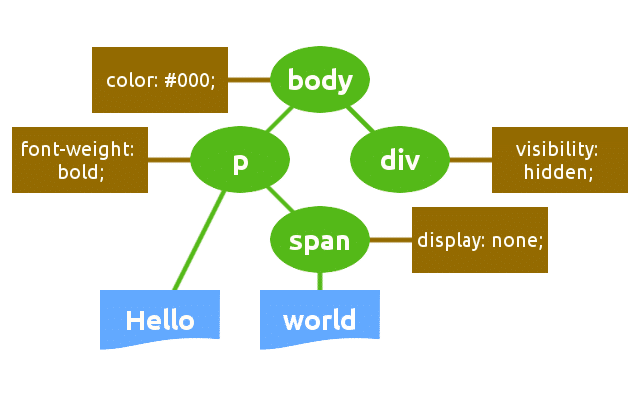
The browser combines DOM and CSSOM into the Render Tree, which is the final tree structure containing all nodes and properties that are being used to render the page to the screen.
The Render Tree only contains nodes that are required to render a page. As a consequence, invisible nodes are omitted.
The browser uses the Render Tree to calculate node dimensions and position, and ultimately as an input for the paint process.

Layout and Paint
In the layout stage, the browser calculates dimensions and position of each node of the Render Tree. In this stage, the browser traverses the Render Tree starting from its root and produces a box model. This information is finally used to convert each node of the Render Tree into actual pixels on the screen.
Critical Rendering Path Optimization
The time required to run the entire process can be variable. It depends on many factors like the document size, the number of requests, the applied styles, the user device, etc.
One of the most relevant Google recommendations is to prioritize visible content so to render the Above the Fold as quick as possible, and provides two main rules to follow:
- Structure the HTML to load the critical, above-the-fold content first
- Reduce the amount of data used by HTML, CSS and JS resources
As well explained in Google’s PageSpeed guide, if the amount of data required to render the ATF exceeds the initial congestion window (14.6kb), it will require additional network round trips between the server and browser. On mobile networks, with high latencies, this would significantly delay the page loading
The browser builds the DOM incrementally, and this gives us the opportunity to reduce the time required to render the ATF by structuring the HTML so to load the above-the-fold first and defer the rest of the page.
But optimization does not end with the construction of an effective DOM structure. Rather, it’s a process of improvement and measurement that involves the whole Critical Rendering Path sequence.
Let’s dive deep.
Minimize Resource Dimensions
We can reduce the amount of data the browser is going to download by minifying, compressing and caching HTML, CSS and JavaScript resources:
- Minification is the process of removing unnecessary characters like comments and white space from the source code. These characters are extremely useful in development, but they’re useless for the browser in order to render the page.
- Compression is the capability of web servers and clients to reduce the size of transmitted files in order to improve speed and bandwidth utilization
- Caching: every browser comes with an implementation of an HTTP cache. What we need to do is ensuring that each server response provides the correct HTTP headers to instruct the browser on when and how long it should cache the requested resources