Shopping cart abandonment does not happen often in brick and mortar shops. Because of the ease of online shopping (or perhaps because of the fact that no one is watching/judging you), this consideration is only really relevant when talking specifically about ecommerce shops.
To put this ecommerce problem into perspective, three out of four shopping carts are abandoned, and the abandoned cart rate rose 2% over the last year.
Cart abandonment represents a major gap in potential conversions. For instance, it’s been found that a 65% cart abandonment rate leaves a 97.9% gap in conversions, which costs marketers an average of $2 to 4 trillion per year. That said, Forrester Research suggests annual losses of $18 trillion.
Shopping cart abandonment is when a potential customer on your ecommerce site is in the middle of checking out (or has at least added it to their cart) and decides to no longer purchase. This is usually measured in the percentage of carts abandoned over a period of time. It can be impacted by bad UI, checkout flow, confusing pricing, brand trustworthiness, etc.
The online buying process can be complex to deconstruct for the purpose of boosting conversions.
Some studies say that 75% of site visitors that abandoned their carts planned on returning to the site to make a purchase or continue their research. In fact, only 2% of customers convert on their first visit to an ecommerce shop, and 92% of first-time visitors don’t intend on buying anything from the store at that point. In fact, it takes about five contacts on average before a customer decides to buy from the average business.
So instead of looking at shopping cart abandonment as foregone sales, you should instead look at it as a metric for gauging the eventual purchasing intentions of your website visitors.
- Shopping Cart Abandonment Statistics
- How to Reduce Shopping Cart Abandonment
- How to Mend Shopping Cart Abandonment with Abandoned Cart Emails
Shopping Cart Abandonment Statistics
According to the Baymard Institute, these are the most common reasons why customers abandon shopping carts:
- Expensive shipping fee (55%)
- Site wanted them to make an account (34%)
- Long or complicated checkout process (26%)
- Couldn’t trust the site with credit card information (17%)
- Website had errors/crashed (17%)
- Not enough payment options (6%)
Of course, there can be other reasons that also come into play, such as not having enough product in stock, waning brand loyalty, and checkout errors.
Other major reasons for cart abandonment include:
- Having a slow website. A slow website can increase abandonment by 75%, and loyalty drops 50% when your site is slow.
- Customers just browsing. 81% of customers are just browsing ecommerce sites because they are conducting online research as to the best available deals. 55% look for products on both Amazon and Pinterest, 79% look for free return shipping, and 71% evaluate shipping fees and policies.
How to Reduce Shopping Cart Abandonment
Just like with conversion rate optimization, there are many factors that can influence how many your shopping cart abandonment rate. Here are some easy steps on how to reduce it!
1. Speed up Your Ecommerce Site
Page speed is one of the most important page optimization efforts for any website. Customers will leave a website if it takes longer than 3 seconds to load. AliExpress shared that reducing the load time of their pages by 36% yielded a 10.5% increase in orders and 27% increase in conversion rates for new customers. On the other hand, by improving render time by 68%, load time by 64%, and page weight by 46%, Ancestory.com saw a 7% increase in conversions.
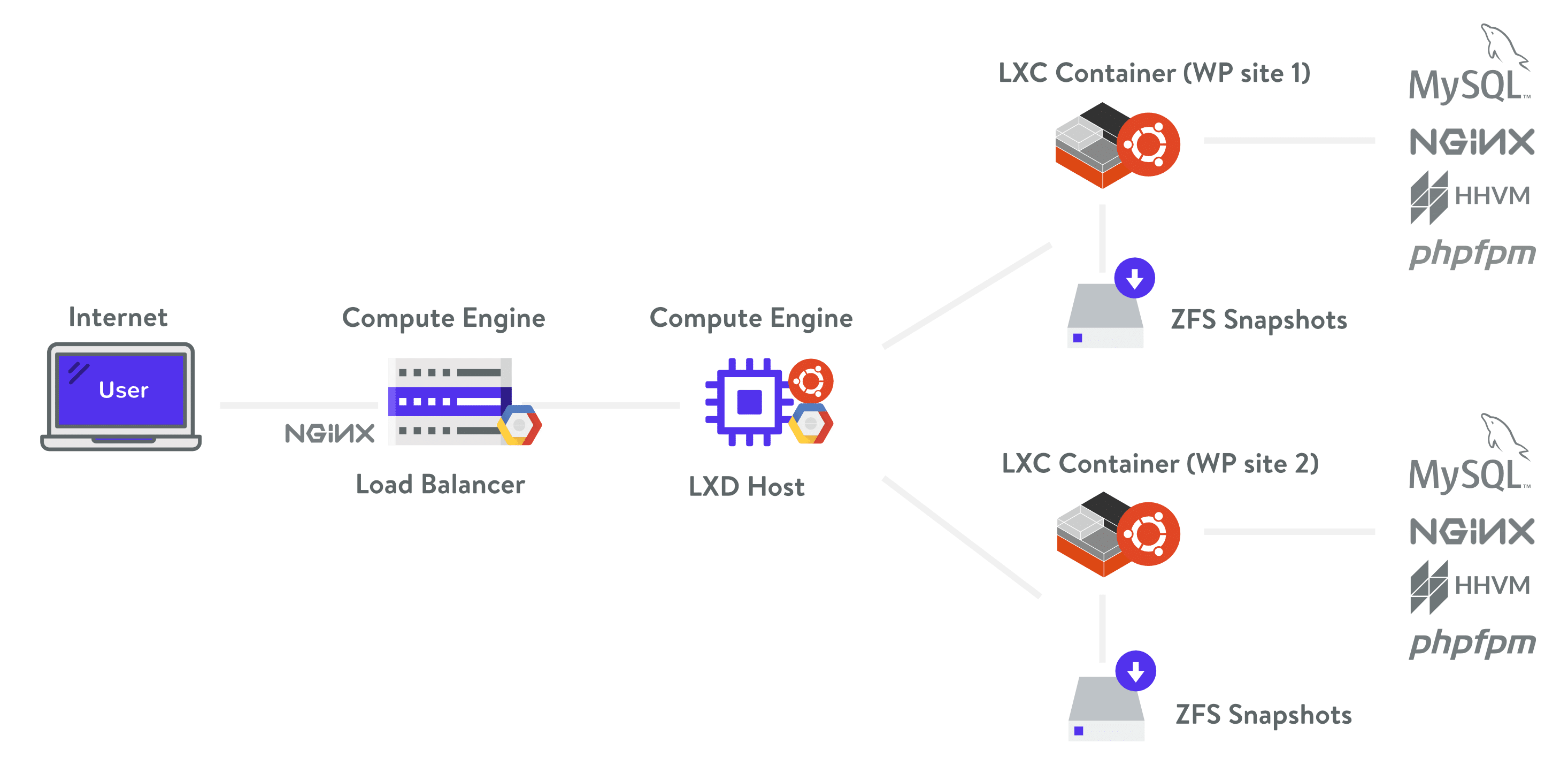
WooCommerce sites can be especially demanding as they generate a lot of data, as well as un-cachable requests, thus robust PHP and database resources are needed in place. When choosing WooCommerce hosting, it is important to use a container-based host, such as Host SEO, that is built for scaling with isolated resources.
Additional ideas for speeding up your website:
- Optimize your images.
- Offload and cache different files such as PDFs and MP3s.
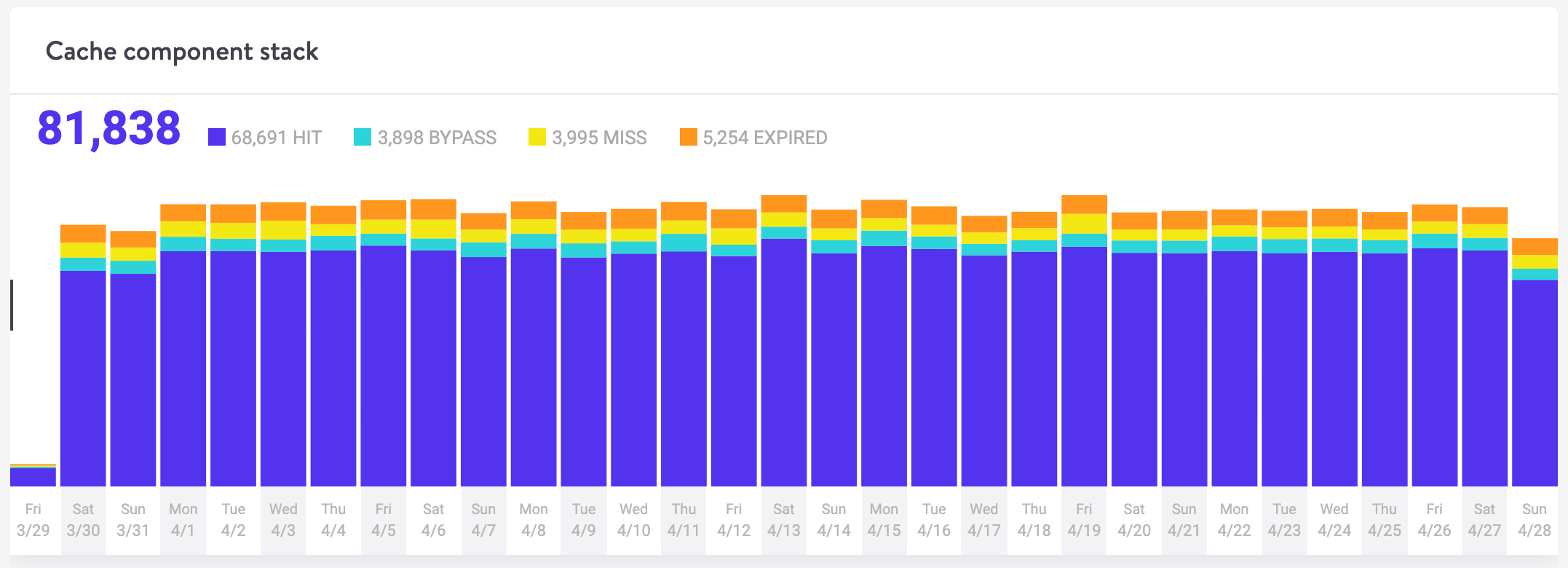
- Cache as much of your content as possible. You can opt for a caching plugin, though there are certain web hosts like Host SEO, which handles caching for you(and offers four different types of caching, to boot).
- Use a content delivery network (CDN). Depending on the location, we’ve seen a CDN decrease overall load times by over 50%!
- Optimize your WordPress database. When you delete a plugin from your WordPress database using the standard method, it typically leaves behind tables and rows in your database, which, over time, can slow your website down. When your site gets too heavy, you can opt to limit post revisions or delete old ones. You may also convert tables from MyISAM to InnoDB, and clean up your wp_options table.
If you really want to dive into all the nitty gritty optimization techniques and tricks, make sure to check out our ultimate guide on how to speed up your WordPress site.
2. Shorten & Simplify the Checkout Process
Some 21% of shoppers said that the reason why they’ve abandoned a shopping cart was because the checkout process was too long or daunting. According to the Baymard Institute, the average large-sized ecommerce site can increase their conversion rate by 35.26% through better checkout design.
A few ideas to simplify checkout:
- Offer one-step checkout (like Amazon) or look for ways to decrease the steps necessary to check out.
- Offer guest checkout. 35% of online transactions are usually dropped because the website required the user to create an account before checkout. Some of the reasons why visitors don’t want to make a user account include privacy, full email inboxes, lack of time, and uncertainty around the purchase.
- Strip down and simplify checkout. This could be done in a number of different ways. For example, Host SEO removes distractions on their checkout page by stripping out the top header. You can also see where you are at in the process as you go.
Take a step back to really consider your existing checkout process: either in terms of a self-audit or through usability testing. Is there anything particularly confusing about it? Are there any fields you can eliminate? Test new changes and make sure to measure the impact on your conversions before fully committing to them.
3. Offer Alternative Payment Methods
When you open up an ecommerce shop, you are potentially opening yourself up to doing business with the whole world. Knowing this, you must realize that one payment method won’t be sufficient for customers in different countries. You may have to incorporate multiple different payment methods depending on where in the world your customers live.
Stripe and PayPal (connected to bank accounts, debit cards, and credit cards) are some of the most common methods for receiving payment that ecommerce stores accept. New, up and coming alternative payment methods to consider on top of these include Apple Pay, Amazon Pay, and Google Pay.
4. Consider Offering Free Shipping
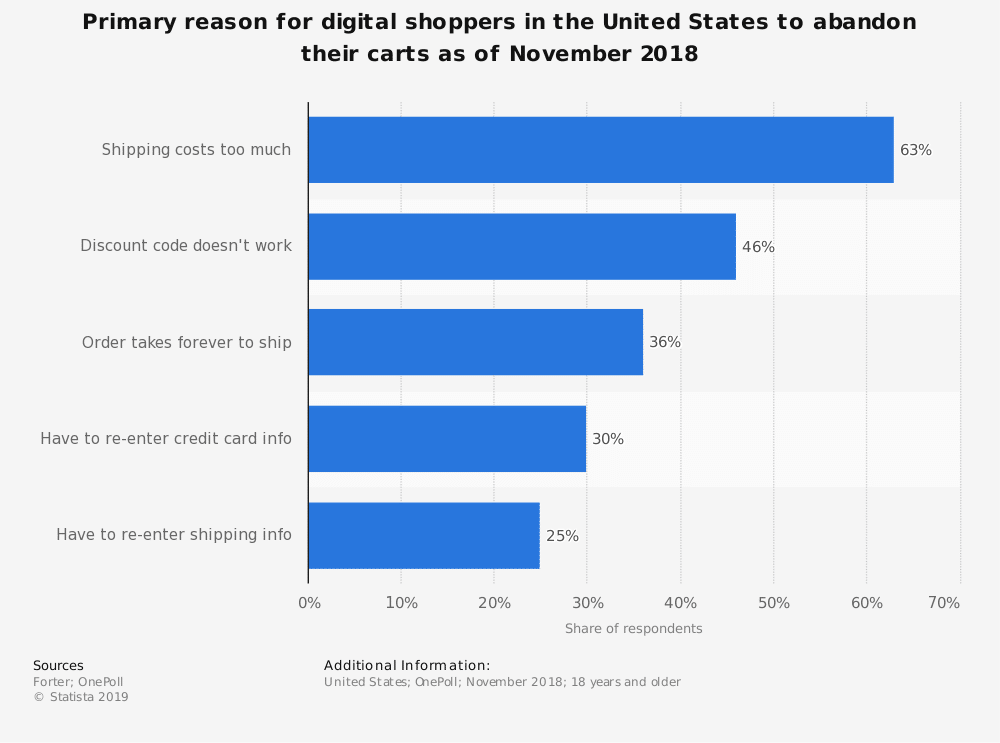
According to Statista, expensive shipping is the top reason why people abandon their carts, but according to Fulfillment Service, free shipping is not the only factor to consider for drawing in new customers. Low prices are the #1 reason why customers revisit ecommerce sites.
Upon checkout, 78% of respondents said they prefer free shipping over expedited shipping. And 67% of the time, customers will choose the cheaper shipping method over the fastest one (which represents 2% of customers). Furthermore, 58% of customers are willing to wait anywhere between 4-7 days to receive an item they bought online, but as an online seller, you also have to provide an expected time frame or delivery date to keep customers happy.
Of those surveyed, 58% want free or discounted shipping, while 28% want a variety of shipping options.
Although free or fast shipping is enough of an incentive to increase sales, it’s important to understand the impact on your bottom line because shipping costs can eat into 5% or more of the total cost. In general, about half of small to medium-sized businesses surveyed said that offering free shipping increased profits.
As retailers, it’s important to find the sweet spot between adding costs and increasing sales.
Here are a few ways that retailers are doing so in terms of shipping:
- Offering free shipping on standard delivery, but additional fees for premium services, such as expedited shipping.
- Charging shipping for low-value products but offering free shipping for high-value products.
- Using lower-cost carriers and offering free shipping if these carriers are chosen by the customer.
5. Inspire Trust with Great Website Security and Reviews
35% of individuals will abandon a website if it does not appear to have a security badge.
If you’re wondering what specific security badges to use, a Baymard survey found that the most trusted badge was Norton (35.6%), followed by McAfee (22.9%), TRUSTe (13.2%), and BBB Accredited (13.2%).
Aside from including security badges, incorporate additional website security features, such as password encryption and SSL certificates (a must — HTTPS is now a Google search ranking factor) so that your customers know you’re legitimately interested in their safety and the badges aren’t just for show.
You can also help customers get over their initial hesitation of purchasing from you through peer reviews, which demonstrate that your store is a legitimate place to shop. 84% trust online reviews as much as personal recommendations. Get creative and place your customer reviews around your ecommerce site. Place your best review on your check out page to lower the chance that a potential customer will abandon the cart.
6. Provide a Solid Mobile-Friendly Shopping Experience
More than half of global web traffic is attributed to mobile users.
76% of smartphone owners that search for a business visit it within the day; 28% of those searches result in purchases. 59% of ecommerce website visits are on mobile devices, with mobile activity accounting or 38% of ecommerce revenue. Among the three most common devices used to shop online, mobile accounts for the highest abandoned cart rate (85.65%), vs desktop (73.07%), and tablet (80.74%).
One strategy that you might employ to optimize for mobile-friendliness could involve using Google AMP, which offers a way for users to view your site quickly by providing a stripped down version of it. There are several plugins you can use to activate this functionality, such as AMP for WooCommerce, and WP AMP. However, you should also test this extensively as AMP has a lot of issues.
You’ll also want to consider our guide on making sure your WordPress site is optimized for Google’s mobile-first index.
How to Mend Shopping Cart Abandonment with Abandoned Cart Emails
If your customers still abandon their shopping carts at a high rate despite your best efforts onsite, there’s good news: you can still get them back with the help of abandoned cart emails.
Abandoned cart emails are helpful and effective. Here are some abandoned cart email statistics to take note of from Moosend:
- Open rate: 45% of cart abandonment emails are opened on average.
- Click through rate: 21% of the emails are clicked on.
- Conversion rate: 10.7% of recipients completed their purchases. According to Barilliance, abandoned cart emails can lead to a 18.64% increase in conversion rates!
You can create your own abandoned cart emails with the help of your email marketing provider and/or ecommerce platform (for example, BigCommerce offers abandoned cart recovery features built-in).
Additionally, these solutions can help simplify the process:
Jilt
Developed by the SkyVerge team, an official WooCommerce partner, Jilt was created to help ecommerce stores recover lost sales due to shopping cart abandonment.

Jilt is a plugin that you install. It integrates with platforms such as WooCommerce, Easy Digital Downloads, and Shopify. Once you’re using Jilt, it monitors incoming customers and tracks them. Once they abandon their shopping carts, it kickstarts an automated email campaign to try to make them come back.
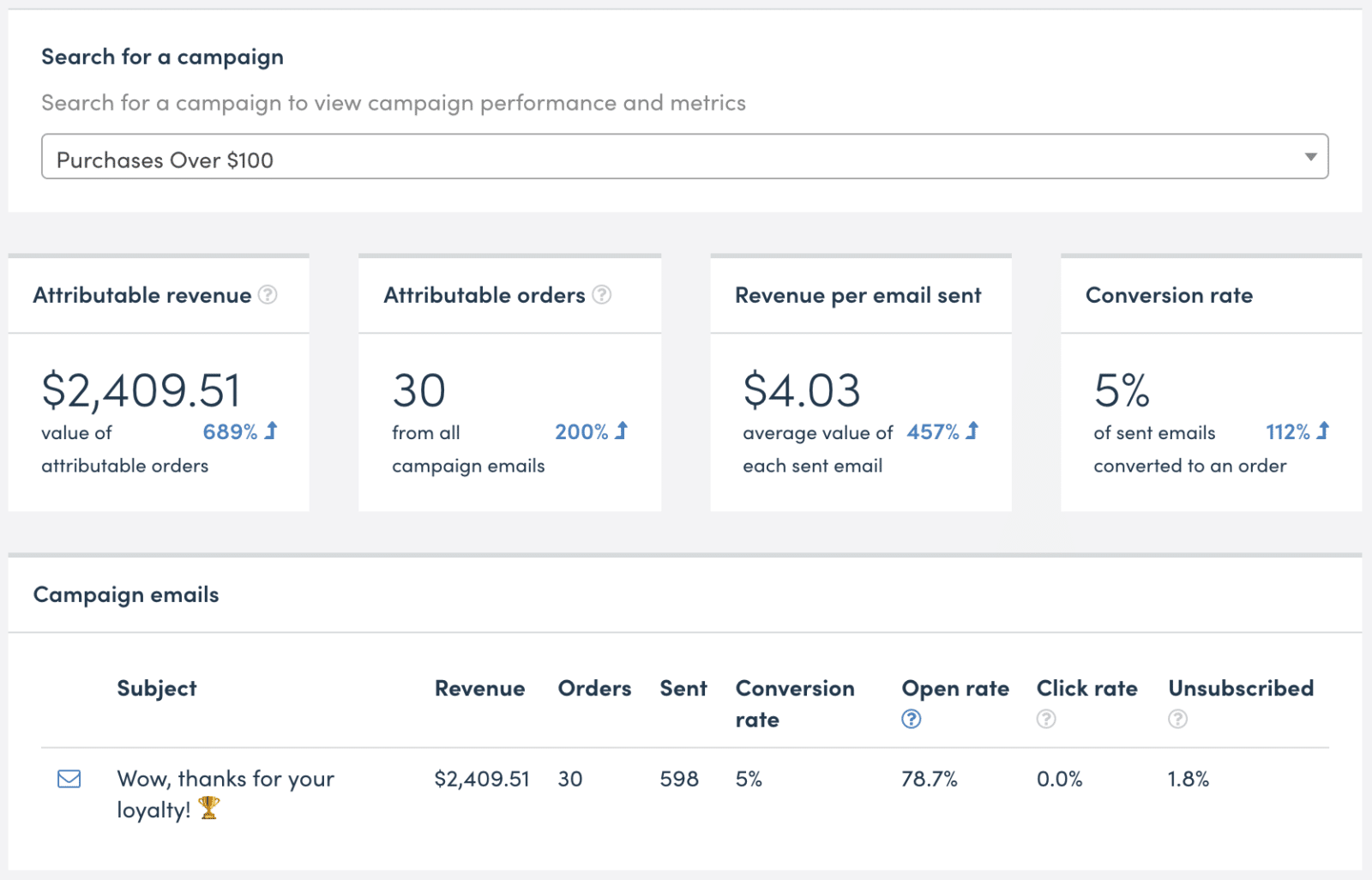
One great thing about Jilt is that they show you how much extra income you can make by reaching customers you could’ve lost. On that note, you’re only charged for the customers that you actually reach through your campaigns. You can also have Jilt dynamically create unique discount codes for you.
Conversio
Conversio is an email marketing company that specifically targets ecommerce stores.
They allow you to send any relevant ecommerce emails, such as receipts, abandoned cart emails, follow-up emails, product reviews, newsletters, and feedback emails. Conversio offers beautiful pre-designed email templates, powerful segmentation, and automated campaigns. Like Jilt, Conversio also charges according to a flexible pricing model.
Abandoned Cart Email Best Practices
Some key abandoned cart email practices to take note of:
- Send more than one email. In fact, you should aim to send at least two. The best campaigns involve sending three emails (resulting in an average of 18.2% additional sales). Send the first email within the hour. If you send one beyond 24 hours, the conversion rate halves. Then, send the second email 24-36 hours after abandonment, and the third one 72 hours after.
- Offer additional discounts. Offer a bigger discount in each of the emails. The solutions above have the ability to create a dynamic discount code in your email templates.
- Timing is important. According to a study by Barilliance, sending your first email during the ideal time can result in a 20.3% conversion rate (versus a 12.2% conversion rate during the non-ideal time). This also affects the conversion rate of the follow-up email (a 17.7% conversion rate during the most optimal time, versus 7.7% otherwise).
- Write a subject line that will get you noticed. Personalization (by using both the receiver’s name and recommending products based on what they were going to purchase) is something to strive for.
Summary
Ecommerce is enjoying spectacular growth but it’s not at the apex of what it could be, with three-fourths of shopping carts abandoned, on average. This can be remedied by understanding why customers abandon their shopping carts and implementing strategies to counter major problem areas on your ecommerce website.
What other questions do you have about shopping cart abandonment? Leave them in the comments below.











