
Website Downtime: Applicable Tips on How to Prevent It
- Category : Server Administration
- Posted on : Sep 21, 2018
- Views : 3,241
- By : Kapueo I.

our website is the face of your business and internet users want it to show up almost instantaneously when they click into it. In fact, most users expect websites to load in no more than two seconds and just a one-second delay can lead to a huge drop in sales.
Can you even imagine? If a second or two can make such a huge difference to your bottom line, what would your site being inaccessible altogether do? If your website is down (or taking ages to load), you can kiss your chances of getting any sales or leads goodbye. Not to mention it’s simply horrible for your brand.
It’s not just about first-time visitors. Even the more loyal ones or regular customers will get irritated and go searching for an alternative. It doesn’t matter what industry you’re in or what you’re selling, customers will go to your competitor. That is the reason it’s so important to prevent website downtime.
Today we’ll dive into all the different ways downtime hurts you, some of the main reasons why it happens from a technical perspective, and what you should do about it as a WordPress site owner. We’ll also include some tips on how to prevent it altogether.
- Why is Downtime Bad for Your Website?
- Top Causes of Website Downtime
- How to Deal with Website Downtime?
Why is Downtime Bad for Your Website?
Some might think an hour or two of downtime in a month is not all that bad. But let’s spend some time talking about what can happen if your site goes down unexpectedly.
Your Brand Loses Credibility
A business website that keeps crashing all the time will lose credibility. Your website is the place for you to make a positive first impression. Customers will find it hard to trust a business that can’t even keep its own website up. Trust us, we know this better than anyone. ?
Your Crawl Rate and Search Rankings Suffer
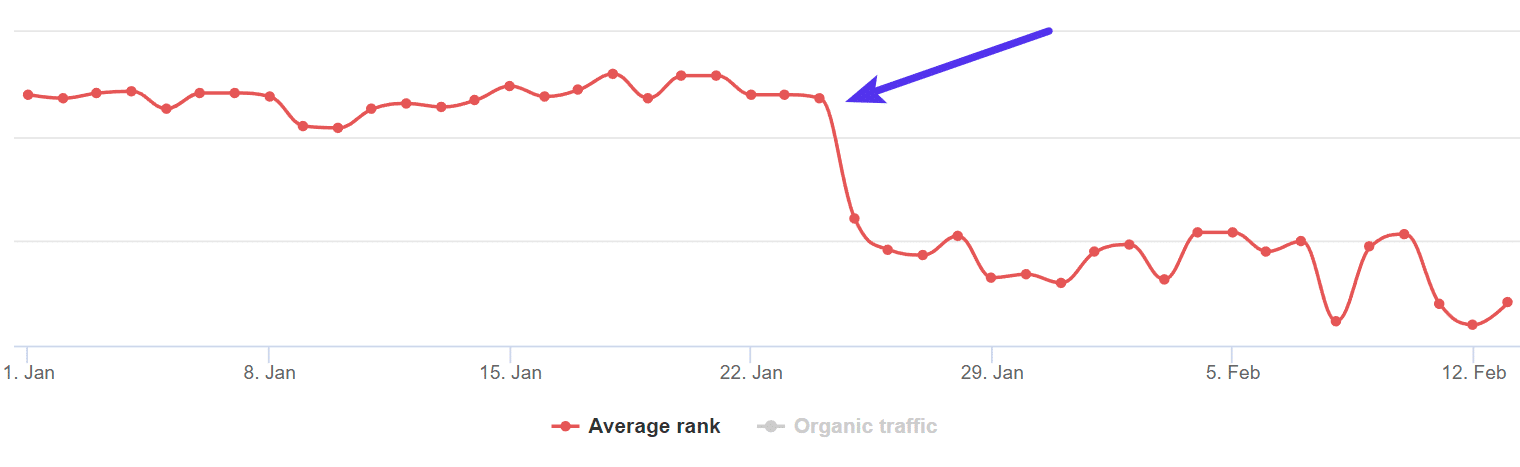
If your server is slow and takes more than two seconds in fetching a single URL, Google might limit the number of URLs it crawls from your website. Simply put, Google likes to crawl fast websites and those that don’t have errors. Also, don’t forget that downtime or a slow server response will result in a higher bounce rate. User experience is one of the many ranking factors Google uses and a high bounce rate indicates poor user experience.
When it comes to SEO, everything impacts each in other in some way or another. If you have extended periods of downtime, which is not uncommon on shared hosting, your search engine rankings might suffer and you’ll have to work your way back into Google’s good graces to recover. This can take time.
our Profits Will Take a Hit
eCommerce is definitely something everyone is used to nowadays but customers can still be a little wary of making online purchases. So, if your site is down or slow during peak hours, you give visitors an excuse to jump ship and leave mid-purchase. Worse yet, if your site goes down when a visitor is thinking about buying something you can nearly guarantee that the downtime will cut into your profits by considerable margins.
According to Carbonite, average downtime costs per minute for small businesses range from $137 to $427 per minute. If we take a look at a study by Gartner of bigger companies, the average cost of downtime is $5,600 per minute. And for Amazon, just a second of downtime costs over $220,000 dollars. Obviously, this will all vary based on your business, but you get the picture, it’s not good.
Top Causes of Website Downtime
A website can crash or go down for many different reasons. Below we will discuss some of the most common ones we see.
Low-Quality Hosting
A low-quality web host is one of the most common reasons a site has downtime. There’s no point in investing in your website design, UX, or site speed if your web host is not–if you’ll pardon the pun–up to code.
The most common of these is shared hosting. Shared hosts include some of the largest in the industry, such as EIG companies like Bluehost and HostGator as well as providers like Siteground, GoDaddy, and InMotion Hosting. These providers usually use cPanel and charge between $3 to $20 a month.
The reason “shared” hosting is bad is right in the name itself. These providers tend to overcrowd servers and even though you don’t know it, your site is sharing resources with 200+ other people. Any issues that pop up with other sites can trickle over into your site. This, in turn, impacts your site’s performance and uptime.
Shared hosts rely on upsells and add-ons to make a profit, not the quality of hosting they provide. If you’re curious to learn more about this, check out this in-depth article from our CFO on the shocking truths about how cheap WordPress hosting really works.
Traffic Overload
Want to go viral? We all do. But it doesn’t always work out the way you want it to. Do you remember that famous Oscar selfie? It was retweeted more than 3 million timesin less than 24 hours, crashing Twitter’s website on its way to becoming the most-retweeted photo of all time.
An abnormally high rush of visitors or activity can result in 500 errors on your website, or worse, a full site crash. Check out how Host SEO helped DARTDrones prepare for what we call the Shark Tank effect. Our infrastructure can easily handle thousands of concurrent visitors.
Many shared hosts limit your website by server processes, number of connections, CPU usage, memory, database queries, etc. Going over these limits when a surge of traffic hits can result in the provider simply taking your site offline or temporarily suspending you. They have to do this to protect everyone else on the server. That is the flaw with shared hosting. This results in lost revenue for every moment your site is down.
At Host SEO we don’t ever want to take your business offline. For many of you, your website is your primary source of income. That’s why if we notice a problem we’ll instead proactively reach out to you before doing anything. You shouldn’t be penalized for being successful, and that’s why we primarily only limit your site by PHP workers (a much more logical approach).
PHP workers determine how many simultaneous requests your site can handle at a given time. To put it simply, each uncached request for your website is handled by a PHP Worker.
If you’re running a blog or more static WordPress site that is primarily serving from cache, you’ve usually got nothing to worry about. If you’re running an eCommerce, membership, or community site; these are typically more resource heavy and have a lot of uncacheable content. This is where the number of PHP workers becomes very important. Check out the do’s and don’ts for hosting WordPress membership sites.
Hacking Attempt or Malware
Not all activity is “good” activity. A sharp uptick in site visitors doesn’t always mean that your website has suddenly become the talk of the town. Bad bots and proxy traffic have been known to bring a WordPress site to a crawl.
A Distributed Denial of Service (DDoS) attack can also result in high activity and lead to a site crash. Similarly, hacking attempts can mess up your website and result in unavailability.
It’s important to take basic precautions like using the latest version of WordPress and updating plugins (and the latest version of PHP) as soon as new versions are released. You should also use a strong password and change it every once in a while, too. Make sure you check out our ultimate guide on WordPress security.
At Host SEO we have many security features in place to prevent anything bad from happening to your website. Things such as GeoIP bl