
How to Stop a DDoS Attack in Its Tracks (Case Study)
- Category : Server Administration
- Posted on : Mar 26, 2018
- Views : 2,777
- By : Ingavar J.

In our last case study, we showed you how we cleaned up a negative SEO attack on Host SEO. Today we are going to show you some steps and troubleshooting we took to stop a DDoS attack on a small WordPress e-commerce site. DDoS attacks can come out of nowhere and smaller sites are usually even more vulnerable, as they aren’t prepared to deal with it when it happens. Let us ask you this question. If your site was attacked tomorrow, what would you do? If you don’t have any ideas, then perhaps you should bookmark and read this article.
What is a DDoS Attack?
DDoS is short for distributed denial of service. The primary purpose of a DDoS attack is to simply overwhelm your web server and either cripple it or take it down. One of the frustrating things with these types of attack is generally the attacker doesn’t gain anything and typically nothing is hacked. The big problem with DDoS attacks is with the overwhelming load associated with it. Most likely you will also see your bandwidth spike to an incredible amount, and this could cost you hundreds or even thousands of dollars. If you are on a cheaper or shared host, this can easily result in a suspension of your account.
On October 21, 2016, the largest DDoS attack (DNS related) in history occurred, bringing down large companies such as PayPal, Spotify, Twitter, Reddit, and eBay. Some even called it the DNS Doomsday of the internet. As the web continues to grow it’s not surprising that DDoS attacks are on the rise at an alarming rate. In fact, according to data provided from easyDNS, DDoS attacks over time are getting much worse. For a lot of sites, it might just be a matter of time until you are hit.
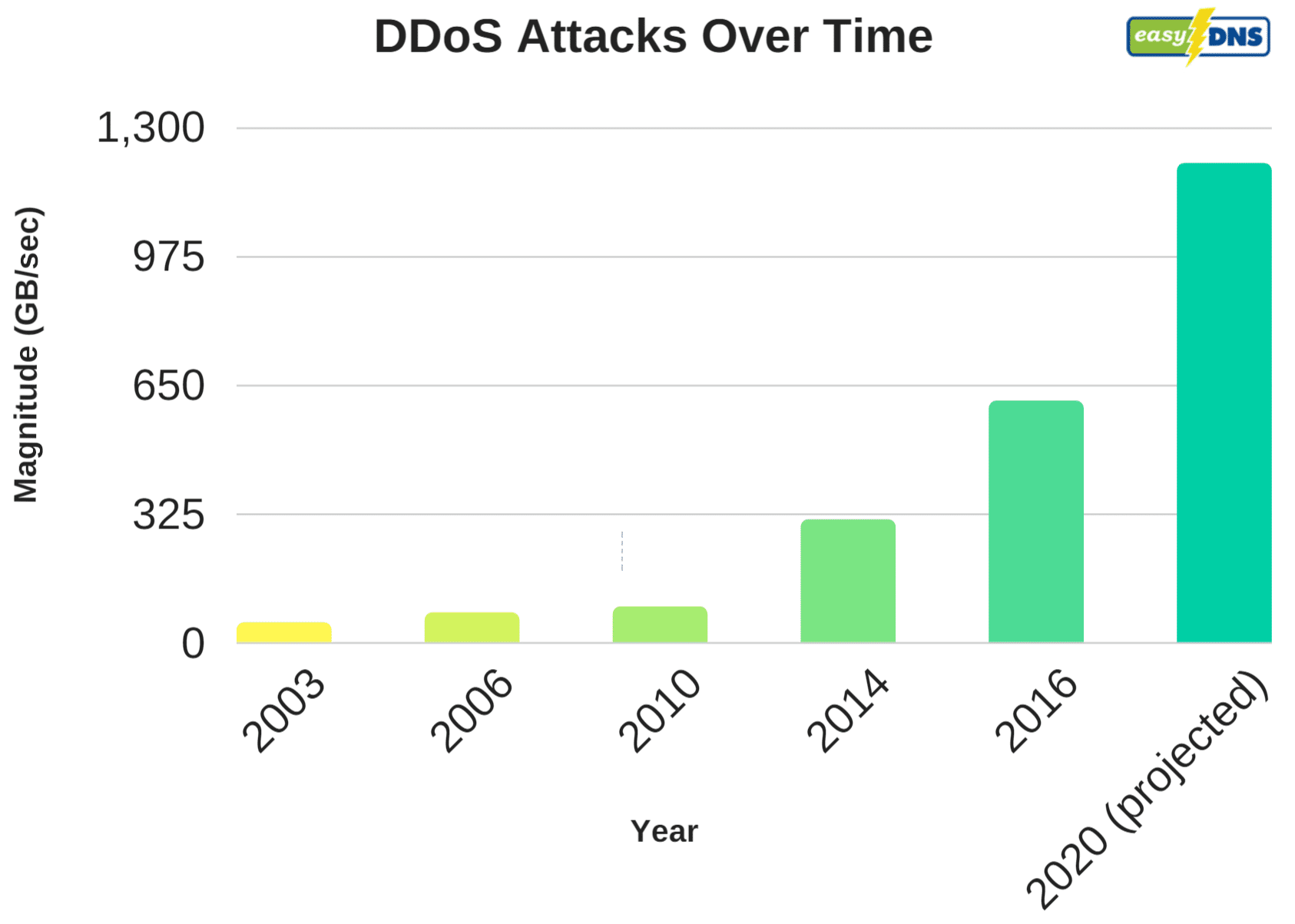
Here at Host SEO, we’re generally able to fend off more attacks than cheaper hosts, simply because of additional security precautions we have in place. But we also recommend utilizing companies out there that have large infrastructures and software built specifically to thwart off DDoS attacks. We will always be supporters of letting the experts do what they are best at. Cloudflare and Sucuri are two we recommend for WordPress users or any type of platform. Investing in decent DDoS protection can save you time, money, and frustration down the road.
Stopping a DDoS Attack on a Small EDD Site
In this case study, we had a small WordPress e-commerce site which was running Easy Digital Downloads. The site typically only generated between 30-40 MB a day in bandwidth and a couple hundred visitors per day. Back in June, it started using a lot of bandwidth out of the blue, without Google Analytics showing any additional traffic. The site instantly went to between 15-19 GB of data transfer a day! That’s an increase of 4650%. Not good. And it’s definitely not just a little increase in bot traffic. Thankfully, the owner was able to quickly spot this in Host SEO’s Analytics.
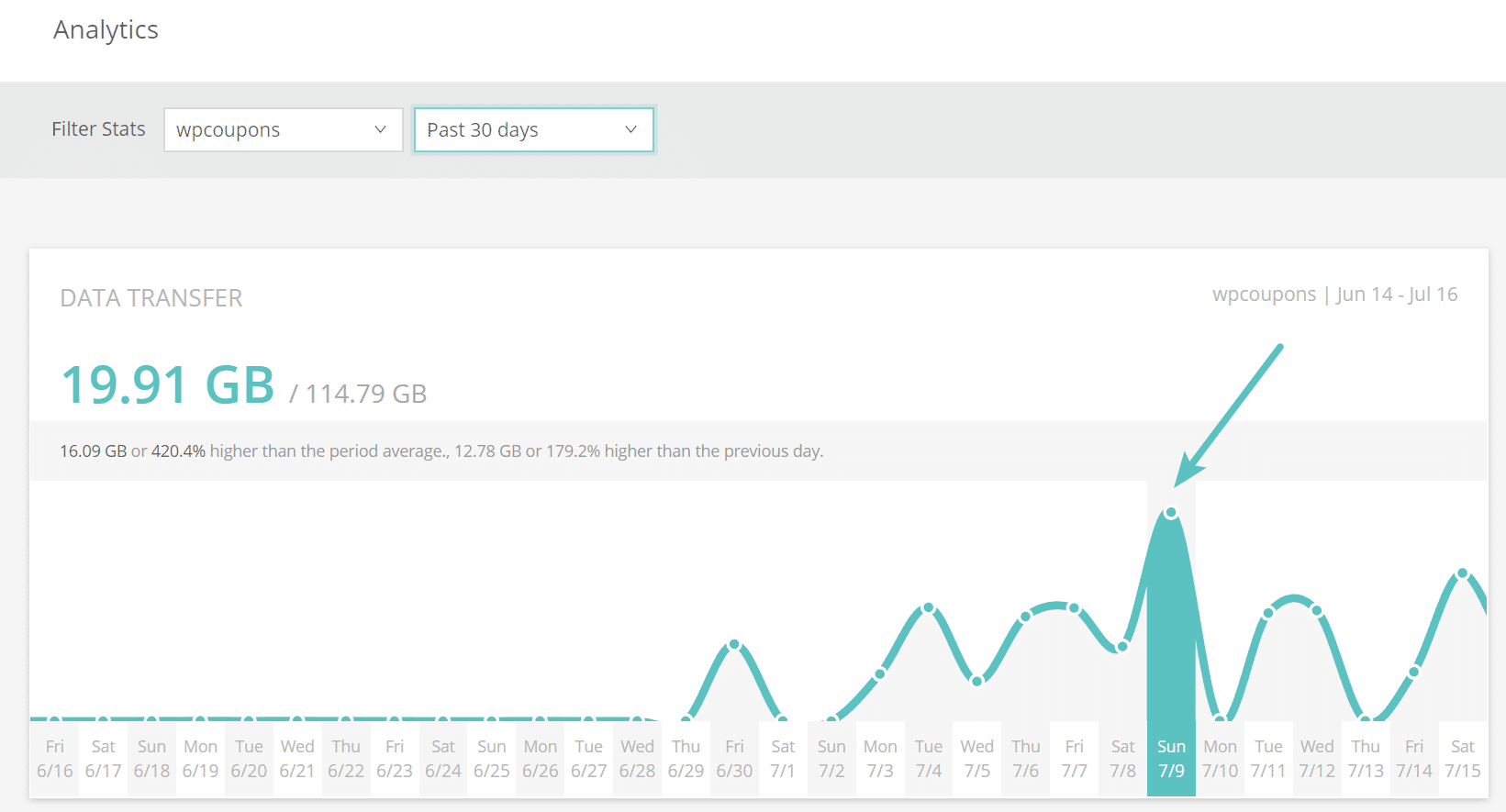
After seeing the increase, it was a matter of checking the server logs to investigate what was happening. These types of things can easily spin out of control. The past 7 days showed that the site’s /account/ page had been requested 5,110,00 timesand produced a total of 66 GB of traffic. That is from a site that typically generates a little over 1 GB of total data in an entire month. So instantly we knew something was up.
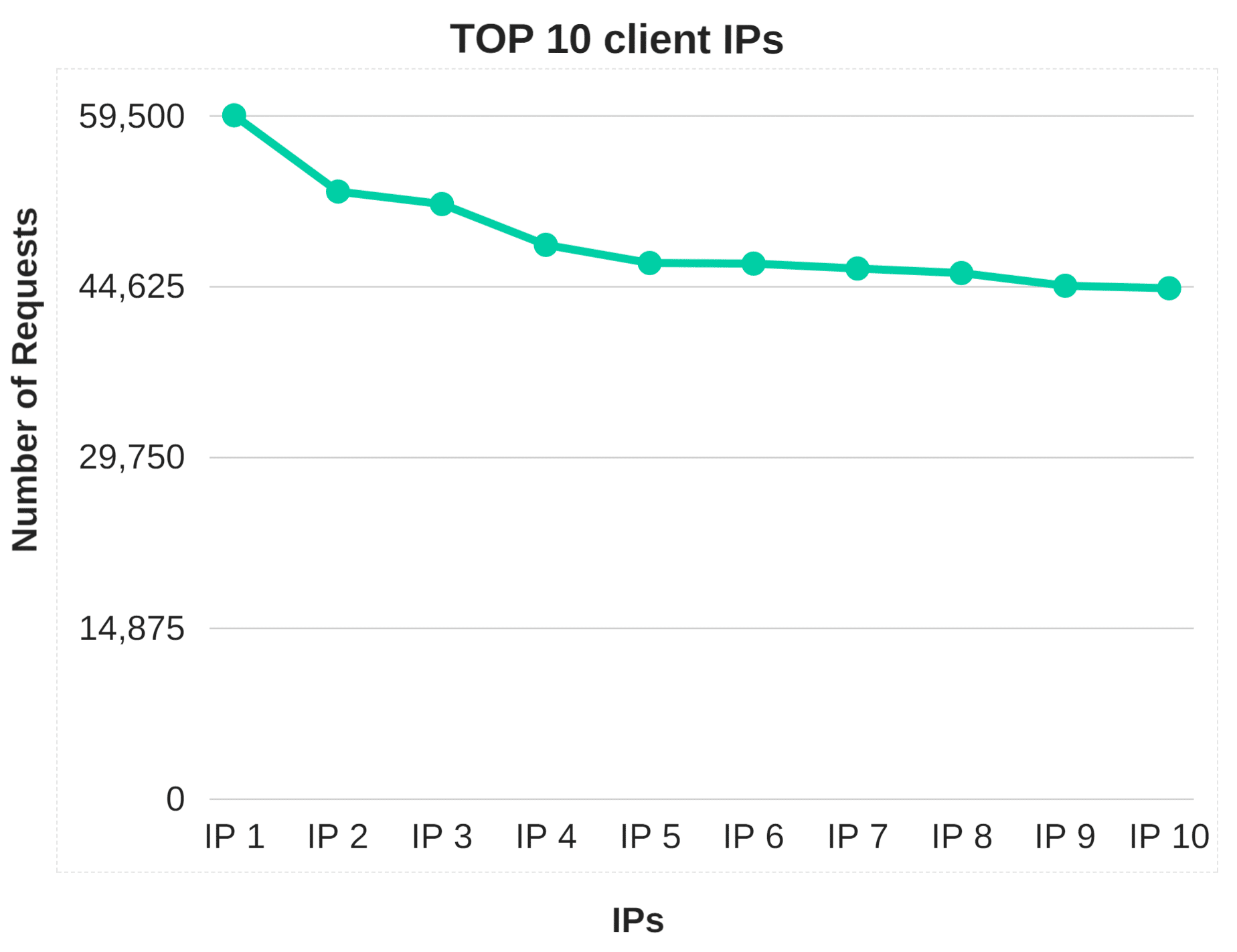
Analyzing the top 10 client IPS for the last 7 days to the site instantly showed some suspicious activity. A majority of them had over 10,000 requests, and there were quite a few. Remember, this is a small site which only should be getting a couple thousand requests total per month.
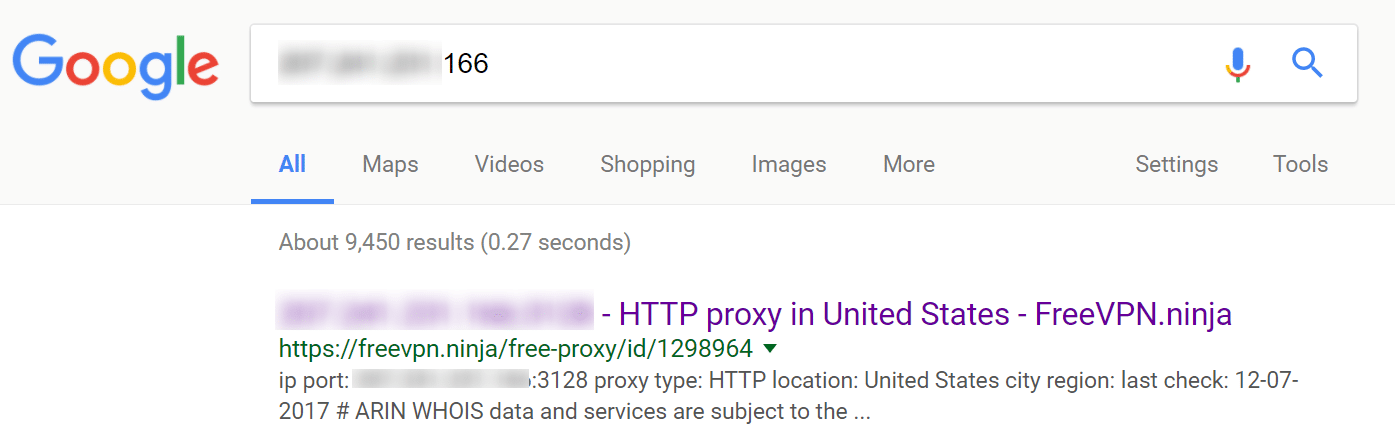
You can always rely on Google to provide you with data. Entering in a couple of the top IPs into search, we could easily see that most of them were all proxy addresses, meaning someone was most likely wanting to hide their traffic.
Changing URLs
The very first thing we did was actually change the /account/ page URL to something different. This is always a good first measure. However, this only stopped the attack for a short period of time, until they discovered the new URL. Remember, because this is an e-commerce site, it must have a public account page. Obviously on a blog alone, changing the WordPress login URL and hiding it completely will stop a lot of these types of attacks, but that wouldn’t work in this case. We call it WordPress Security by obscurity.
Hacking or Brute-Force Attempts?
Another thing you can confirm in these situations is that it isn’t a hacking attempt, which in this case it wasn’t. WP Security Audit Log is a great plugin to quickly monitor and see if there are any invalid login attempts on a page. You can also check your logs to see if there are any POST actions happening in a large quantity. This appeared to be a classic DDoS attack in which they simply send a bunch of traffic to one portion of the site to try and overwhelm it.
IP Blocking
If you are running on your own server, the next step would probably be to install an IP blocking or firewall plugin such as WordFence. However, just like most other managed WordPress hosts, we don’t allow plugins like that here at Host SEO. For a couple of reasons. First of all, they can have a huge effect on your performance, especially the scanning capabilities. Second, we utilize load balancers with Google Cloud Platform, which means a lot of time their IP blocking functionality wouldn’t work as intended.
However, depending upon the length and scale of the attack, this could be a never-ending process of blacklisting IPs, which in most cases doesn’t solve the problem fast enough. A lot of DDoS attacks when blocked in one area, will simply pop up in another, or change IPs and proxy addresses. So in this instance, it makes sense to take advantage of a DDoS solution which could help automate the process with their already built-in rules compiled from years worth of data.
Moving the Site to Cloudflare Didn’t Help
A lot of times Cloudflare does a decent job of stopping some basic bot traffic, but when it comes to the free plan, their DDoS protection isn’t the greatest. In fact, we moved the site to Cloudflare and it resulted in even more suspicious traffic hitting the site. Although we think this was simply due to the attack increasing their efforts. As seen below it was getting up to the point of almost 50,000 requests per hour. Their CDN portion works great, but if you need more, you will most likely need to pay.
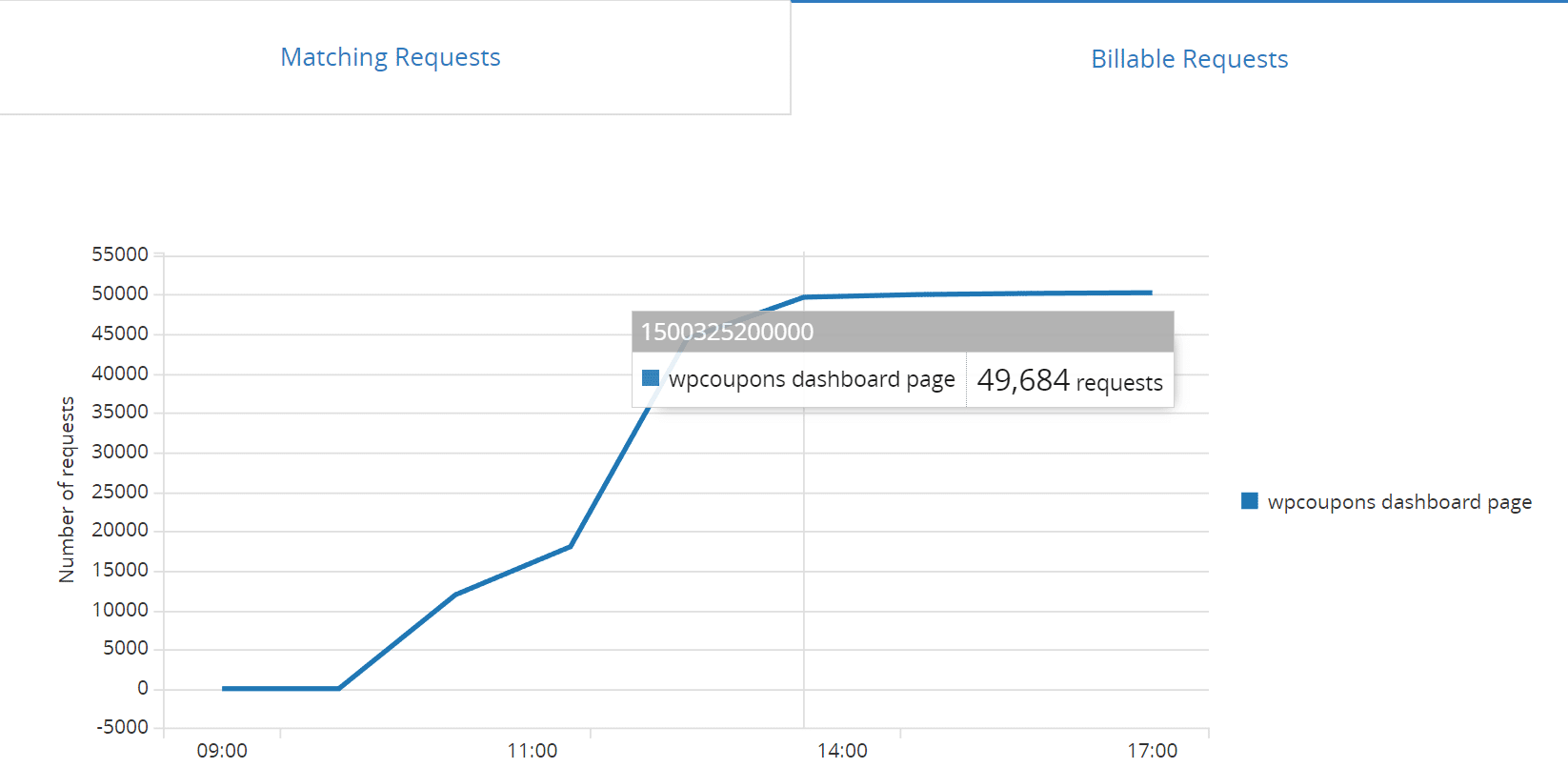
We then implemented “Rate limiting” on the site. Rate limiting allows you to create rules based traffic matching a URL and then block/limit it based on activity. This can be enabled on the free plan, and costs $0.05 per 10,000 requests. However, at the rate we were seeing requests, it would have been about 36 million requests per month, which would have cost $180 a month by itself. So obviously, that was not a solution that was fixing the problem. And yes, we did try all types of pattern rules.
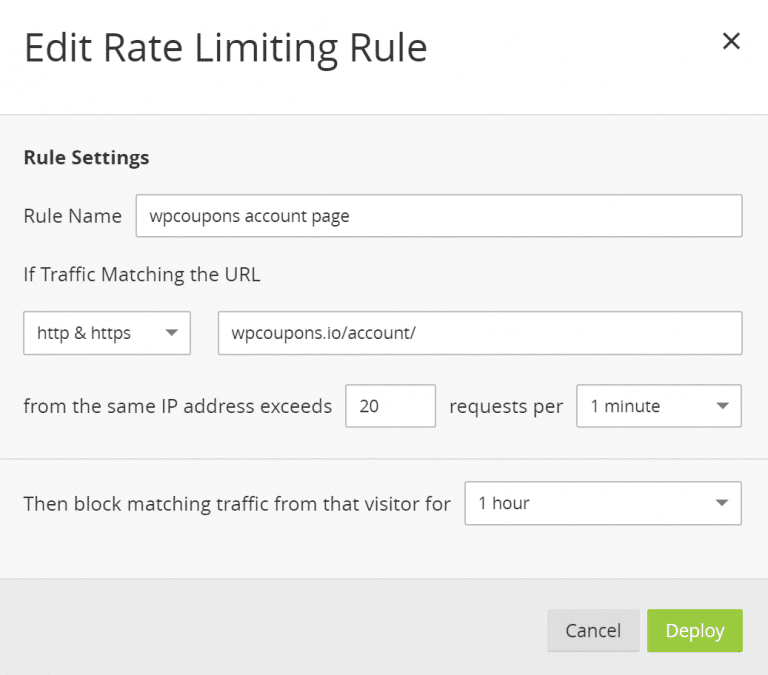
Note: Rate Limiting is billed based on the number of good (not blocked) requests that match your defined rules across all your websites. But in this case, it wasn’t working.
The next step, which we knew was already coming, was to look into an actual web application firewall. Many users don’t realize this, but Cloudflare’s free plan doesn’t include this. And this is almost required to stop DDoS attacks nowadays. So the next option would be to upgrade to Cloudflare’s pro plan at $20/month. However, this is where you should take some time and compare other third-party solutions.
Comparing Cloudflare to Sucuri
In our opinion, two of the best solutions out there right now for web application firewalls that are easy to implement for any type of site is Cloudflare and Sucuri. Note: We aren’t affiliated with either of these companies. However, if you really look into these you will see that Sucuri is perhaps a much better bang for your buck. Let’s take a look, as they both have $20/month plans.
Cloudflare
With Cloudflare’s Pro plan you only get Advanced DDoS Protection at Layers 3 and 4 (read more about layer 3 and 4 DDoS attacks). This will help to automatically stop TCP SYN, UDP and ICMP attacks on their edge servers, so they never reach your origin server. To get layer 7 protection you have to upgrade to the $200/month plan. Remember, that this is a very small e-commerce site, so $200/month would be quite costly, on top of their hosting fees.
Sucuri
With Sucuri’s $20/month plan, you get Advanced DDoS Protection at layers 3 and 4, along with layer 7. This helps to automatically detect sudden changes in traffic and protects against POST floods and DNS-based attacks, so they never reach your origin server. So right off the bat, you are probably going to see better DDoS mitigation with Sucuri. And in this case, we wanted layer 7 for HTTP flood attacks.
An HTTP flood attack is a type of Layer 7 application attack that utilizes the standard valid GET/POST requests used to fetch information, as in typical URL data retrievals (images, information, etc.) during SSL sessions. An HTTP GET/POST flood is a volumetric attack that does not use malformed packets, spoofing or reflection techniques. – Sucuri
Sucuri also offers load balancing in its $70/month plan whereas Cloudflare has quite a few fees attached to different aspects of their load balancing feature, such as usage-based pricing, whether you want geo-load balancing, etc.
Both of them have similar features such as being able to add challenges to certain pages, blacklisting IPs, etc. However, as far as DDoS protection goes, Sucuri offers more. We also really like the IP blacklisting UI in Sucuri and how certain things are setup vs Cloudflare.
And remember, no company can promise you 100% DDoS protection, all they can do is help you automatically mitigate it.
Moving the Site to Sucuri
Moving your site to Sucuri is pretty easy. Just like Cloudflare, there isn’t technically anything you need to install, as it acts as a full proxy service. This means you are pointing your DNS to them, and then they are pointing to your host. And essentially the web application firewall (or WAF) sits in the middle.
Their dashboard in our opinion isn’t as flashy or modern looking as Cloudflare, but when it comes to a WAF, you really should just be caring about how well it works. As you can see below, basically it detects your current hosting IP, and they provide you with a Firewall IP. This is what you point your DNS to (A name record + AAAA record).
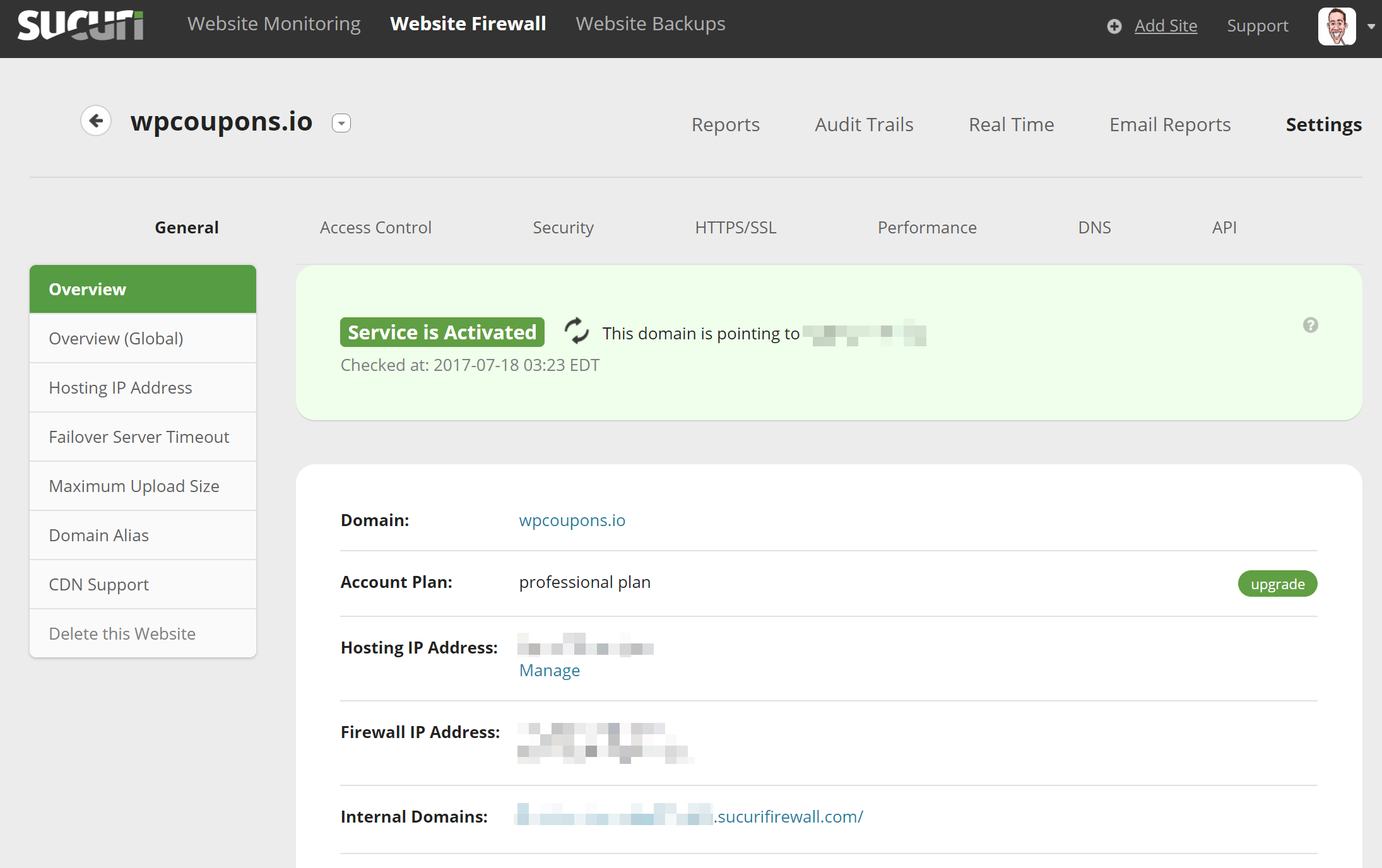
You can be up and running on Sucuri in a matter of minutes. Which is good in case of a current DDoS attack. The only wait time really is DNS propagation. They include an HTTP/2 Anycast CDN as well. So it is more than just a firewall. It can also help speed up your WordPress site. But you can also optionally use your own CDN such as KeyCDN with Sucuri just fine.
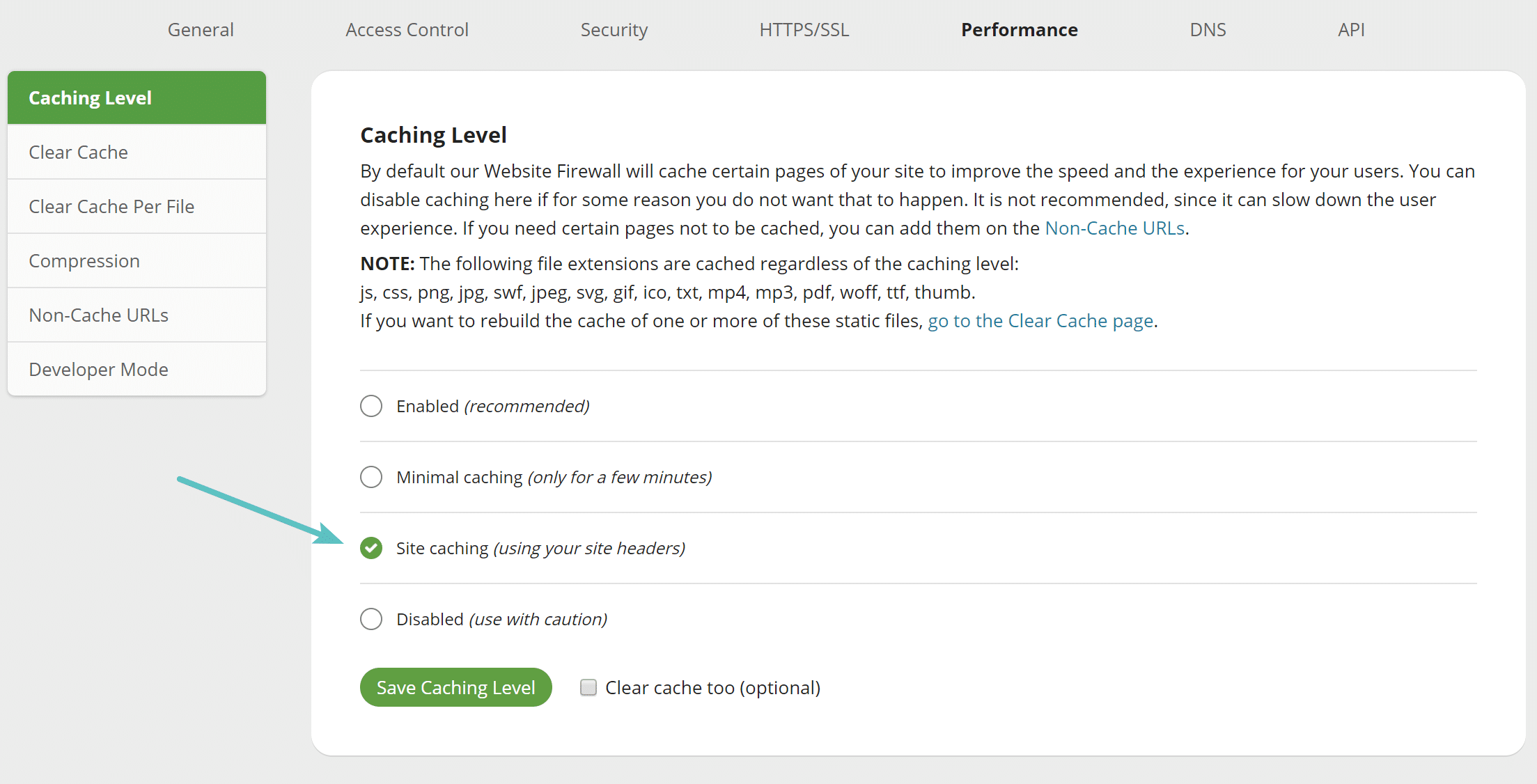
They include a free SSL cert with Let’s Encrypt or you can upload your own. One downfall is that Let’s Encrypt isn’t automated, you do have to open a ticket. But their custom SSL cert process is fast. Another tip for performance is that you might want to enable the site caching option. This will honor your origin server’s cache instead of using Sucuri’s. Most likely you have caching setup on your WordPress host they way you want it already.
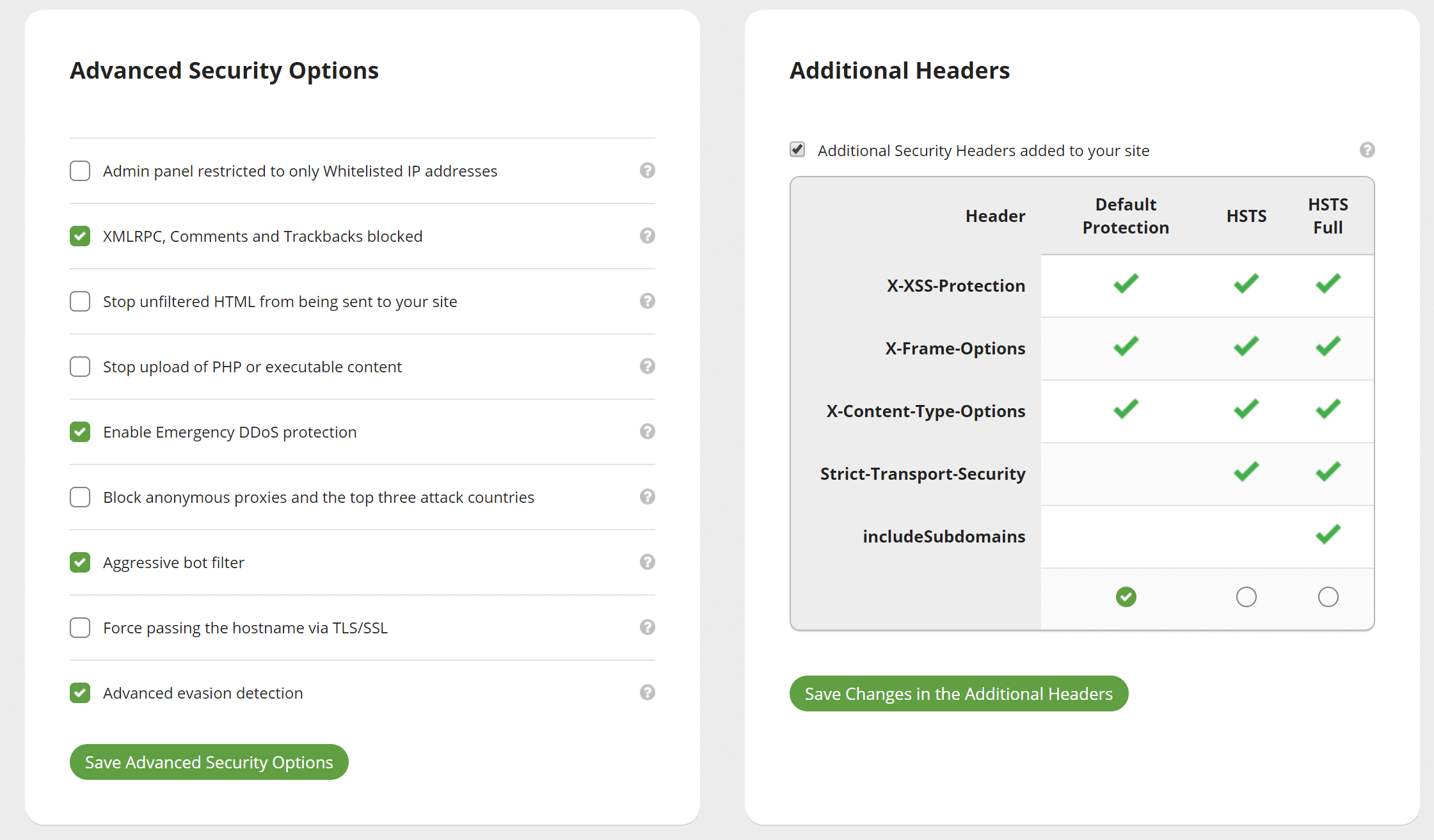
Advance Security Options
Under the security screen you can easily block all XML-RPC traffic, aggressive bots, enable additional security headers like HSTS, and much more. Note: XML-RPC traffic was already blocked on this particular site.
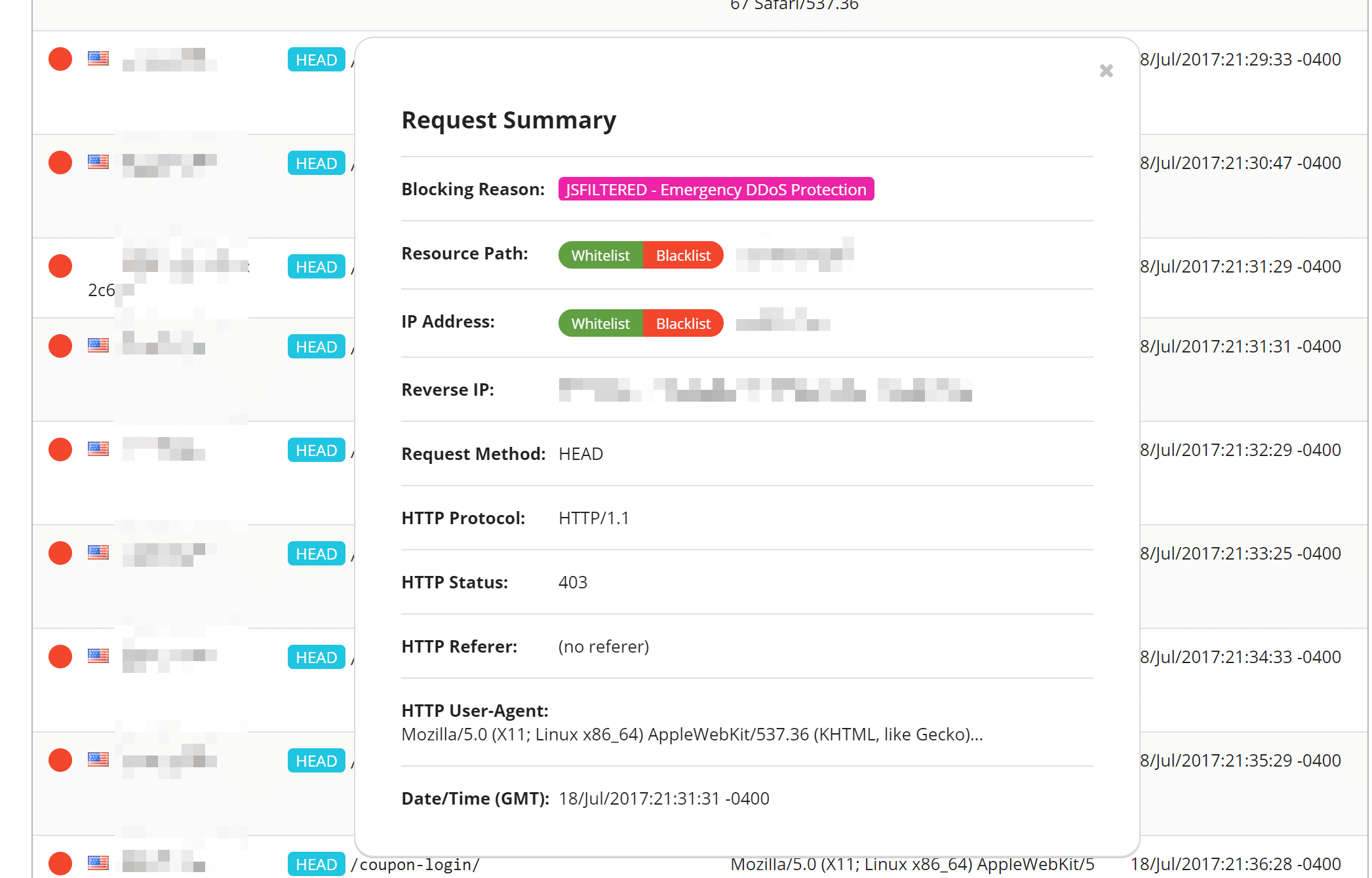
Real-Time View
One thing we really like was their real-time DDoS protection view. You can easily go into it and see an entire log of current requests. You can one-click blacklist or whitelist anything suspicious, and it will even give you a reason if it was already blocked.
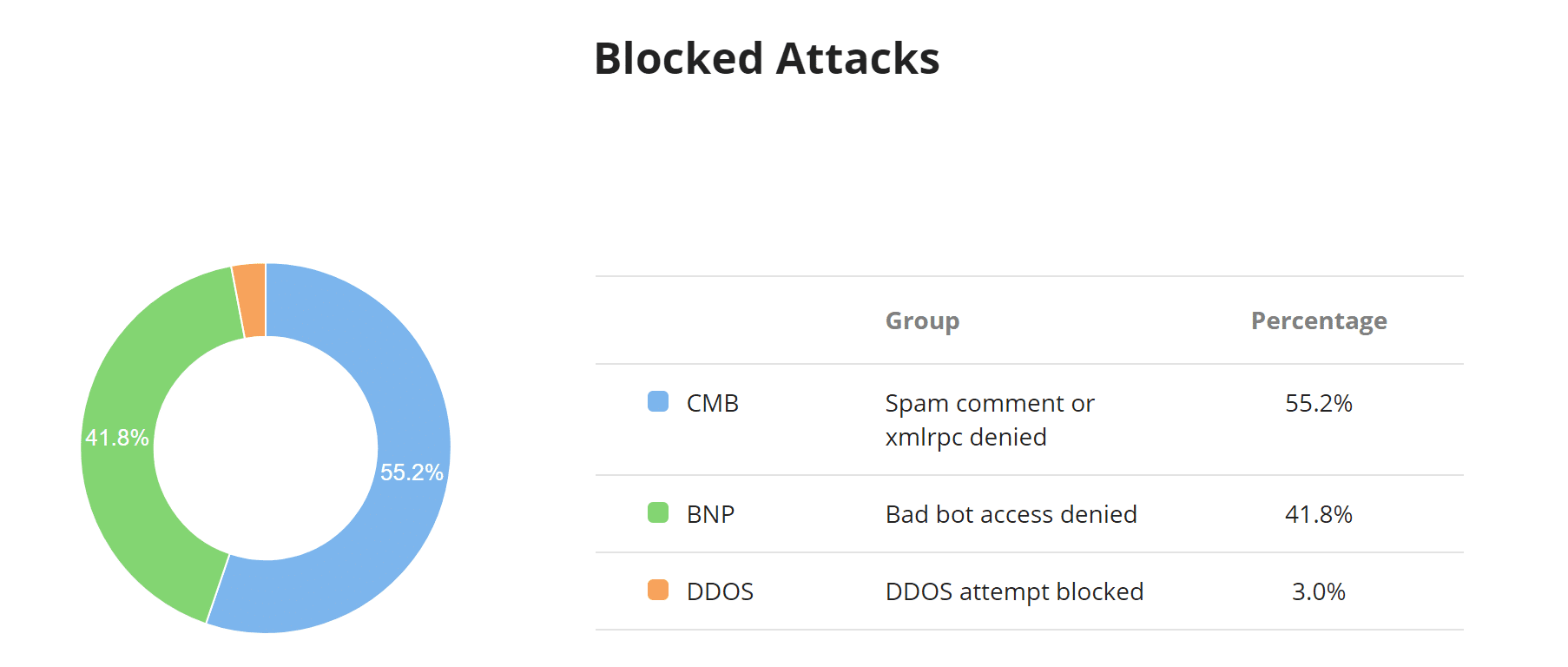
Other Useful Reports
There are a lot of other useful reports, such as the blocked attacks chart. This allows you to quickly see a percentage of what types of attacks are being blocked, including DDoS attacks. Some other charts in this window include traffic by browser type, devices, and HTTP response codes.
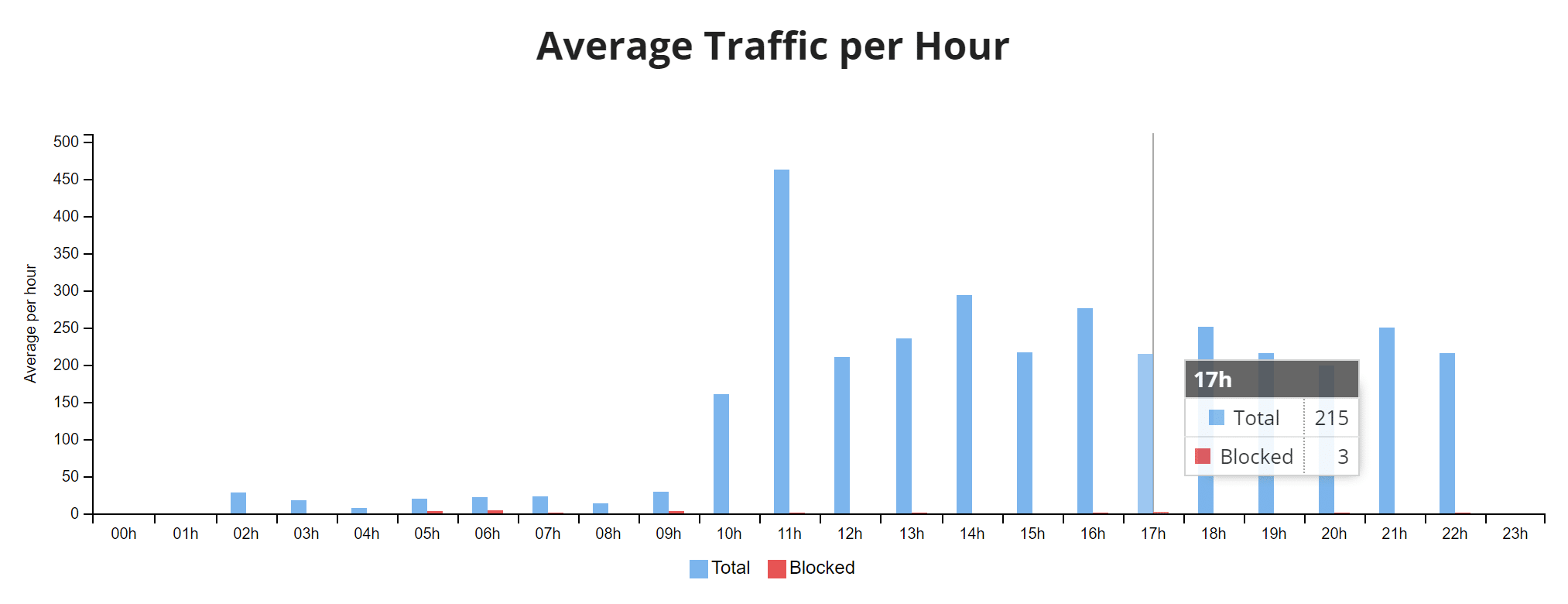
The average traffic per hour chart is handy to see when the peak times are for your traffic and a ratio of requests being blocked.
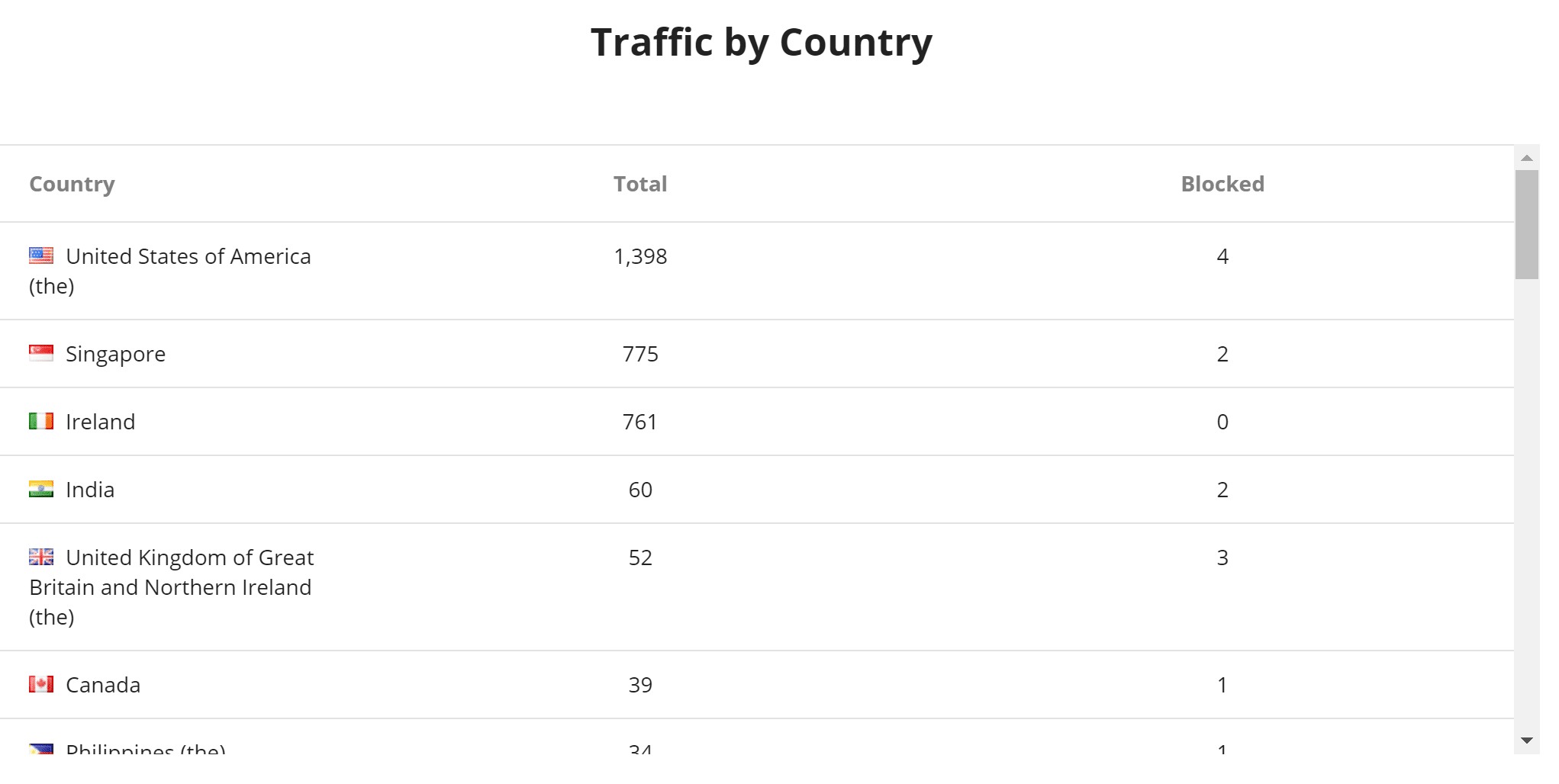
The traffic by country table can help you determine if something is coming from one specific geolocation. Under their access controls, you can then easily block an entire country temporarily with a single click.
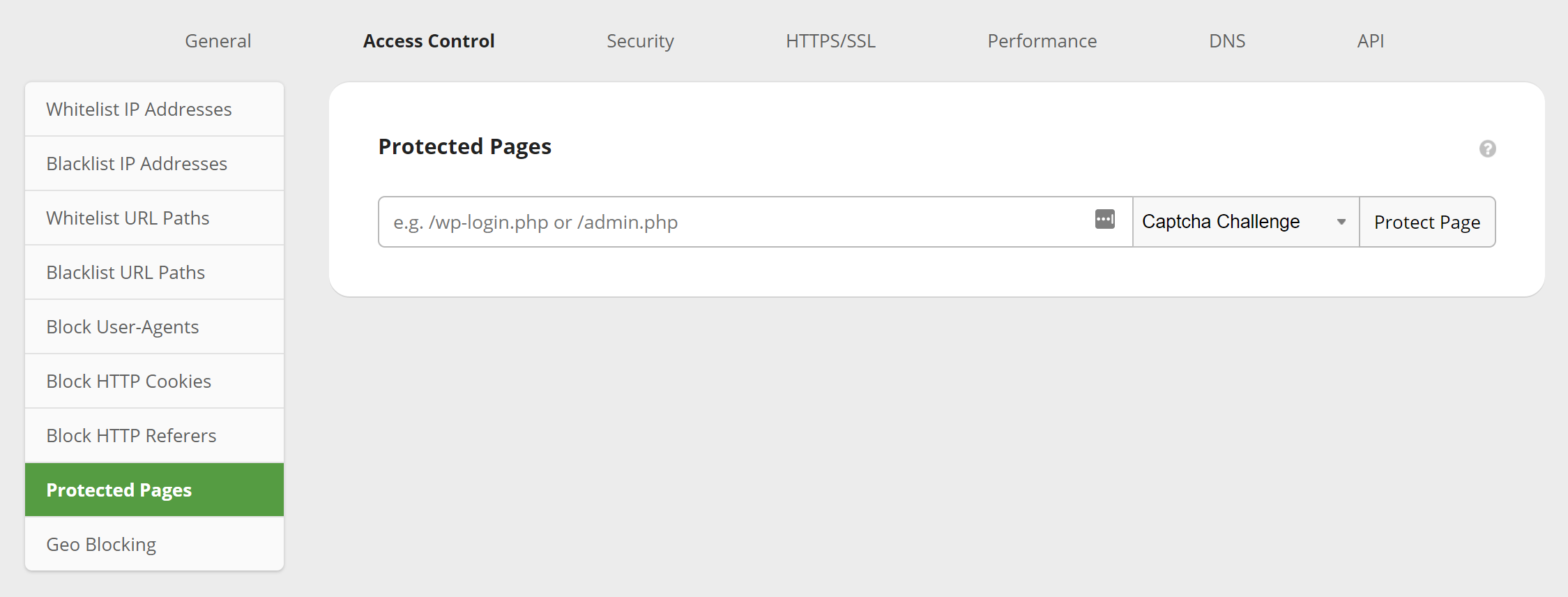
Other features under Access Control include the ability to whitelist and blacklist IPs and paths, block user-agents, block cookies, block HTTP referrers, and also protect a certain page with a captcha, two-factor, or simple password.
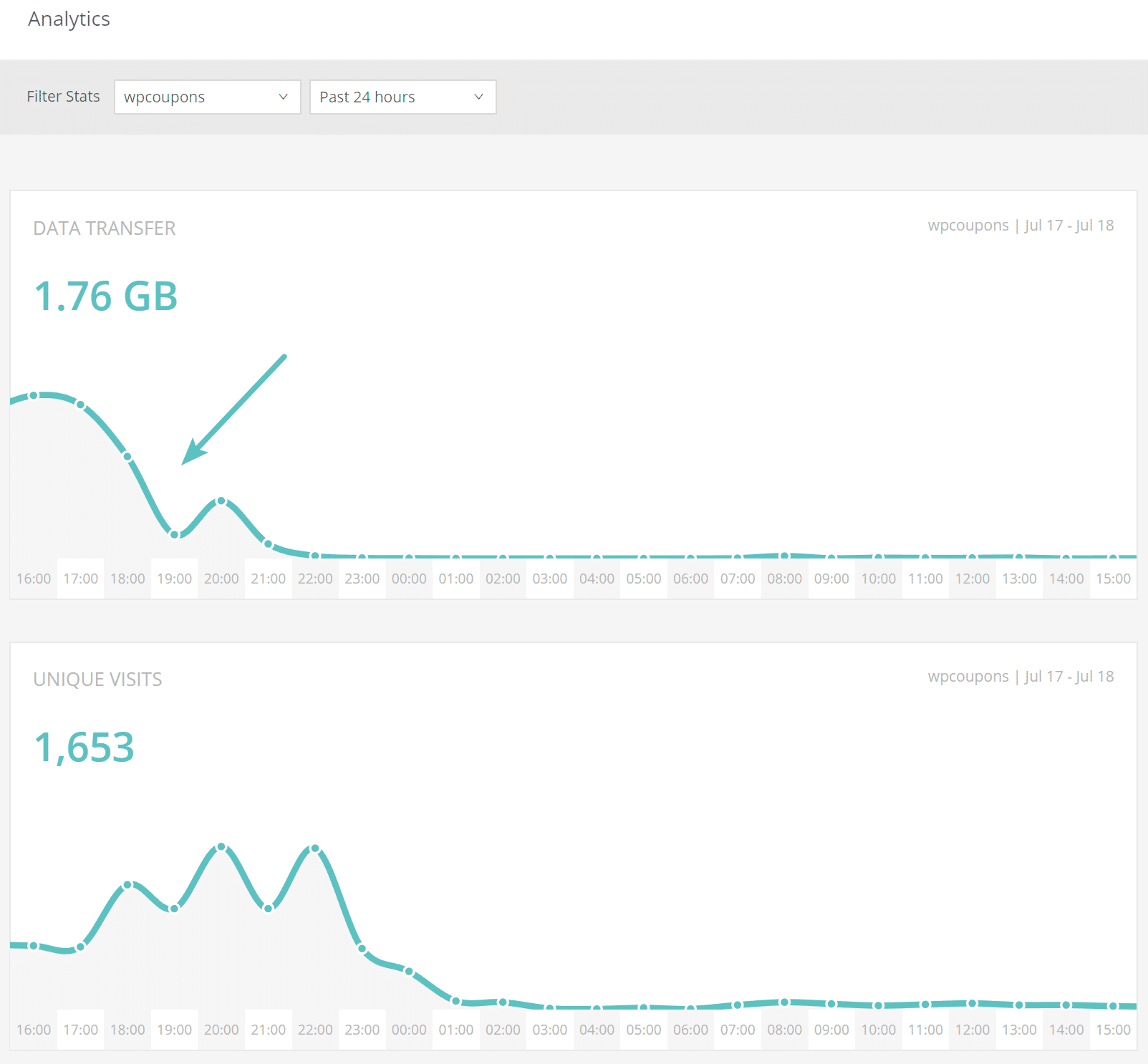
Did Sucuri help our small WordPress e-commerce site? In fact, an hour after the DNS finished propagating, all of the bandwidth and requests instantly dropped on the site (as seen below) and there hasn’t been a single issue since. So definitely a good investment and time saver if you are running into issues like these.
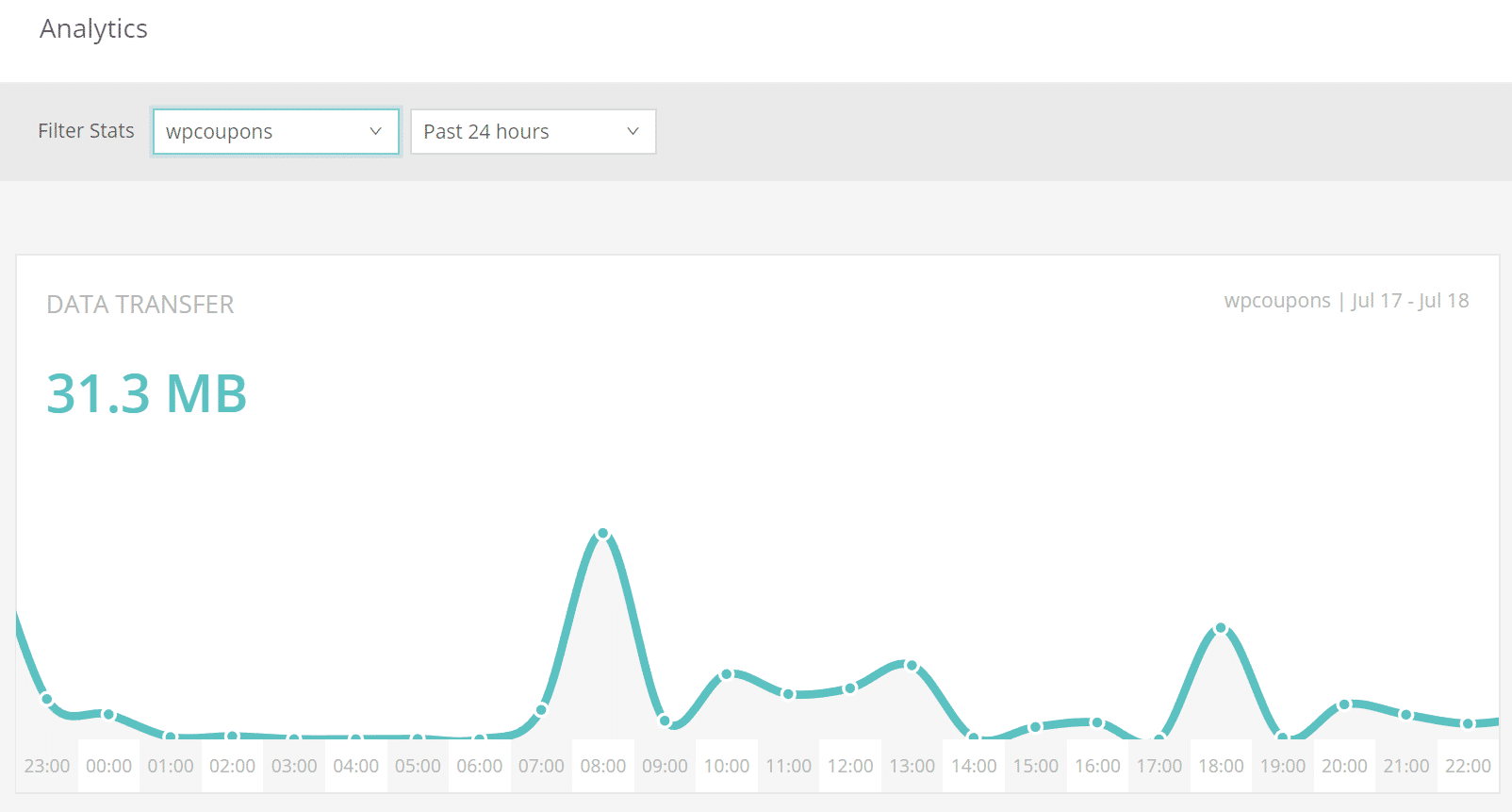
And here is how the site looked a while after the move to Sucuri. As you can see it is now back down to its original 30-40 MB of data transfer per day.
Even if you aren’t under an attack, perhaps you are just wanting an easier way to keep bots from stealing your host’s bandwidth. They helped WP Beginner block over 450,000 attacks in 3 months. We also noticed an interesting comment on that post:
We are getting hit hard by SPAM bots located on Amazon AWS and Google Cloud. Do you know if Sucuri firewall can help with that? We currently use WPEngine which has a built-in firewall (not blocking anything) and CloudFlare (also not blocking the spam) we are running out of options and really hope Sucuri can help. – AJ
If you have already tried other solutions, perhaps give Sucuri a try. And don’t get us wrong, Cloudflare is still a great solution for a lot of sites, as we recommend them to most of our clients. Their higher paid plans at $200/month most likely would have also mitigated the attack just fine. However, it’s always good to know about other solutions out there. Especially if you are on a budget.
Summary
Hopefully, the above information gives you a little more insight on how to stop a DDoS attack. This is of course just one of many different ways you could approach the situation. But if you’re already in panic mode, usually migrating to either Cloudflare or Sucuri can get you back up and running smooth in no time. If you are just trying to save money on bandwidth from spam bots, a web application firewall can also be a very effective solution.
Categories
Subscribe Now
10,000 successful online businessmen like to have our content directly delivered to their inbox. Subscribe to our newsletter!Archive Calendar

| Sat | Sun | Mon | Tue | Wed | Thu | Fri |
|---|---|---|---|---|---|---|
| 1 | 2 | |||||
| 3 | 4 | 5 | 6 | 7 | 8 | 9 |
| 10 | 11 | 12 | 13 | 14 | 15 | 16 |
| 17 | 18 | 19 | 20 | 21 | 22 | 23 |
| 24 | 25 | 26 | 27 | 28 | 29 | 30 |
| 31 | ||||||
Recent Articles
-

Posted on : Jul 25
-

Posted on : Jul 07
-

Posted on : Apr 07
-

Posted on : Mar 19
Optimized my.cnf configuration for MySQL 8 (on cPanel/WHM servers)
Tags
- layer 7
- tweak
- kill
- process
- sql
- Knowledge
- vpn
- seo vpn
- wireguard
- webmail
- ddos mitigation
- attack
- ddos
- DMARC
- server load
- Development
- nginx
- php-fpm
- cheap vpn
- Hosting Security
- xampp
- Plesk
- cpulimit
- VPS Hosting
- smtp
- smtp relay
- exim
- Comparison
- cpu
- WHM
- mariadb
- encryption
- sysstat
- optimize
- Link Building
- apache
- centos
- Small Business
- VPS
- Error
- SSD Hosting
- Networking
- optimization
- DNS
- mysql
- ubuntu
- Linux






