WordPress caching can be complicated and some might even call it boring. Trying to explain the details of such a complex technology might take a full book. However, we can break down the idea of caching by comparing it to a simple math problem. What’s 10 times 2? Most people can immediately tell you the answer is 20. Why is that? They’ve memorized the answer. In fact, there’s probably a minimal amount of calculation going on their head. This type of memorization comparison is definitely simplifying website caching, but it helps us visualize how the process works and why you might need a WordPress caching plugin.
Your website may be viewed dozens of times each month. Maybe you see even higher numbers, in the hundreds, thousands, or millions. Seeing as how your website is most likely serving up the same, or similar, content on a regular basis, wouldn’t it be nice if the server could remember those files to serve up your website every time?
- Caching Explained
- When Do You Need a WordPress Caching Plugin?
- No Caching vs With Caching
- The Best WordPress Caching Plugins
Caching Explained
In short, every webpage visited on your site requires a request to the server, processing by that server (including database queries), then a final result sent from the server to the user’s browser. The result is your website, complete with all of the files and elements that make it look the way it does. For instance, you might have a header, images, a menu, and a blog. Since the server has to process all of those requests, it takes some time for the complete webpage to be delivered to the user–especially with clunky or larger websites.
That’s where a WordPress caching plugin comes into play! The caching plugin instructs the server to store some files to disk or RAM, depending on the configuration. Therefore, it can remember and duplicate the same content it’s been serving in the past. As a result, your web pages load much faster, directly from cache. Basically, caching reduces the amount of work required to generate a pageview.
When Do You Need a WordPress Caching Plugin?
We talked a bit about speed, but do you always need a WordPress caching plugin? And what are some of the other benefits of caching?
Those are some excellent questions, and for those of you managing your own servers or are on shared hosting, a caching plugin usually makes perfect sense.
Disadvantages of Caching Plugins
However, sometimes you don’t need a caching plugin at all. If you decide on a managed WordPress host like Host SEO, we take care of caching for you. Caching is done at the server-level, and in most cases, in a much faster manner. Compared to a plugin, the server-level caching requires no expertise, no tweaking dozens of settings trying to achieve the fastest speeds; it’s simply fast all the time! ?
We don’t allow most caching plugins on our platform as they deteriorate performance. There are a lot of things that can simply go wrong with caching plugins unless you know what you’re doing.
You Always Need Some Type of Caching
Regardless of whether you have server-level caching or go with a plugin, you’ll always need caching in some form. So, what are some of the other benefits of caching?
- You speed up your website for users – We already covered this, but it’s nice to mention again since it’s the primary advantage.
- You improve your overall user-experience – Since the website moves faster for users they are now more likely to browse around. Faster websites are known for decreasing bounce rates, since people are not interested in waiting around for a page to load for 10 seconds.
- Your server uses fewer resources – This ties into speed, since the fewer resources make for a faster site. However, it also puts less of a strain on your server. This is very important when it comes to highly dynamic sites, such as membership sites, and determining what you can and cannot serve from cache.
- You may see a boost in search engine optimization – Once again, this relates to the speed and user experience, but with all of those areas improving you’re able to show Google and other search engines that your website is worth indexing at a higher ranking. Basically, a fast website + a great UX = SEO improvement.
- You’ll see lower TTFB – Caching is one of the easiest ways to lower your TTFB. In fact, in our tests caching typically reduces TTFB by up to 90%! ?
No Caching vs With Caching
We ran a few speed tests with Host SEO’s server-level caching so you can see the difference it makes, both in terms of overall speed and TTFB.
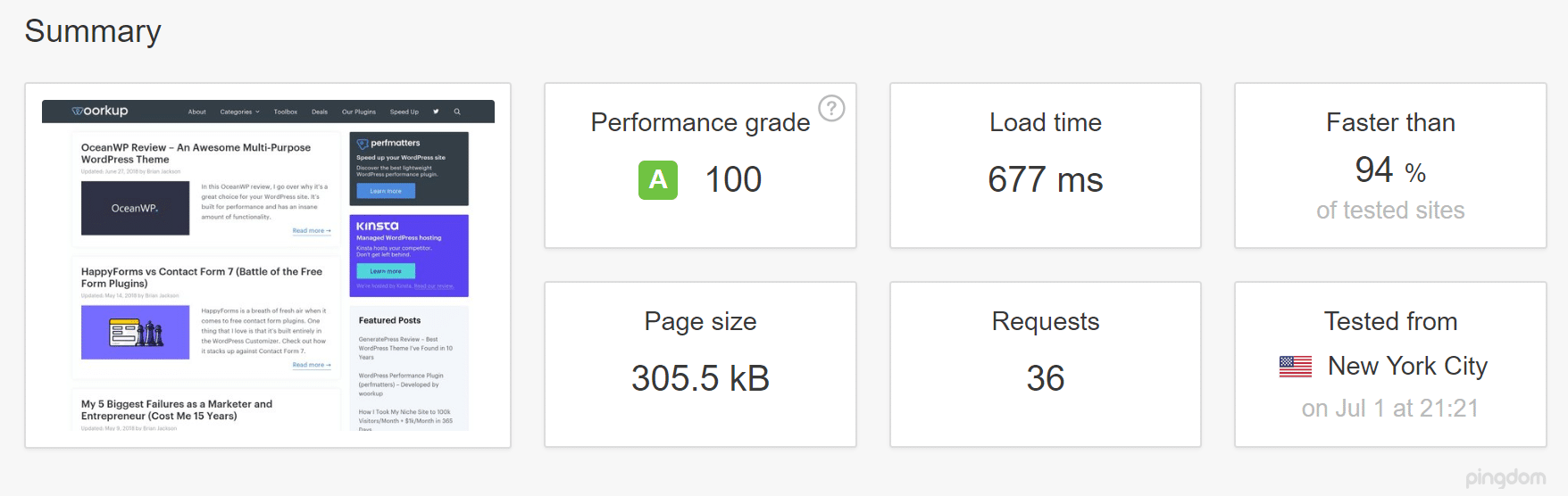
No Caching Speed Test
We first ran 5 tests on Pingdom without caching enabled and took the average.
With Caching Speed Test
We then enabled server-level caching and ran 5 tests on Pingdom and took the average.
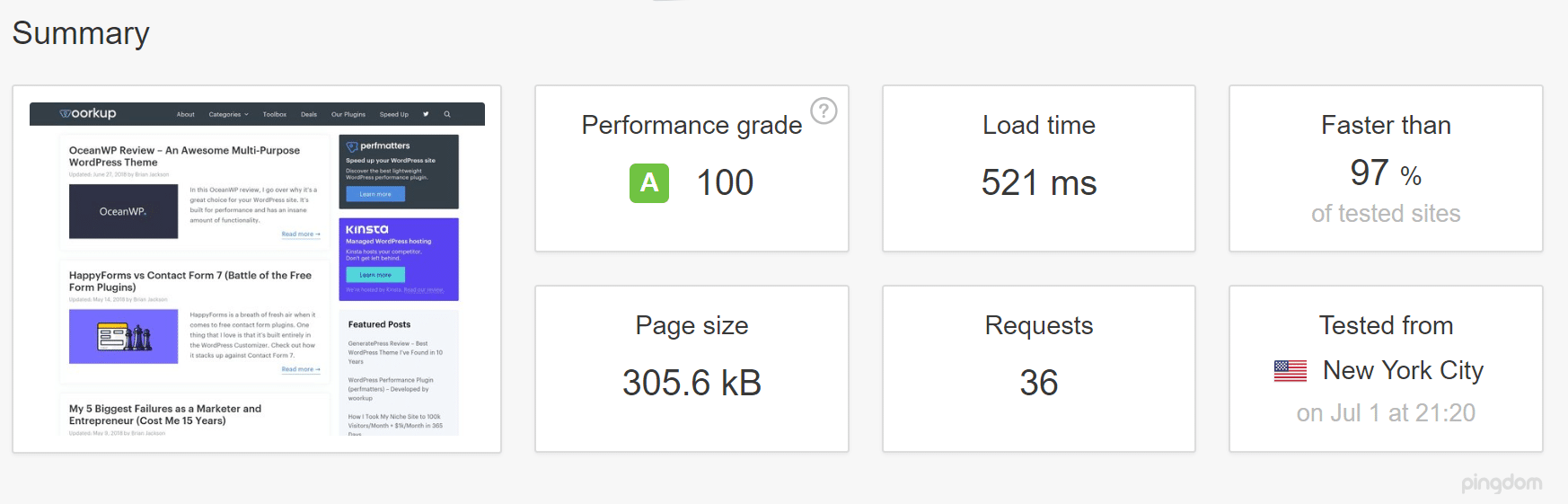
As you can see server-level caching decreased our page load time by 23.04%! And that’s without any extra work involved. This site we tested is also fairly optimized, so larger unoptimized sites are bound to see even greater differences.
No Caching TTFB
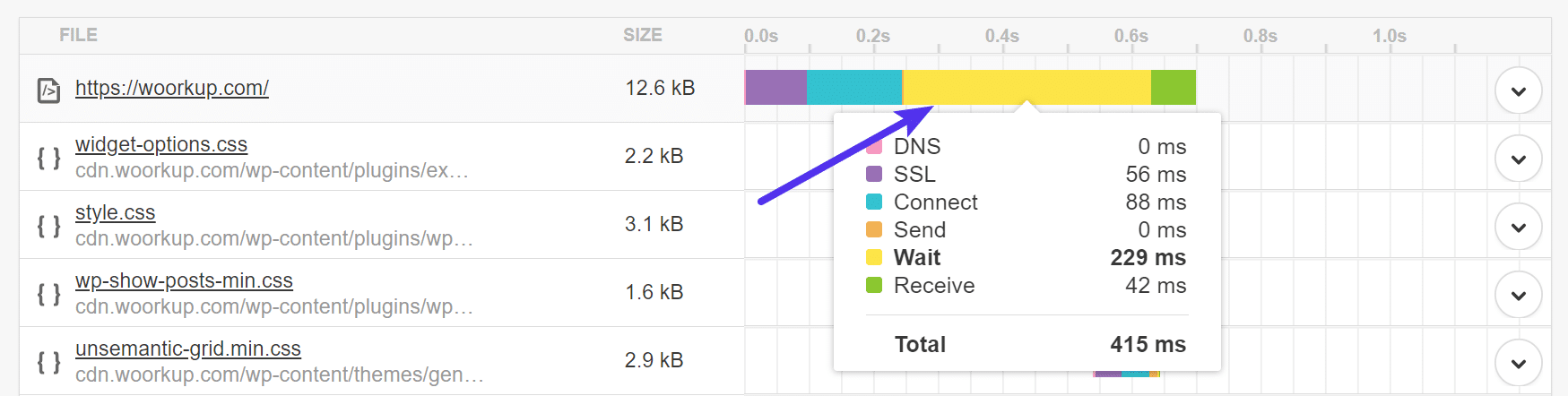
As we mentioned earlier, it’s also important to note the difference in TTFB without and with caching. TTFB in Pingdom is represented by the yellow “waiting” bar. As you can see the TTFB with no caching is over 200 ms.
With Caching TTFB
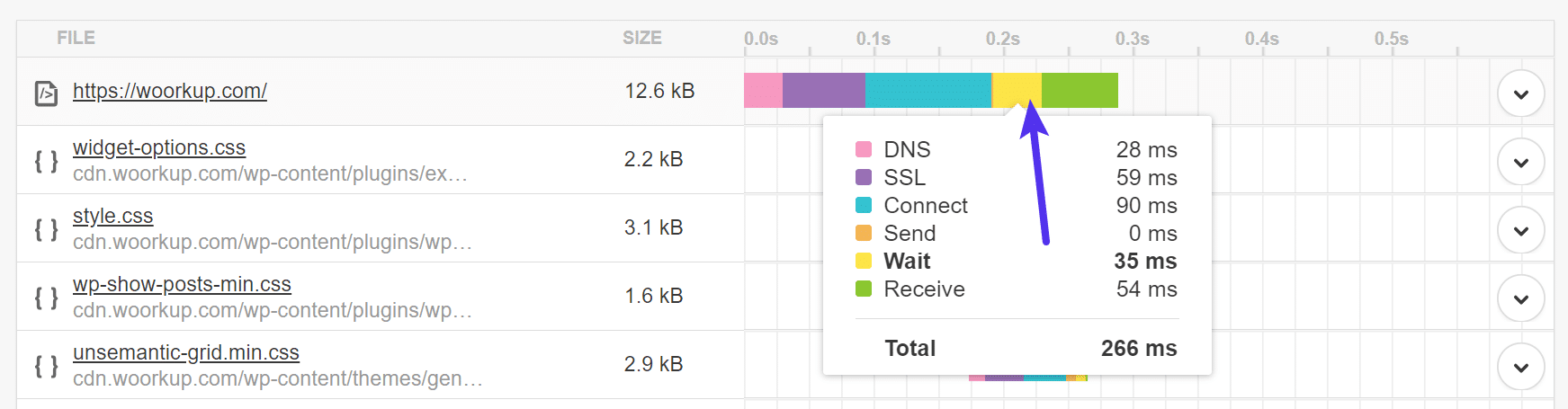
Now if we take a look at the TTFB with caching enabled we can see that it is under 40 ms.
The Best WordPress Caching Plugins
If you intend on managing your own server or are using shared hosting, these are the caching plugins to try out. Some of them are more intuitive than others, but all of them have great reviews. Many online posts will try to compare the speeds of caching plugins and sell you on the best one. However, this is almost impossible because these plugins are going to perform differently based on your own server, configuration, resources, and even physical location.
We love speed tests just as much as the next person, but deeming a plugin as “the fastest” is also unfair to the plugin’s author, as what works best for one user, might not for another. Not to mention there are hundreds of different settings that could be enabled or disabled. Therefore, you should always test WordPress caching plugins yourself.
Here’s a short list of the top WordPress caching plugins for you to quickly browse through. If you’re interested in learning about the details from each one, keep reading below.
- WP Rocket (premium)
- Cache Enabler (free)
- Comet Cache (free + premium)
- W3 Total Cache (free)
- WP Super Cache (free)
- WP Fastest Cache (free + premium)
- Hyper Cache (free)
In our experience, you should try at least two or three WordPress caching plugins and make a decision based on your experience. For instance, you might like the user interfaces from some caching plugins far better than others. Some caching plugins are also stronger when it comes to ease of use.
We suggest running a speed test with a website speed test tool such as Pingdom or GTMetrix after implementing each plugin. Or one of the many other website speed test tools out there. This way, you’re able to see the impact each WordPress caching plugin has on your website’s performance.
Important: Remember to run your speed tests multiple times to ensure that it is serving from cache. Whenever you clear cache on your WordPress site, it has to rebuild. Some caching plugins also have the option to “warm” (preload) the cache after it’s cleared.
Now, without further ado…keep reading to learn all about the best WordPress caching plugins and what they can do for you.
1. WP Rocket
WP Rocket is a premium WordPress caching plugin with three payment plans offered. You technically only have to pay for a one-time fee, but the support and updates are included if you keep the payments going for every year. That said, caching for one website is listed at $39, with support for three websites at $99 and unlimited websites for $199. Although you can find other free plugins, these are quality rates for one of the most feature-packed caching plugins on the market. There is no free trial or free version of the plugin, but the developers do offer a 14-day money back guarantee.
One of the reasons we like the WP Rocket plugin so much is because of its simple user interface and quick setup. It’s a WordPress caching plugin with the power to make your site blazing fast, but any beginner could sit down and understand most of the settings involved.
It’s also nice that WP Rocket is built to run smoothly with eCommerce websites, seeing as how those are often the types of sites that need the caching speed most. Overall, you might be wondering why you should shell out any money for a WordPress caching plugin when so many other competitors give away caching plugins for free. The reasoning is because WP Rocket has far more features and it’s easier to use.
For instance, WP Super Cache has page caching but no browser caching. WP Rocket has both. Hyper Cache lacks lazyload, something that WP Rocket provides to you. The list goes on, but it’s important to remember that the $39 is a small price to pay for the features provided.
Why is this one of the best WordPress caching plugins?
- WP Rocket provides a developer-friendly experience and a dashboard for beginners to feel comfortable. It’s not too often developers have much to play around with inside caching plugins. On the other hand, standard caching plugins sometimes look far too complicated for beginners.
- The plugin has an extremely simple setup for all users.
- Database optimization is included for cleaning up your database and removing the number of resources being used.
- You can lazyload your media with WP Rocket. This means that the images don’t load on your website until the user scrolls over them. So the server doesn’t have to put the work in if it’s not necessary.
- CloudFlare compatibility is provided for speeding up your site even more.
- WP Rocket integrates with some of the top multilingual plugins on the market.
- Multisite compatibility is offered through the plugin.
- You can preload cache.
- You receive tools for both minification and concatenation.
- One unique feature involves the optimization of Google Fonts. I’ve yet to see this on any of the other caching plugins I’ve used.
- Support for object caching.
- WP Rocket is fully compatible with Host SEO’s server-level caching. So if you want to take advantage of all the optimization features WP Rocket has to offer you can do so. Check out how you can use WP Rocket at Host SEO.
Check out the official WP Rocket documentation when configuring and testing it on your WordPress site.
2. Cache Enabler
Cache Enabler is a free and open-source caching plugin from our partner KeyCDN, who powers the Host SEO CDN. The disk caching engine is quite fast and reliable, while the WordPress multisite support is an advantage for those with networks of websites. This is a top-notch caching plugin without the price tag. You’re not quite getting the full suite of features that you would from WP Rocket, but it’s a viable alternative for those on a budget.

Its claim to fame is that it’s the first WordPress plugin that helps you serve WebP images without the need for JavaScript. If this sounds like jibberish to you, just know that although JavaScript is a valuable coding language, some situations make it less than desirable for speed. Overall, the Cache Enabler plugin combined with the Optimus, ShortPixel, or EWWW plugin allows you to take advantage of this newer image format. This is great for any online business owner since the majority of websites have many images, especially blogs and eCommerce stores.
Lastly, the Cache Enabler settings are short and sweet, asking for things like the cache expiry and caching behavior preferences behind the scenes. It shouldn’t confuse many people, since the Settings page provides explanations, and there aren’t that many settings to begin with.
Why is this one of the best WordPress caching plugins?
- The Cache Enabler plugin offers a unique way to serve up WebP images. To convert your images to WebP format, you can use Optimus, ShortPixel, or EWWW Cloud (we recommend the cloud version for performance).
- The user interface is simple and to the point. It’s by far one of the easiest caching plugins to configure. All experience levels should be fine handling this type of WordPress caching plugin.
- The actual cache size is displayed on the dashboard to understand how much space the cache is taking up. It’s an efficient and fast caching program with automated and manual options for clearing the cache.
- Minification is available for both inline JavaScript and HTML.
- Cache Enabler combines with a plugin called Autoptimize to include extra features like injecting CSS into the page head.
Check out the official Cache Enabler documentation when configuring and testing it on your WordPress site.
3. Comet Cache
The Comet Cache plugin is a reputable and popular solution with both free and paid versions. The paid version starts at $39 and goes all the way up to $139. This a one-time fee, but you can pay additional fees if you’d like extended customer support. Comet Cache has similar features as the previous caching plugins, but one area it excels at is the documentation.
Comet Cache is fairly easy to install and simple to move around the dashboard. However, it beats out the majority of the competition in the documentation department. Even on the regular WordPress plugin page, you’ll find dozens of links and FAQs to guide you and educate you about caching.

A full knowledge base and blog are provided on the Comet Cache website, and you’ll see all sorts of information comparing the free and pro versions. Much of the reason you might upgrade to the pro version is that of its automation. Basically, you’re able to set it and forget it, allowing the caching plugin to do most of the work for you. The free version does most of the same tasks, but some of the time you have to complete those tasks manually. The client-side browser caching comes in handy as well, since you’re essentially double caching, with the server on your end and the browser on the user’s end.
Why is this one of the best WordPress caching plugins?
- Comet Cache features a fast configuration and a reasonable backend for setting up your caching within minutes.
- Caching can be done on posts, pages, categories, or tags.
- The paid version offers automatic and intelligent cache clearing. This way you have the option to set the caching preferences upon installation and forget about them into the future.
- RSS feeds can be cached to ensure that none of your content syndication is delayed.
- Most of the primary features are given away for free, so you don’t necessarily have to upgrade to the paid version.
- The premium version is just about the same as what you would get from WP Rocket, so we’d recommend testing out both to see which one you like the best.
Check out the official Comet Cache documentation and community forum when configuring and testing it on your WordPress site.
4. W3 Total Cache
As one of the most popular plugins in the WordPress plugin library, W3 Total Cache is a common WordPress caching plugin shown on these types of roundups. Although we like it for a free solution, it’s far from perfect. The main downside is that the backend settings are often quite plentiful and difficult to understand. The developers do a decent job of completing the right settings for you, but beginners will still find it confusing.
That said, W3 Total Cache is a free, open-source WordPress caching plugin with millions of installations. It has the advantage of integrating with a CDN, and it works well for mobile-friendly sites as well as regular desktop ones. The plugin also boasts that it’s a useful companion for websites with SSL certificates, making it an ideal speed solution for eCommerce stores.
Since W3 Total Cache is an open-source plugin you don’t have to pay any money for it. All of the features are includes with the base plugin, with no upgrades suggested along the way. The good news is that the plugin covers you on multiple fronts, like by offering bandwidth savings through minifications, HTTP compression, and feed optimization.
As we mentioned before, it’s not our favorite backend configuration, but that also might just be personal preference. Regardless, a WordPress caching plugin such as W3 Total cache is bound to improve your overall site performance and boost your conversion rates because of that site performance.
Why is this one of the best WordPress caching plugins?
- W3 Total Cache is completely free and it provides the majority of caching plugins you’ll need to keep your site fast and highly-optimized.
- Although you shouldn’t always follow the crowd, popularity is often an indicator of quality. W3 Total Cache has thousands of great reviews and millions of installations.
- The plugin is compatible with all sorts of hosting options such as dedicated servers, shared hosting, and clusters.
- Caching is provided for all mobile environments as well. This way, when someone lands on your website while on a mobile device, they still get the same benefits of caching as they would on a desktop
- SSL support is provided for when you’re trying to make your online store faster.
- The CDN works with the media library so that you’re able to see how well your images are being optimized.
- Minification and compression are provided, along with caching of your database, objects on your disk, and posts.
- Support for Object caching.
Unfortunately, they don’t have any official documentation, but ShoutMeLoud has a great tutorial on how to configure W3 Total Cache on your WordPress site.
5. WP Super Cache
WP Super Cache is yet another example of an open-source caching plugin with millions of installations. Most of the time when you search for a caching plugin you’ll see WP Super Cache and W3 Total Cache on the top of the list. It doesn’t help that they have similar names, but your best bet is to install both of them separately to see which one is your favorite. Some people might be more keen on installing WP Super Cache, simply because it comes from the folks at Automattic.
Anyway, WP Super Cache is free and open-source, with no upgrades needed after the installation. It works efficiently by creating static HTML files and serving those files instead of the heavy WordPress PHP scripts. A benefit of going with WP Super Cache is that it offers three caching modes. One of them is called Simple Mode, which is what the average WordPress user would go with since it’s the least risky. However, one of the modes is called Expert Mode, where you’re able to super cache your files with some modifications to the .htaccess file. It’s great for advanced developers who would like more control over the caching process.
As suggested, most users will go with the Simple caching mode. With this configuration, the WP Super Cache Plugin is easy to set up, allowing for the compression of pages, simple caching, cache rebuilding, and CDN support. Not only that, but you’re able to identify known users and not cache the pages for them if needed. The extra homepage checks are also useful for when you’d like to ensure your primary webpage is at its most optimized.
One of the best parts of WP Super Cache is the garbage collecting. In short, your cache directory actually fills up over time and can cause your site to run slower. Therefore, WP Super Cache completes an automated garbage collection process on a regular basis, cleaning out the old files and keeping your site optimized.
Why is this one of the best WordPress caching plugins?
- WP Super Cache has the reputation and track record to ensure that it’ll provide excellent caching services for all of your websites, regardless of size.
- It’s a free, opensource product from Automattic. So, you know that updates will come out regularly and the plugin is not going away anytime soon.
- The backend interface has most of the settings you need filled in already. It’s pretty easy to comprehend and activate, even for beginners.
- The plugin uses a process of garbage collecting, where it clears out old files from the cache so that your caching process doesn’t slow down your site in the process.
- WP Super Cache has been integrated with a unique CDN setup for a better distribution of your files.
- You have three caching modes to choose from, from Simple to Supercaching. This opens up opportunities for all skill levels, since the Simple cache is best for regular users, and the Supercache mode allows for advanced users to really speed up their sites.
- The plugin has a unique feature called Cache Rebuilding, where the cache on your blog isn’t cleared whenever a comment is posted. Instead, it rebuilds the cache and serves up the old page to other users.
Unfortunately, they don’t have any official documentation, although they do have a lot of information on their repository page. ShoutMeLoud also has a great tutorial on how to configure WP Super Cache on your WordPress site.
6. WP Fastest Cache
As you can see, many of these WordPress caching plugins have names that are far too similar. WP Fastest Cache is no different, but it does have some unique features that make it a respectable caching plugin for all websites. All users download the free version to start the process, but a premium plugin is available that can only be purchased in the WP Fastest Cache settings module.
The premium plugin only requires a one-time fee and offers a wide range of tools not provided in the free version. That said, most sites will be happy with what the free plugin offers. For instance, the free version of WP Fastest Cache has desktop caching, minification of HTML, and combination options for JavaScript and CSS.

Browser caching and GZIP tools are also provided in the free version. Overall, WP Fastest Cache has been known to speed up your website and improve its performance when compared to a site without any caching plugin at all. The Settings page is pretty much a list of checkboxes. We’d argue it’s one of the easier Settings pages to walk through since it provides information boxes to explain what each of the settings does. You can also jump to different tabs for managing items like cache timeouts, image optimization, and the CDN.
Why is this one of the best WordPress caching plugins?
- The free version is useful for most sites, and we’ve found that it typically serves sites faster than much of the competition.
- The Settings page is easy to understand, since it’s simply a list of checkboxes with information about each setting.
- You can quickly upgrade to the premium version right in the WordPress dashboard. There’s no need to download a plugin from the development website.
- You can combine and minify CSS and JavaScript.
- CDN integrations are possible without much configuration.
- Image optimization is handled separately from caching. So you’re able to see exactly how much space is being saved with one of your biggest resource hogs.
- There’s a feature for creating a cache specifically for your mobile theme. You’ll also find an option to not serve a cached version for the desktop to the mobile users.
Unfortunately, they don’t have any official documentation all in one place, but they do have a lot of tutorials on their blog about how to configure WP Fastest Cache on your WordPress site.
7. Hyper Cache
Hyper Cache may be the last caching plugin on our list but it’s no slouch. It’s an excellent solution for you to test out on either a high-end server or a low resource hosting option. The Hyper Cache plugin runs solely on PHP, so no complex configurations are required and you can run the plugin on any type of WordPress blog.
It’s also aware of mobile environments, so the caching still occurs when someone is looking at your site on a phone or tablet. The Hyper Cache plugin is an open-source project, so you don’t have to pay a dime or worry about upgrades in the future. You can, however, support the developer with a donation.

Some of the primary features include a simple and fast installation process, excellent for beginners and regular WordPress users who don’t want to go through a giant list of caching settings. The compression caching does a wonderful job of optimizing your bandwidth and improving your overall page speed. In addition to that, the plugin is meant to work well with bbPress. So, if you’re planning on running a forum it’s a great solution for caching all of the forum pages.
Overall, the Hyper Cache plugin makes its greatest splash with the simplicity of the configuration. It’s somewhat of a “set it and forget it” type plugin, where you shouldn’t have to think about it after the installation. Some of the settings are a little tricky or given strange names, but they all typically have recommendations on what to activate and information on what each setting does for your website.
Why is this one of the best WordPress caching plugins?
- The plugin doesn’t have any payment plans at all. It’s a free, open-source plugin with all of the features included upon download.
- It’s a mobile aware caching plugin, so the caching occurs on smaller devices as well.
- CDN support is provided for tapping into a larger network of servers and speeding up your site even more.
- The Hyper Cache plugin delivers options for serving cached pages to users who comment on your blog. This benefits blogs with lots of comments. So, if you have a significant amount of conversation on your blog you still know that your site is going to run fast.
- Compression is managed through the plugin, even for non-cached pages.
- The plugin detects if a website theme has been switched to a mobile version.
- One interesting feature is that the Hyper Cache plugin will move the cache folder away from your blog. This means that when y